Blockquote
A pull quote with an author, role and source link — for testimonials, press quotes and callouts. Like every block in the library, it is a second authoring surface, not a second renderer: the canvas preview and the front end are both produced by the blockquote element — the same server-side code as the page builder — so the output is identical either way.

Configure it
Select the block and open the Settings (block) tab. The whole sidebar is generated from the element’s option schema, so it stays in step with the page builder.
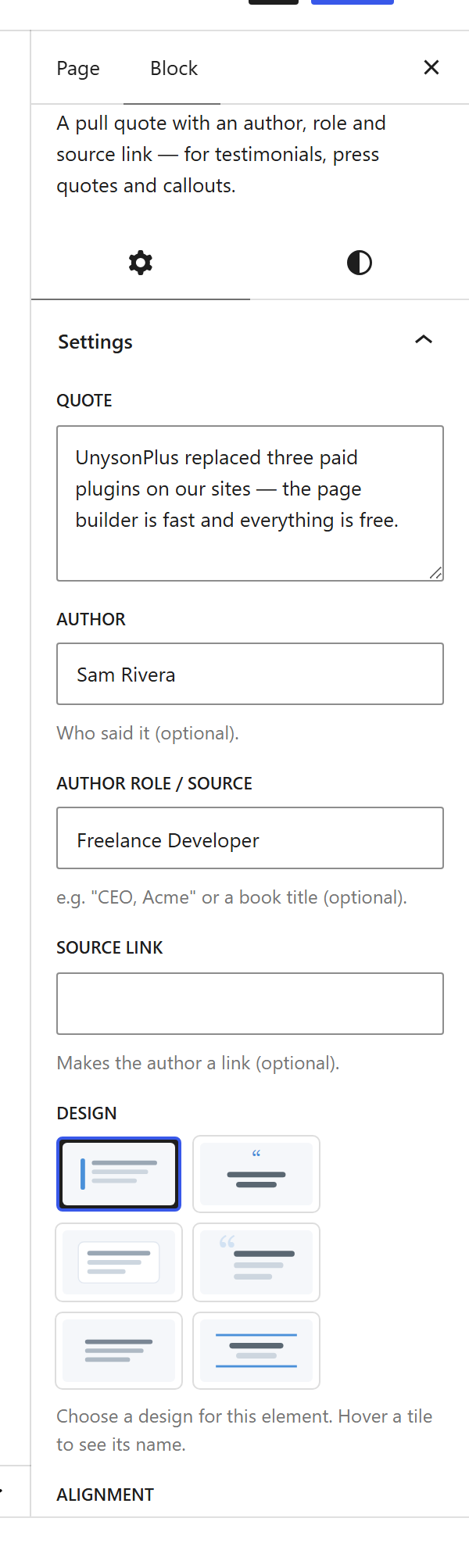
Options
| Option | What it does |
|---|---|
Quote (quote) | The quoted text. |
Author (author) + Role (role) | Who said it, and their title. |
Source URL (source_url) | Link the citation to a source. |
Design (design) + Quote mark (show_mark) | The overall style, and whether to show a large quote mark. |
Alignment (align) + Max width (max_width) | Alignment and a readable maximum width. |
Box Style (box_style) | Plain, or a card with background and border. |
Colours (quote_color, author_color, accent_color, bg_color) | Per-part colour pickers. |
The block also opts into WordPress Margin / Padding (and, where it makes sense, alignment), which inherit the site’s design system from theme.json.
Sample content
A block stores only what you change as one upOptions object; the element’s declared defaults fill in the rest at render time. The demo above is:
<!-- wp:unysonplus/blockquote {"upOptions":{"quote":"UnysonPlus replaced three paid plugins on our sites…","author":"Sam Rivera","role":"Freelance Developer","align":"center","show_mark":"yes"}} /-->
The blockquote element
The block and the page builder’s Blockquote element are two doors onto the same code. Its full option, markup and behaviour reference is documented there.