Table
A data table — rows and columns of content with a header row, striping, hover highlighting and per-cell formatting. Build a spec sheet, a schedule or a simple comparison, and it stays readable on mobile. Like every block in the library, it is a second authoring surface, not a second renderer: the canvas preview and the front end are both produced by the Table element — the same server-side code as the page builder — so the output is identical either way.
Options
Select the block and open the Settings (block) tab; the whole sidebar is generated from the element's option schema, so it stays in step with the page builder.
| Option | What it does |
|---|---|
Table (table) | The grid itself — add and remove rows and columns from the toolbar; the first row is the header. Each cell holds rich text, and can carry a colspan/rowspan merge. |
Header / footer rows (header_options) | How many rows at the top (and bottom) are treated as <thead> / <tfoot>. |
Style (table-style-picker) | The visual treatment — striping, borders, hover highlighting. |
The block also opts into WordPress Margin / Padding (and, where it makes sense, alignment), which inherit the site's design system from theme.json.
Reach for a <table> only for genuine rows-and-columns data — not for page layout. A real table gives screen-reader users row/column navigation and a header association that a grid of <div>s can't. Keep cell text short so the table wraps gracefully on small screens. MDN: table accessibility
Sample content
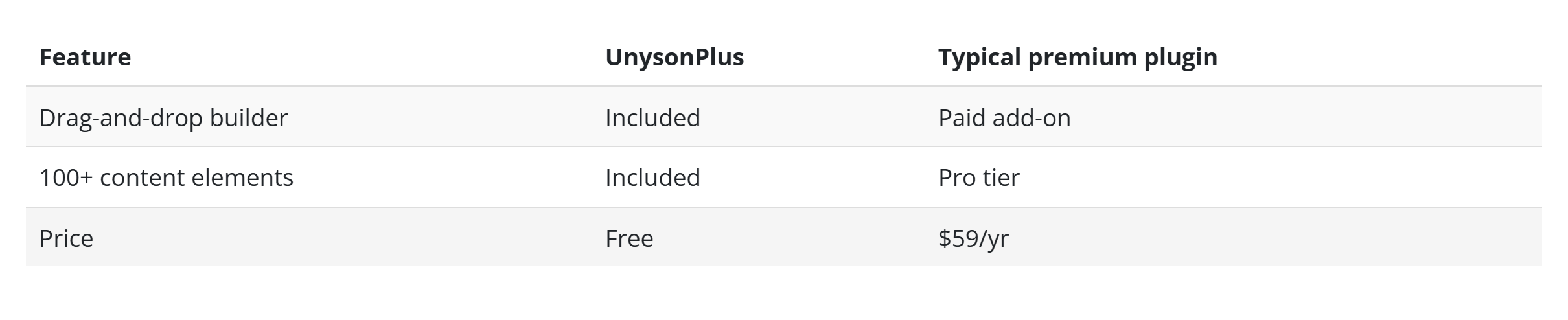
A block stores only what you change as one upOptions object; the element's declared defaults fill in the rest at render time. Build the grid in the block's table editor rather than by hand — each cell is an object, and the rows and columns carry structural metadata. The demo above is a four-row, three-column comparison with a header row.
The table element
The block and the page builder's Table element are two doors onto the same code. Its full option, markup and behaviour reference is documented there.