Webhooks
A webhook sends a CRM event to another app the moment it happens: a new contact, a tag added, an unsubscribe, a deal won. The CRM posts the event as JSON to a web address you choose, signed so the receiver can tell it really came from your site.
Use webhooks to keep another system in step with the CRM: an automation service such as n8n, Zapier or Make, your booking or accounting software, a data warehouse, or your own code.
:::tip Webhooks go out; the REST API is for asking A webhook pushes events out as they happen. To read or change CRM records from another app, use the REST API. Most integrations use both: a webhook says "this contact changed", the API fetches or updates whatever else is needed. :::
Switch webhooks on
Webhooks is a module. A CRM manager switches it on under CRM → Modules → Webhooks, and Webhooks then appears in the CRM sidebar under Data.
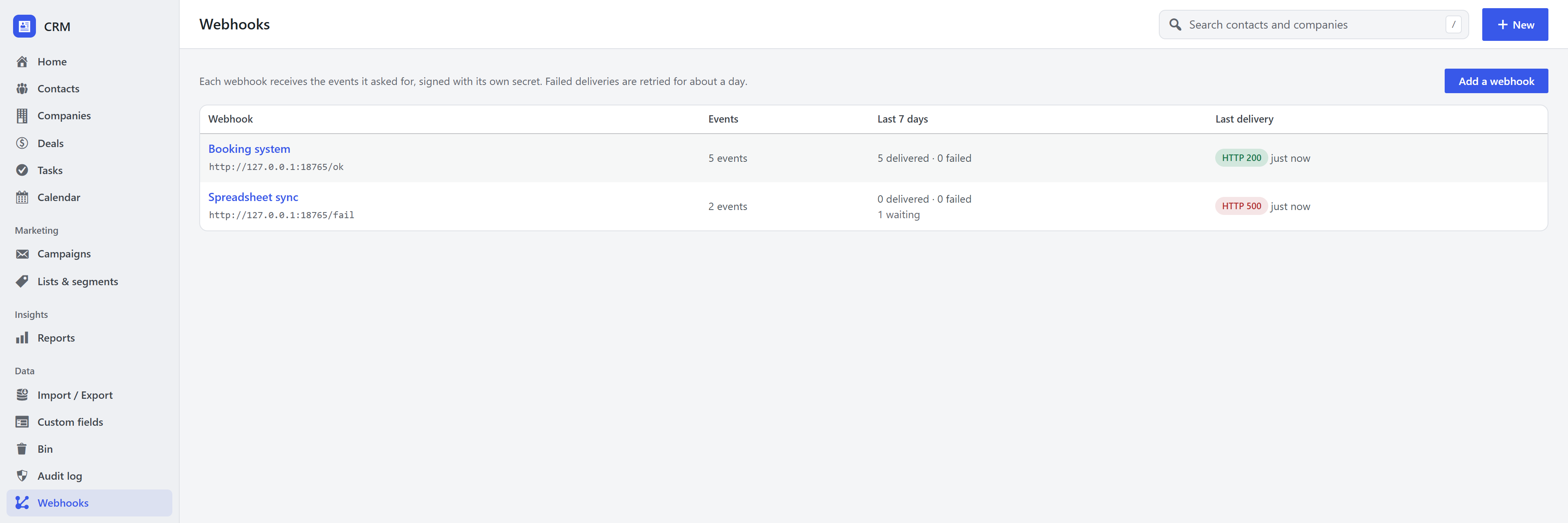
Add a webhook
- Open CRM → Webhooks and choose Add a webhook.
- Enter the address that should receive the events (the receiving app gives you this, usually starting
with
https://) and a name for yourself. - Tick the events to send, or Every event, including ones added later.
- Save, then press Send a test. The CRM sends a
pingevent right away and shows the answer it got.
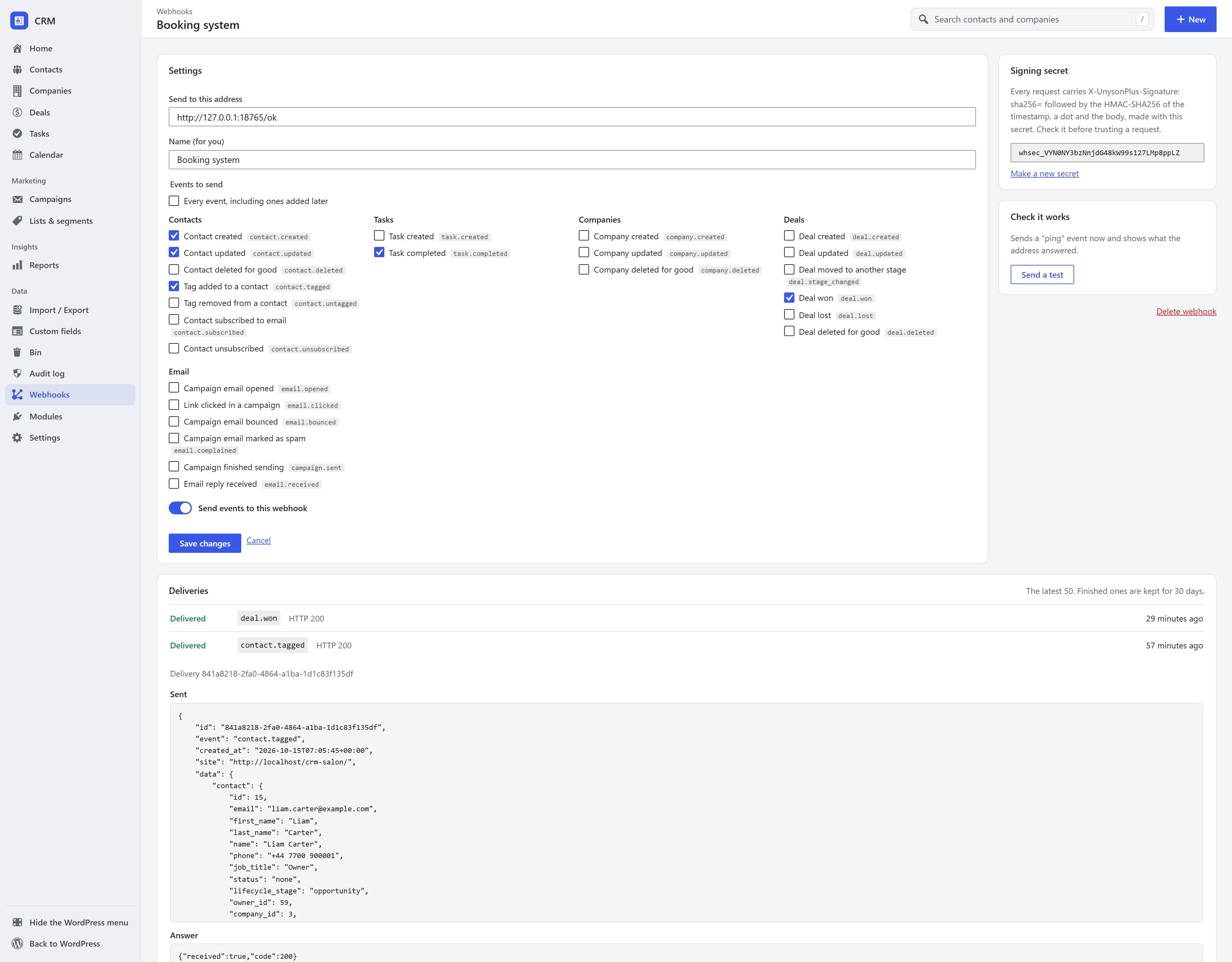
Each webhook has its own signing secret (it starts with whsec_). Copy it into the receiving app so it
can check the signature. Make a new secret replaces it immediately, so update the receiver at the same
time.
Events
| Event | Sent when | data holds |
|---|---|---|
contact.created | A contact is added (by hand, a form, an import, the API) | The contact |
contact.updated | A contact's details change | contact, changed (the field names) |
contact.deleted | A contact is deleted for good (not moved to the bin) | id, email |
contact.tagged / contact.untagged | A tag is added to / removed from a contact | contact, tag (id, slug, name), source |
contact.subscribed | A contact subscribes to email (including confirming double opt-in) | The contact |
contact.unsubscribed | A contact unsubscribes | The contact |
form.submitted | A contact or booking form with Add the sender to the CRM is sent (forms) | contact, new_contact, form_id, form_title, entry_id, answers (each id, label, type, value) |
task.created / task.completed | A task, call or meeting is added / done | The task (completed adds outcome) |
company.created / .updated / .deleted | Companies change (Companies module) | The company |
deal.created / .updated | A deal is added / changed (Sales pipeline module) | The deal (updated adds changed) |
deal.stage_changed | A deal moves stage | deal, from_stage_id, to_stage_id |
deal.won / deal.lost | A deal is closed | The deal (lost adds reason) |
deal.deleted | A deal is deleted for good | id, title |
email.opened / email.clicked | A campaign email is opened / a link in it clicked (Email marketing) | campaign_id, contact, url for clicks |
email.bounced / email.complained | A campaign email bounces / is marked as spam | campaign_id, contact |
campaign.sent | A campaign finishes sending | id, title, subject, total, sent, failed |
email.received | A reply arrives on a contact's timeline (Email conversations) | contact, subject, from, text, deal_id |
ping | You press Send a test | webhook_id, message |
Events for a module appear only while that module is on. Opens and clicks from email security scanners are not counted, so they are not sent either. Other plugins can add their own events (see Create your own CRM module).
A contact in a payload has the same shape as in the REST API: id, email, first_name,
last_name, name, phone, job_title, status, lifecycle_stage, owner_id, company_id, address,
score, lifetime_value, source, dates and fields (custom fields).
What the receiver gets
Every event is an HTTP POST with a JSON body:
{
  "id": "841a8218-2fa0-4864-a1ba-1d1c83f135df",
  "event": "contact.tagged",
  "created_at": "2026-10-15T07:05:45+00:00",
  "site": "https://example.com/",
  "data": {
    "contact": { "id": 15, "email": "liam.carter@example.com", "first_name": "Liam", "...": "..." },
    "tag": { "id": 4, "slug": "vip", "name": "VIP" },
    "source": "admin"
  }
}
and these headers:
| Header | Value |
|---|---|
X-UnysonPlus-Event | The event, e.g. contact.tagged |
X-UnysonPlus-Delivery | The delivery id (the same as id in the body). The same on every retry. |
X-UnysonPlus-Timestamp | When this attempt was signed, in Unix seconds |
X-UnysonPlus-Signature | sha256= followed by the signature (below) |
Answer with any 2xx status as soon as you have stored the event. Anything else, a timeout (10 seconds) or a redirect counts as a failure.
Check the signature
The signature is an HMAC-SHA256 of the timestamp, a dot and the raw request body, made with the webhook's secret, written as hex. Recompute it and compare before trusting a request, and refuse requests whose timestamp is more than a few minutes old so a captured request cannot be replayed later.
PHP
$secret    = 'whsec_…';
$body      = file_get_contents( 'php://input' ); // The raw body, before any JSON decoding.
$timestamp = $_SERVER['HTTP_X_UNYSONPLUS_TIMESTAMP'] ?? '';
$signature = $_SERVER['HTTP_X_UNYSONPLUS_SIGNATURE'] ?? '';
$expected  = 'sha256=' . hash_hmac( 'sha256', $timestamp . '.' . $body, $secret );

if ( ! hash_equals( $expected, $signature ) || abs( time() - (int) $timestamp ) > 300 ) {
	http_response_code( 401 );
	exit;
}
$event = json_decode( $body, true );
// … store it, then answer quickly.
http_response_code( 200 );
Node.js
import crypto from 'node:crypto';

// `rawBody` is the request body as a string or Buffer, exactly as received.
function verify(rawBody, headers, secret) {
  const ts = headers['x-unysonplus-timestamp'];
  const expected = 'sha256=' + crypto.createHmac('sha256', secret).update(`${ts}.${rawBody}`).digest('hex');
  const given = headers['x-unysonplus-signature'] || '';
  const fresh = Math.abs(Date.now() / 1000 - Number(ts)) <= 300;
  return fresh && given.length === expected.length &&
    crypto.timingSafeEqual(Buffer.from(given), Buffer.from(expected));
}
Sign over the raw body: a body that has been parsed and re-encoded will not match.
Delivery, retries and the log
- Events are sent in the background, a moment after they happen, never during the page load or form submission that caused them. A slow receiver never slows your site down.
- A failed delivery is retried after 1 minute, 5 minutes, 30 minutes, 2 hours, 6 hours and 12 hours (seven tries over about a day), then marked failed. Every retry carries the same delivery id, so a receiver can skip a delivery it has already handled.
- A webhook that fails 20 deliveries in a row is switched off, and its screen says so. Fix the receiver, press Send a test, then switch it back on.
- The log on each webhook's screen shows the latest 50 deliveries: what was sent, the answer, how many tries, and when the next one is due. Send again now retries a failed delivery straight away. Finished deliveries are kept for 30 days.
Background sending uses WordPress's scheduler, which runs when the site gets visits. On a site with very
little traffic, set up a real cron job for wp-cron.php so events go out promptly.
Private addresses are refused. A webhook cannot be sent to the server itself or to a private network
address (127.0.0.1, 10.x, 192.168.x) on a live site, so a webhook cannot be used to probe the server's
own network. Sites whose environment type is local or development may use them, for testing.
Manage webhooks over the REST API
CRM managers (and administrators) can manage webhooks under fw-crm/v1, with the same authentication as the
rest of the REST API:
| Method and route | Does |
|---|---|
GET /webhooks | List webhooks (without their secrets) |
POST /webhooks | Create one: { "name", "url", "events": ["contact.created", …] or ["*"], "active" }. Answers 201 with the secret. |
GET /webhooks/{id} | One webhook, with its secret |
PUT / PATCH /webhooks/{id} | Change any of name, url, events, active |
DELETE /webhooks/{id} | Delete it and its log |
POST /webhooks/{id}/test | Send a ping now: { "ok", "response_code", "error", "duration_ms", "delivery_id" } |
POST /webhooks/{id}/secret | Make a new signing secret: { "secret" } |
GET /webhooks/{id}/deliveries | The log, newest first: status (pending, sent, failed), page, per_page |
POST /webhook-deliveries/{id}/retry | Send a delivery again now |
GET /webhooks/events | Every event that can be chosen right now |
curl -u "admin:APPLICATION PASSWORD" -H "Content-Type: application/json" \
  -d '{"name":"Booking system","url":"https://hooks.example.com/crm","events":["contact.created","deal.won"]}' \
  https://example.com/wp-json/fw-crm/v1/webhooks
For developers: send your own events
Another plugin can add an event to the list and send it:
add_filter( 'unysonplus_crm_webhook_events', function ( $events ) {
	$events['bookings.booked'] = array( 'label' => 'Booking made', 'group' => 'Bookings' );
	return $events;
} );

// When it happens. Nothing is sent if no webhook asked for the event.
do_action( 'unysonplus_crm_webhook', 'bookings.booked', array( 'contact_id' => $contact_id, 'service' => 'Colour' ) );
Other hooks:
| Hook | Use |
|---|---|
unysonplus_crm_webhook_payload (filter) | ( $payload, $event, $webhook ): change the payload before it is queued, or return null to skip that webhook |
unysonplus_crm_webhook_request_args (filter) | ( $args, $webhook, $event ): change the HTTP request, e.g. add a header the receiver needs |
unysonplus_crm_webhook_delivered (action) | ( $delivery_id, $result, $webhook ): after every delivery attempt |
unysonplus_crm_webhook_allow_local (filter) | Allow private network addresses (return true) |
unysonplus_crm_webhook_log_days (filter) | Days to keep finished deliveries (30) |
Related
- REST API: read and change CRM records from another app.
- Create your own CRM module: add a module, with its own events.
- Modules and settings: switching modules on and off.