Admin app shell (FW_Admin_App)
Some admin areas are not one page of fields. They are a dozen screens that belong together — a CRM, a membership area, SEO — and WordPress gives them one submenu entry and a row of horizontal tabs that wraps. By the eighth tab, the one you want is never the one in front of you.
FW_Admin_App draws a different frame around such a screen:
- the WordPress admin menu folds to icons (core's own
foldedbody class), so your navigation gets the room; - your app's navigation takes the left edge, in named groups, with the current place highlighted;
- a top bar carries the title, optional breadcrumbs and your own actions;
- focus mode (per user) hides the WordPress menu altogether, with "Back to WordPress" as the way out.
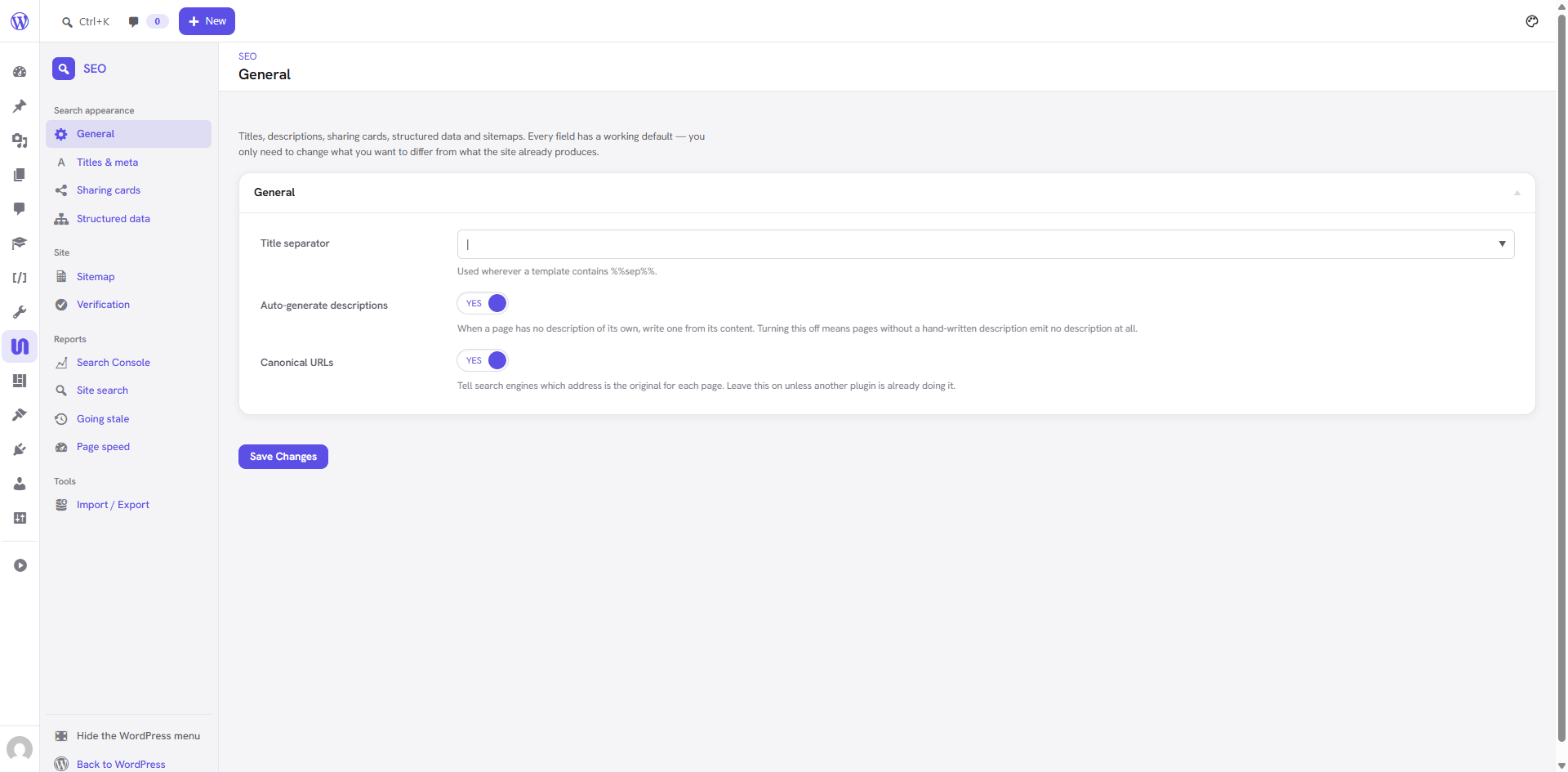
The SEO extension inside the shell. WordPress's menu is folded to icons on the far left; everything
between it and the content is FW_Admin_App.
There is no switch that turns this on for arbitrary screens, and there shouldn't be. A screen earns this frame by being an application. Bolting it onto an ordinary settings page folds the user's WordPress menu in exchange for nothing.
Available since: framework 3.0.48. Declare it in your extension's manifest (see Requiring it).
Quick start
Three calls: build it, attach() it to your admin page, and wrap your view in open() / close().
class My_Ext_Page {

	const PAGE_SLUG = 'my-ext';

	/** @var FW_Admin_App */
	protected $app;

	public function __construct() {
		$this->app = new FW_Admin_App( 'my-ext', array(
			'brand'   => array( 'label' => __( 'My App', 'fw' ), 'icon' => 'dashicons-screenoptions' ),
			'page'    => self::PAGE_SLUG,
			'default' => 'home',
			'nav'     => array(
				'main' => array(
					'label' => __( 'Workspace', 'fw' ),
					'items' => array(
						'home'    => array( 'label' => __( 'Home', 'fw' ), 'icon' => 'dashicons-dashboard' ),
						'records' => array( 'label' => __( 'Records', 'fw' ), 'icon' => 'dashicons-list-view' ),
					),
				),
				'setup' => array(
					'label' => __( 'Setup', 'fw' ),
					'items' => array(
						'settings' => array( 'label' => __( 'Settings', 'fw' ), 'icon' => 'dashicons-admin-generic' ),
					),
				),
			),
		) );

		add_action( 'admin_menu', array( $this, '_admin_menu' ) );
	}

	public function _admin_menu() {
		$hook = add_menu_page(
			__( 'My App', 'fw' ),
			__( 'My App', 'fw' ),
			'manage_options',
			self::PAGE_SLUG,
			array( $this, 'render' ),
			'dashicons-screenoptions'
		);

		$this->app->attach( $hook ); // body classes + the shell's CSS/JS, on this screen only
	}

	public function render() {
		$view = $this->app->requested_view(); // 'home' on a bare page URL

		$this->app->open( $view );

		echo '<p>' . esc_html__( 'Whatever this view is.', 'fw' ) . '</p>';

		$this->app->close();
	}
}
That is a complete app screen. attach() must run on admin_menu with the hook suffix
add_menu_page() / add_submenu_page() returned — see the traps.
Constructor
$app = new FW_Admin_App( string $id, array $args );
$id is a slug ([a-z0-9_-]). It becomes the fw-app-<id> body class, which is what you hang any
app-specific CSS on.
| Arg | Type | Default | What it does |
|---|---|---|---|
brand | array | [] | The sidebar header: label, icon (a dashicons-* class), optional url (defaults to the app's own home). |
page | string | '' | Your admin page slug. Used to build every view URL. |
arg | string | 'view' | The query arg that picks the view. |
default | string | '' | The view a bare page URL lands on. Its URL carries no arg, so each screen has one address, not two. |
nav | array | callable | [] | The sidebar. A callable is invoked at render time — see Navigation. |
capability | string | 'manage_options' | What the app as a whole requires. (Per-item capabilities go on the items.) |
back | string | "Back to WordPress" | Label of the leave-the-app link. |
back_url | string | dashboard | Where that link goes. |
Navigation
The sidebar is groups of items:
'nav' => array(
	'<group key>' => array(
		'label' => __( 'Group heading', 'fw' ), // '' renders the group with no heading
		'items' => array(
			'<view>' => array(
				'label'   => __( 'Item', 'fw' ),
				'icon'    => 'dashicons-admin-generic',
				'cap'     => 'edit_posts',              // optional: hidden without it
				'soon'    => true,                      // optional: renders a "Soon" badge
				'url'     => admin_url( 'edit.php' ),   // optional: link elsewhere entirely
				'visible' => function ( $view ) {       // optional: any runtime condition
					return My_Modules::enabled( 'records' );
				},
			),
		),
	),
),
nav() applies cap and visible for you, and drops a group that is left with nothing in it —
a heading over empty space is worse than no heading.
A callable nav for menus that depend on state
If your menu depends on something only known at render time — modules switched off, a schema that is filterable, a list of records — pass a callable instead of an array:
'nav' => array( 'My_Ext_Nav', 'groups' ), // called with no arguments, returns the same shape
The SEO extension does exactly this to reconcile its sidebar with the options schema, so a tab added
to settings-options.php is reachable the moment it exists instead of being silently unreachable:
public static function nav_for( array $views ) {
	$nav   = self::nav();
	$known = array();

	foreach ( $nav as $group ) {
		$known = array_merge( $known, array_keys( $group['items'] ) );
	}

	// A view the schema no longer has loses its link rather than leading nowhere.
	foreach ( $nav as $key => $group ) {
		$nav[ $key ]['items'] = array_intersect_key( $group['items'], $views );

		if ( ! $nav[ $key ]['items'] ) {
			unset( $nav[ $key ] );
		}
	}

	// A view nobody filed here is still reachable, in a trailing group.
	$extra = array_diff( array_keys( $views ), $known );

	if ( $extra ) {
		$items = array();

		foreach ( $extra as $view ) {
			$items[ $view ] = array( 'label' => $views[ $view ], 'icon' => 'dashicons-admin-settings' );
		}

		$nav['more'] = array( 'label' => __( 'More', 'fw' ), 'items' => $items );
	}

	return $nav;
}
URLs and views
$app->url();              // https://site/wp-admin/admin.php?page=my-ext
$app->url( 'home' );      // the same URL — 'home' is the default view
$app->url( 'records' );   // …?page=my-ext&view=records

$app->requested_view();   // 'records' | the default view | null (not this app's page)
requested_view() reads the request, not a parameter, which is what makes it useful far from the
page itself. Anything building data for the screen can ask whether it is being built for the view the
person is actually looking at.
The SEO extension uses that to stop paying for reports nobody is reading. Its Reports views each run a query — a Chrome UX Report fetch, a Search Console call, a freshness scan — and before the split all four ran on every load of the page:
$wants = static function ( $tab ) {
	// Off the settings page entirely (the Extensions manager, a programmatic read)
	// the whole tree is still built — only the page itself narrows it.
	return ! class_exists( 'FW_SEO_Settings_Page' ) || FW_SEO_Settings_Page::wants( $tab );
};

'html' => $wants( 'vitals_tab' ) ? FW_SEO_Vitals::report_html() : '',
The top bar
open() takes the active view and an optional bar description:
$app->open( $view, array(
	'title'   => __( 'Records', 'fw' ),                 // defaults to the active item's label
	'crumbs'  => array(
		array( __( 'My App', 'fw' ), $app->url() ),     // [ label, url ]; url optional on the last
		array( __( 'Records', 'fw' ) ),
	),
	'actions' => '<a class="button button-primary" href="#">' . esc_html__( 'Add new', 'fw' ) . '</a>',
	'search'  => $this->search_form(),                  // your own <form>, rendered left of actions
	'class'   => 'my-ext-screen',                       // extra class on the content column
) );

// …your view…

$app->close();
actions and search are printed as-isThey are raw HTML slots, so escape them yourself. Everything else (title, crumb labels, nav
labels) is escaped for you.
Styling the content column
The shell ships framework/static/css/admin-app.css, which styles the frame and nothing inside it.
Your view's CSS is yours — enqueue it with the shell as a dependency so it always loads after:
wp_enqueue_style(
	'my-ext-screen',
	fw_min_uri( $this->extension->get_declared_URI( '/static/css/screen.css' ) ),
	array( 'fw-admin-app' ),
	$this->extension->manifest->get_version()
);
Scope it to your app's body class, and build on the shell's tokens so your screen follows the Admin Skin's light/dark modes for free:
/* Tokens the shell defines on body.fw-app-screen */
body.fw-app-screen {
	--app-bg      /* page background      */
	--app-panel   /* card / panel surface */
	--app-side    /* sidebar surface      */
	--app-text    /* body text            */
	--app-muted   /* secondary text       */
	--app-border  /* hairlines            */
	--app-accent  /* current place, primary actions, focus */
	--app-radius  /* corner radius        */
}

body.fw-app-my-ext .my-ext-card {
	background: var(--app-panel);
	border: 1px solid var(--app-border);
	border-radius: var(--app-radius);
	color: var(--app-text);
}
Each token falls back to a WordPress admin value when the Admin Skin is off, so you never need a second set of colours.
They are declared on the body, not on .fw-app, so an app with its own token names can alias
them from the body-scoped rule its CSS is already written against:
body.fw-app-crm {
	--crm-panel: var(--app-panel);
	--crm-text: var(--app-text);
	/* …the CRM's screens were written against --crm-*; one alias block keeps
	   them, and there is still only one definition of the colour. */
}
Classes the frame renders
| Class | Where |
|---|---|
body.fw-app-screen | On every app screen (plus core's folded). |
body.fw-app-<id> | Your app only — scope your CSS with this. |
body.fw-app-focus | While the WordPress menu is hidden. |
.fw-app | The grid: sidebar + main. |
.fw-app-side, __brand, __groups, __group, __label, __link, __text, __soon, __foot | The sidebar. |
.fw-app-top, __menu, __title, __actions, .fw-app-crumbs | The top bar. |
.fw-app-body | The content column (also carries wrap, so admin notices land correctly). |
Focus mode
The sidebar's last-but-one item hides the WordPress menu entirely. It is stored per user in the
fw_admin_app_focus user meta and posted to the fw_admin_app_focus admin-ajax action.
It is not per app. Someone who wants the WordPress menu out of the way while they work wants that
on every app screen, not re-decided in each one. Read it with FW_Admin_App::is_focus() if your view
needs to know.
Requiring it
The shell lives in the framework core, so an extension that uses it must say so. Unyson will refuse to activate the extension against an older core instead of fataling:
$manifest['requirements'] = array(
	'framework' => array(
		'min_version' => '3.0.48', // class FW_Admin_App
	),
);
Traps
These are the ones that cost real time.
attach() on admin_menu, never in the render callbackIt adds a body class. By the time your render callback runs, <body> has already been printed.
Call it where you create the page, with the hook suffix that add_menu_page() returned.
If your views are forms over a shared options schema, parse only the view that was on screen. Parsing the whole tree reads defaults for every field the form never rendered and writes them over what is stored — so saving the Sitemap view quietly resets Social.
$values = array_merge(
	$stored,
	fw_get_options_values_from_input( $tabs[ $view ]['options'] ) // NOT the whole schema
);
The framework loads FW_Admin_App behind is_admin(). That covers admin-ajax.php and
admin-post.php, but not WP-CLI — so a test or a CLI command that builds a URL through your app
should require the class itself:
if ( ! class_exists( 'FW_Admin_App' ) ) {
	require_once fw_get_framework_directory( '/includes/admin-app/class-fw-admin-app.php' );
}
The Admin Skin colours every link with the accent through
body.upa a:not([class*="button"]):not([class*="btn"]) — four class-level parts. A rule like
.fw-app a.my-link has two and loses, silently, and only when the skin is active. Both the CRM
and Membership shipped a sidebar that was accent-coloured for exactly this reason, with a comment
above it explaining the colour it was failing to apply.
The shell already wins this fight for its own navigation. For your content, scope from the body when you need to beat a skin rule:
body.fw-app-my-ext .fw-app .my-panel a { color: var(--app-text2); }
The framework registers the shared ajax action on every admin request. attach() runs on
admin_menu, which admin-ajax.php never fires — a handler registered from there would never be
listening, and the toggle would work until the page reloaded.
Who uses it
| Screen | App id | Notes |
|---|---|---|
| SEO | seo | Eleven views in four groups; sidebar reconciled with the options schema. |
| CRM | crm | Top-bar search and a "New" menu through the slots; module resolved in a callable nav. |
| Membership | membership | The same shape as the CRM. |
All three now draw one frame. The CRM and Membership are the ones to read if your app needs the top bar slots; SEO is the shortest complete example.
Reading the SEO extension (framework/extensions/seo/includes/class-fw-seo-app.php plus
class-fw-seo-settings-page.php) is the shortest complete example: a nav definition, a view-routed
page, and per-view saving, in about 150 lines of its own code.