Post Types & Taxonomies
Create custom post types and taxonomies from the WordPress admin — no code required. Start from a blueprint for a common content type, or build one row by row: labels, key, supported editor features, URLs, visibility and archive behaviour.
Post types created here can also be targeted by the Custom Fields extension,
displayed with the [posts] element, and edited with the Page Builder.
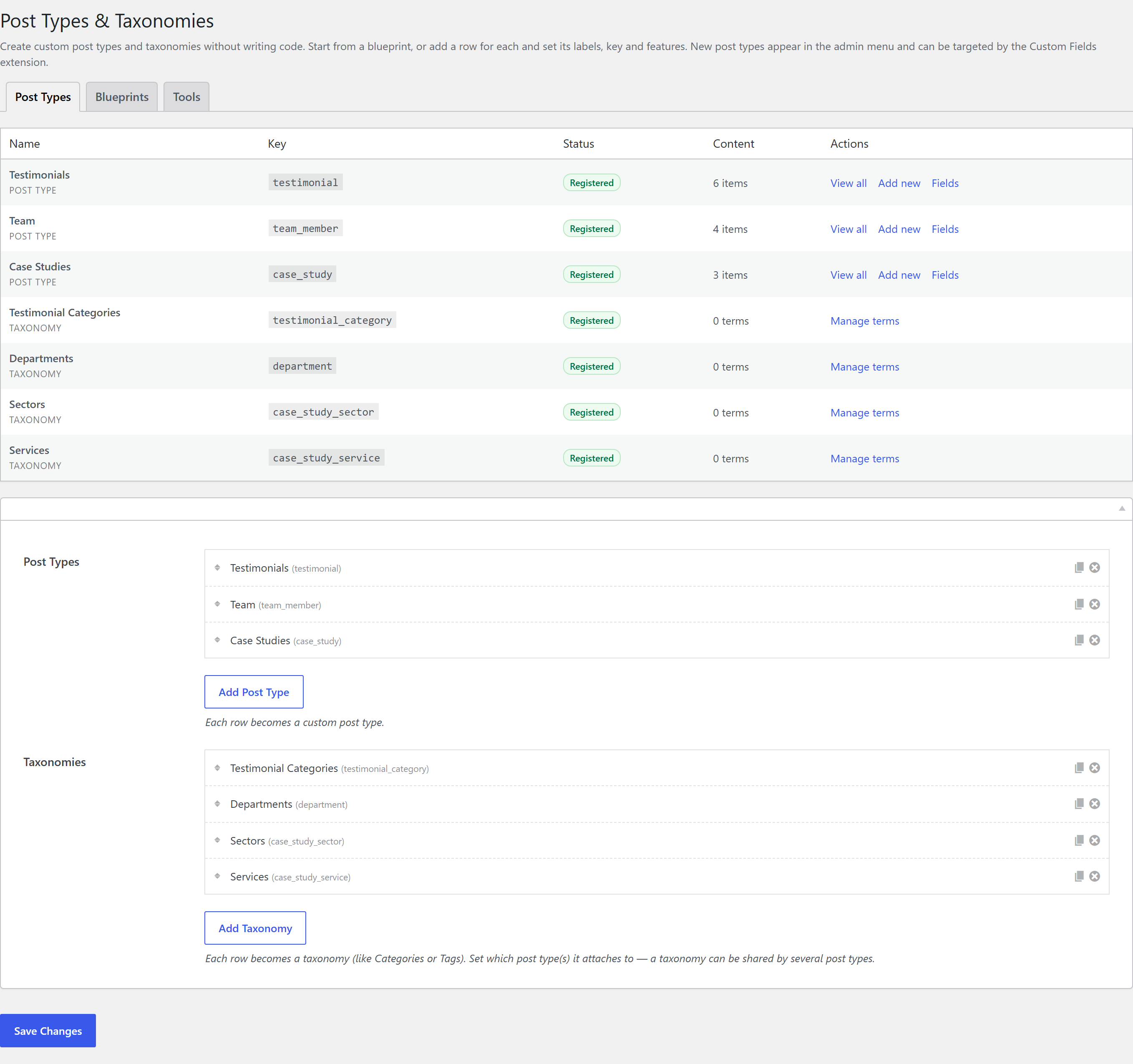
The screen has three tabs:
| Tab | What it holds |
|---|---|
| Post Types | The two definition lists, plus a live overview of what is registered and how much content each type holds. |
| Blueprints | One-click packs — post type, its taxonomies, and a matching field group. |
| Tools | JSON export / import (including Custom Post Type UI imports), PHP code export, and the key-rename migration. |
Blueprints
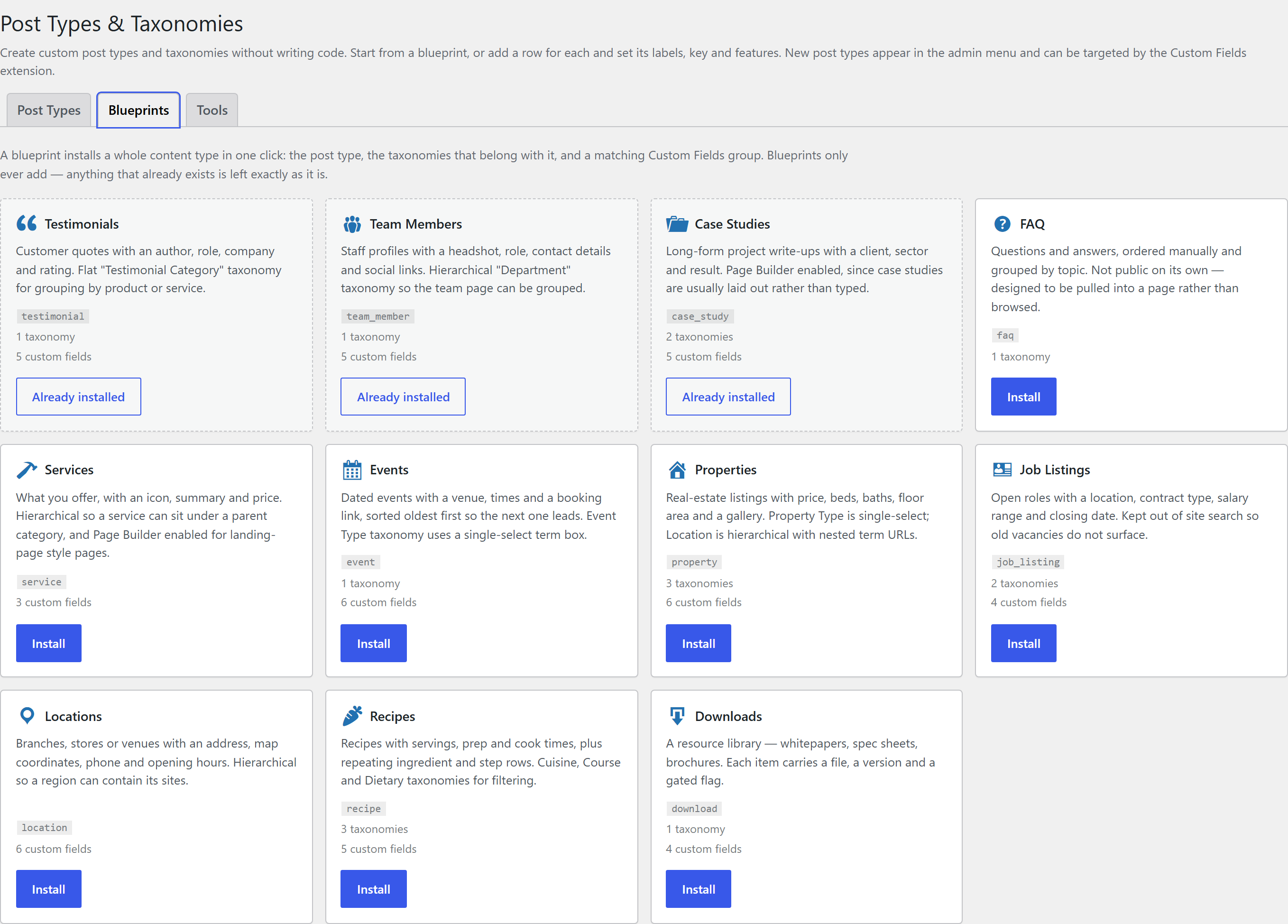
The fastest way to get a working content type. Pick a blueprint and click Install — it creates the post type, the taxonomies that belong with it, and (when Custom Fields is active) a matching field group, all wired together.
| Blueprint | What you get |
|---|---|
| Testimonials | Quotes with author, role, company, URL and a 1-5 rating slider; a Testimonial Category taxonomy. |
| Team Members | Profiles with job title, email, phone, LinkedIn, bio and an optional link to a WordPress user; a hierarchical Department taxonomy; ordered by menu order. |
| Case Studies | Client, project URL, year, headline result, a gallery and related case studies; Sector and Service taxonomies; Page Builder enabled. |
| FAQ | Manually ordered questions grouped by Topic. Non-public — designed to be pulled into a page. |
| Services | Hierarchical, with summary, price and an icon picker; Page Builder enabled. |
| Events | Start and end date-times, venue, address, booking URL and a video embed; single-select Event Type; sorted oldest first. |
| Properties | Price, beds, baths, floor area with units, a map location, gallery and virtual tour; single-select Property Type, hierarchical Location with nested URLs, flat Features. |
| Job Listings | Location, salary range, closing date, apply URL and a hiring manager; Department and Contract Type. Kept out of site search. |
| Locations | Address, phone, email, opening hours and a map location; hierarchical so a region can contain its sites. |
| Recipes | Servings, prep/cook time, repeating ingredient and step lists and a video; Cuisine, Course and Dietary taxonomies. |
| Downloads | A resource library — file, version, size and a gated flag; Download Category. |
Blueprints only ever add. Anything whose key already exists — from another blueprint, another plugin, or your own row — is reported and left exactly as it is, so installing one can never damage existing content, and re-installing is safe.
Developers can register their own with the fw_ext_post_types_blueprints filter.
Post type options
Each row's popup is split into tabs.
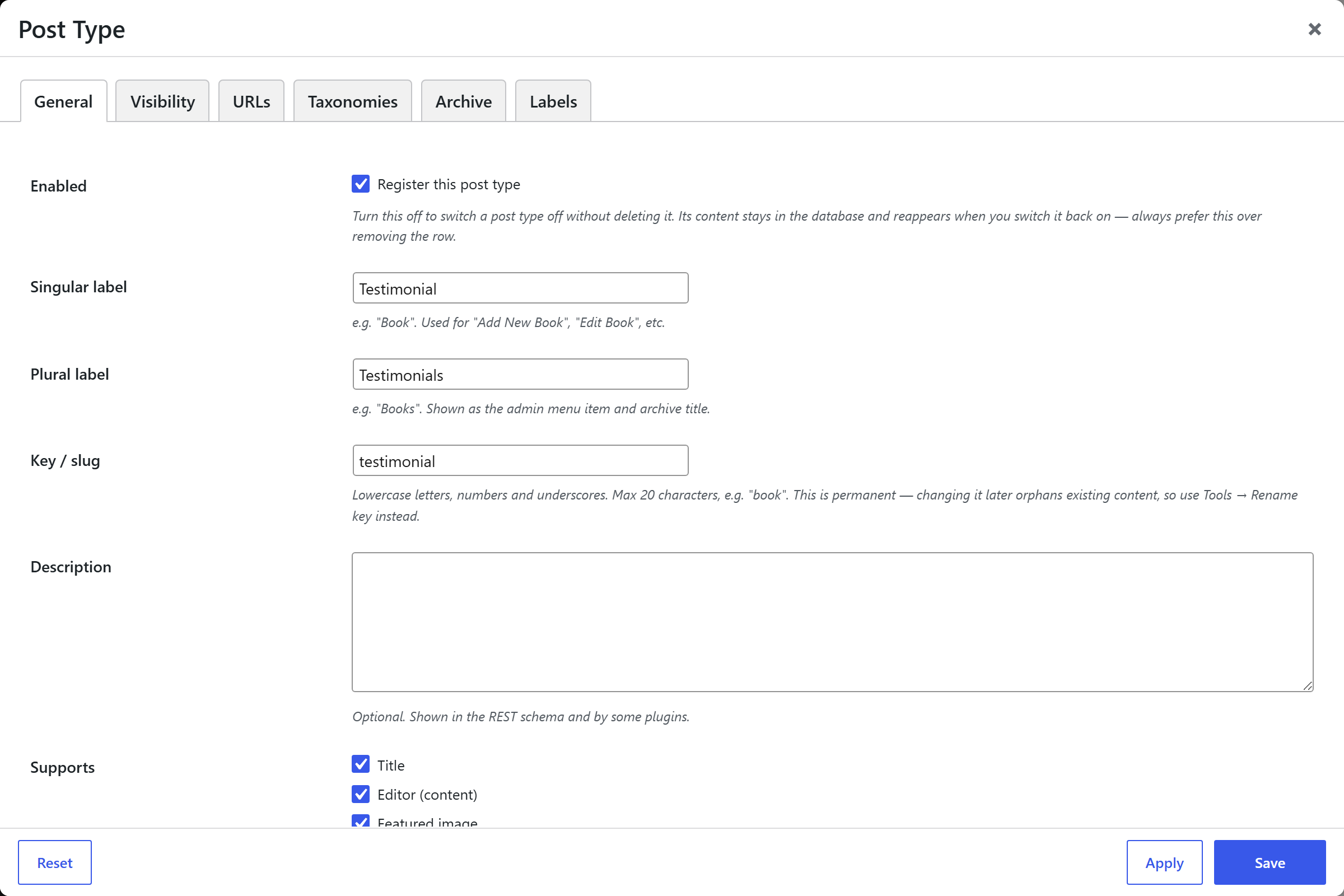
General
| Option | What it sets |
|---|---|
| Enabled | Whether the type is registered. Turn this off to switch a post type off without deleting its definition — see Removing a post type. |
| Singular / Plural labels | The display names (e.g. "Project" / "Projects"). |
| Key (slug) | The post type's identifier. Max 20 characters, permanent — but see Renaming a post type key. |
| Description | Shown in the REST schema and by some plugins. |
| Supports | Which editor panels are enabled: title, editor, featured image, excerpt, author, comments, revisions, page attributes, native custom fields. |
| Page Builder | Enables the Unyson+ Page Builder on this post type. Equivalent to ticking it on the Page Builder settings page — you don't need to do both. |
| Hierarchical | Page-like (parent/child) vs post-like. |
| Menu icon | A Dashicon, an uploaded PNG/JPG, raw SVG markup, or none. |
| Menu position | Its position in the admin menu. |
Visibility
Public is the master switch; the rest default to sensible values derived from it, and you only change them for a non-standard combination.
| Option | What it sets |
|---|---|
| Public | Visible on the front end and queryable. |
| Publicly queryable | Whether front-end URLs resolve for this type. |
| Exclude from search | Keeps the type out of site search while it stays otherwise public. |
| Available in menus | Whether it appears in the Appearance → Menus editor. |
| Admin screens / Admin menu item / Admin bar | Which parts of the admin UI are generated. |
| Block editor / REST | Gutenberg and the REST API. |
| REST base | The endpoint name under /wp-json/wp/v2/. Worth setting deliberately if anything headless consumes the type. |
| Exportable | Whether it's included in Tools → Export. |
URLs
| Option | What it sets |
|---|---|
| URL slug | The slug used in permalinks. Lets a post type keyed book live at /books/. |
| Use permalink prefix | Whether the site's permalink base is prepended. |
| Has archive | Whether the type gets an archive page. |
| Archive slug | A different path for the archive than for single items — e.g. items at /book/…, archive at /library/. |
If your permalink structure starts with a prefix such as /blog/, leaving Use permalink prefix
on puts every item of every custom type underneath it (/blog/books/…). Turn it off for clean
/books/… URLs — this is usually what you want.
Taxonomies
Built-in taxonomies attaches WordPress' own Categories and/or Tags to the post type, sharing the same terms as your posts. To keep terms separate, create your own taxonomy instead.
Archive
Optional overrides applied to this type's archive page only — items per page, order by (title, menu order, last modified, comment count, random) and direction. Blank inherits the site-wide setting.
Labels
Optional overrides for individual admin strings — the menu item, "All items", "Add new", "Edit", "View", "Search", the empty-state message, the archive title, and the featured-image box (so a Book can say "Cover" and a Team Member "Headshot"). Anything left blank keeps the label generated from the singular and plural names.
Taxonomy options
| Tab | What it holds |
|---|---|
| General | Enabled, singular/plural labels, key (max 32), the post types it attaches to (required), description, hierarchical (Category-style) vs flat (Tag-style), and an optional default term assigned when none is chosen. |
| Editor | The term selector — default checkboxes/tag input, single select (radio buttons), or hidden — plus the admin column, Quick Edit and tag-cloud toggles. |
| Visibility & URLs | Public, availability in menus, REST + REST base, URL slug, permalink prefix, and nested term URLs (/genre/fiction/thriller/). |
| Labels | The same optional per-string overrides as post types. |
Single select is the right choice for anything mutually exclusive — a status, a property type, a course. It enforces exactly one term per item, which the default checkbox box cannot.
What the screen tells you
Above the lists, an overview table shows every definition with its status (Registered, Disabled, Not registered, No key), a live content count, and links straight to that type's list, "Add new", and its fields.
Validation runs when you save and reports, per row, anything that will not register: a missing, unusable, over-length or reserved key; a duplicate key; a post type and taxonomy sharing a key; a key another plugin already owns; a taxonomy attached to no post types. It also warns about softer problems — a URL slug that collides with an existing page, an archive enabled on a non-public type, a non-numeric menu position.
Validation never blocks a save. Your definitions are always stored exactly as entered, so nothing is lost while you fix the problem — the notices just explain what will not register, and why.
Removing a post type
Removing a row does not delete content. It stops registering the type, which makes the existing posts invisible — no admin menu, no edit screen, and their URLs stop resolving — while the data stays in the database.
So the screen treats removal as recoverable: it asks for confirmation, and every removal is recorded in a Recently removed panel showing how much content is now orphaned, with a Restore button that brings the type and its content back exactly as they were.
To switch a post type off, untick Enabled on its General tab rather than deleting the row. The definition and its content stay intact, and turning it back on is instant.
Tools
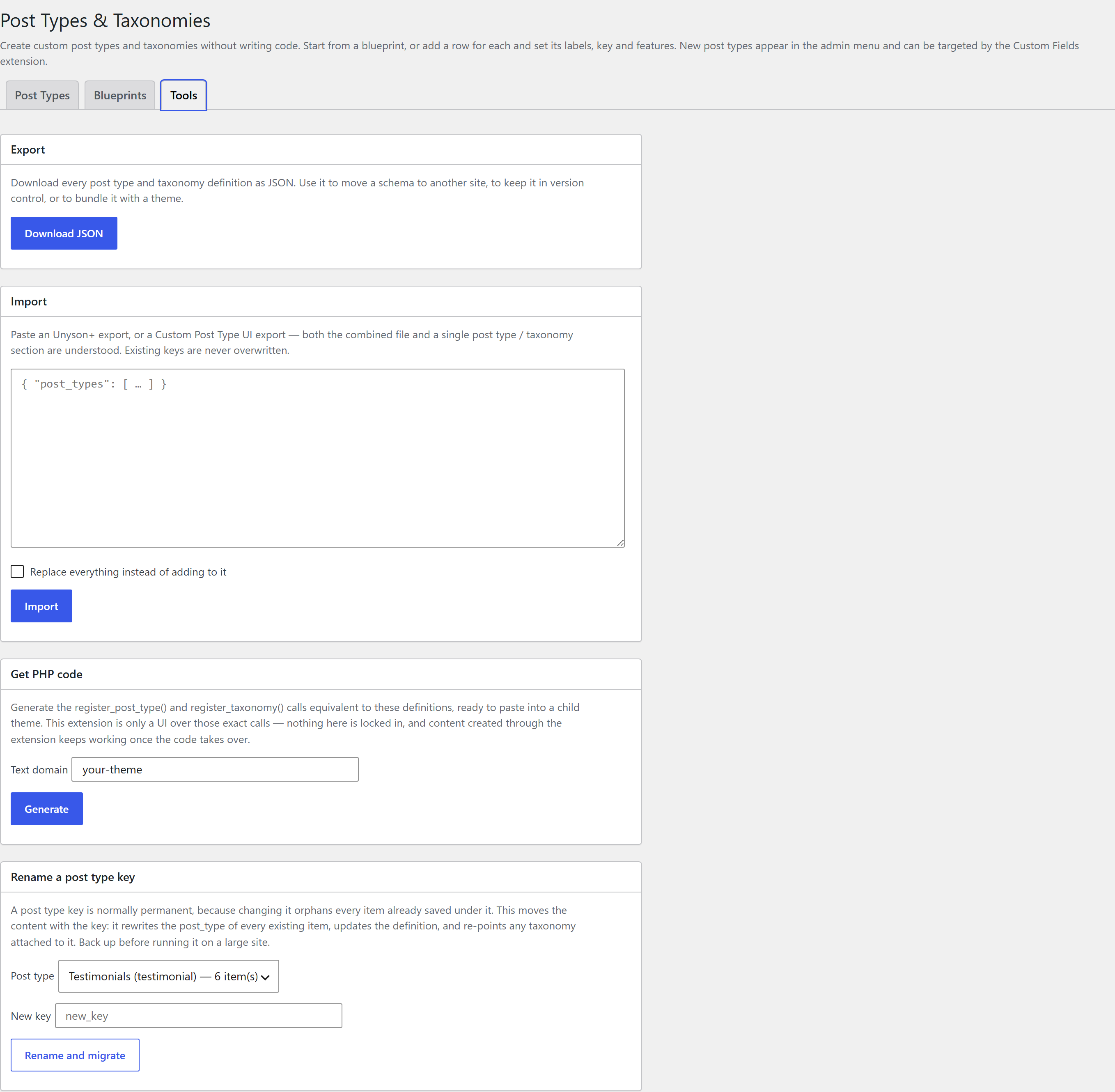
Export and import
Export downloads every definition as JSON — useful for moving a schema to another site, keeping it in version control, or bundling it with a theme.
Import accepts that file and also a Custom Post Type UI export, so an existing schema can be brought across without retyping it. Both the combined CPT UI file and a single post type or taxonomy section are understood, including labels, supports, archive slug and menu icon. Existing keys are never overwritten; an optional Replace mode clears the current definitions first.
Get PHP code
Generates the register_post_type() and register_taxonomy() calls equivalent to your definitions,
ready to paste into a child theme's functions.php, with label strings wrapped in __() against a
text domain you choose.
The extension is only a UI over those exact calls, so moving a definition into code changes nothing about your existing content — it keeps working, and you can then delete the row. Use it when you want a definition in version control, or shipped inside a distributable theme.
Renaming a post type key
A post type key is normally permanent, because changing it orphans everything already saved under it. This tool migrates the content with the key: it rewrites the post type of every existing item, updates the definition, and re-points any taxonomy attached to the old key.
This rewrites rows in the database. Back up before running it on a site with a lot of content. The tool refuses reserved keys and keys already registered by something else, and shows how many items will move before you run it.
How it registers
Definitions are stored in the extension's settings and registered with register_post_type() /
register_taxonomy() on the WordPress init hook (priority 20, post types before taxonomies). A
save that changed something schedules a flush_rewrite_rules() that runs on wp_loaded on the next
request, so permalinks work immediately without disturbing rewrite rules that other plugins register
later in init.
Developers can adjust the arguments before registration with the fw_ext_post_types_args and
fw_ext_post_types_taxonomy_args filters, react to schema changes with the fw_ext_post_types_saved
action, and tune archive queries with fw_ext_post_types_archive_query. Every user-created type also
gets fw-cpt-single-{key} / fw-cpt-archive-{key} body classes for styling.
See Per-extension hooks for the full list.
Typical workflow
- Activate Post Types & Taxonomies from Unyson+ → Extensions.
- Open the Blueprints tab and install the closest match — or add a Post Type by hand.
- Adjust the labels, URL slug and archive behaviour on the row's tabs.
- Optionally add a Taxonomy and attach it to the post type(s).
- Save. The overview table confirms what registered and how much content each type holds, and Custom Fields adds meta boxes to your new post types.