Background Pro
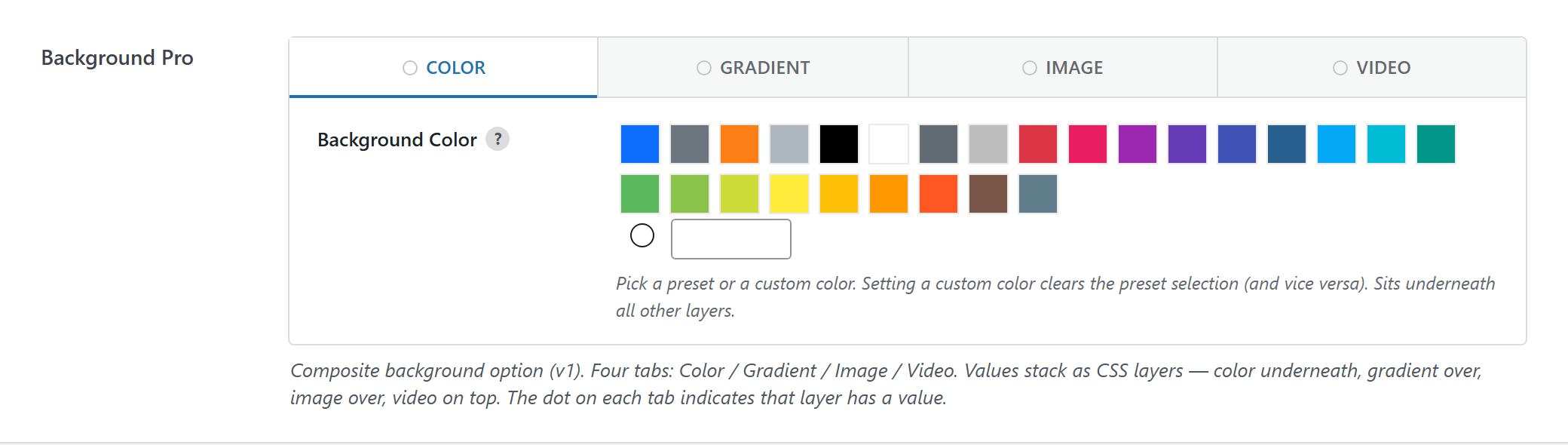
Composite background option with Color / Gradient / Image / Video tabs that stack as CSS layers (color underneath → video on top). The dot on a tab marks a layer that has a value.
$options = [
	'demo_background_pro' => [
		'label' => __( 'Background Pro', 'unysonplus' ),
		'type'  => 'background-pro',
		'desc'  => __( 'Composite background. Color / Gradient / Image / Overlay / Video tabs stack as CSS layers — color underneath, video on top. A dot on a tab marks a layer that has a value.', 'unysonplus' ),
		'help'  => __( 'Optional longer tooltip, shown on the (?) icon next to the label.', 'unysonplus' ),

		// — Optional attributes —

		// disable: hide one or more layer tabs. Array OR comma-string of:
		// color | gradient | image | overlay | video. Handy when a layer makes no
		// sense in context (e.g. a CSS-class fill can't host a <video>).
		'disable' => [ 'video' ],            // also accepts 'gradient,video'

		// value: the DEFAULT value (same shape as *Saved value* below). Every key is
		// optional — omit a layer and it falls back to the type's own default, so set
		// only what you want pre-filled.
		'value' => [
			'color' => [ 'value' => [ 'predefined' => '', 'custom' => '#f8f9fa' ] ],
			'image' => [
				'src'        => [ 'attachment_id' => 0, 'url' => '' ],
				'position'   => 'center center',
				'size'       => [ 'selected' => 'cover', 'custom' => '' ], // selected: auto|cover|contain|custom
				'repeat'     => 'no-repeat',
				'attachment' => 'scroll',                                   // scroll|fixed|local
			],
			// 'gradient' => [ 'data' => [ 'type' => 'linear', 'angle' => 90, 'stops' => [] ] ],
			// 'overlay'  => [ 'color' => 'rgba(0,0,0,.35)', 'gradient' => [] ],
			// 'video'    => [ 'enabled' => 'yes', 'external_url' => '', 'loop' => 'yes', 'autoplay' => 'yes', 'mute' => 'yes' ],
		],
	],
];
Optional attributes
Beyond the standard label / desc / help, background-pro adds two of its own:
| attribute | type | what it does |
|---|---|---|
disable | array or comma-string | Removes layer tabs. Valid keys: color, gradient, image, overlay, video. The first remaining tab becomes the initially-active one. |
value | array | The default value — the same array shape as Saved value below. Partial values are fine; any omitted layer/key uses the type default. |
Setting a default value
Set value to pre-fill the option. It merges over the type defaults, so include only the layers you care about — the example above defaults the Color layer to #f8f9fa and the Image size to cover, and leaves gradient / overlay / video untouched. A layer "turns on" purely by having a value: a non-empty gradient stops array renders the gradient, an image src renders the image, video.enabled = 'yes' renders the video — there are no separate enable switches (except video's enabled).
Disabling layers
Pass disable to hide tabs you don't want authors to use:
'disable' => [ 'gradient', 'video' ],   // Color / Image / Overlay only
// or, equivalently:
'disable' => 'gradient,video',
This is exactly how the Box-Preset / Icon-Badge fills use 'disable' => 'video' — they render as a CSS class and so can't host a <video> layer.
Reading the value
background-pro returns an array — read a field by key (the full shape is in Saved value below).
In a shortcode
The shortcode framework passes the option values into view.php as $atts:
$value = $atts['demo_background_pro'];
echo esc_attr( $value['color'] ); // + gradient / image / video / overlay (see Saved value)
In a page template — a per-page option
Options defined on a post/page (a metabox) are read with fw_get_db_post_option():
$value = fw_get_db_post_option( get_the_ID(), 'demo_background_pro' );
echo esc_attr( $value['color'] ); // + gradient / image / video / overlay (see Saved value)
When the field is one of several inside a box/group, read the whole group once and pick fields by key — the common CPT pattern (e.g. a review or book box):
$book  = fw_get_db_post_option( get_the_ID(), 'book' );
$value = $book['demo_background_pro'];
echo esc_attr( $value['color'] ); // + gradient / image / video / overlay (see Saved value)
In Theme Settings — a global option
Global options are read with fw_get_db_settings_option():
$value = fw_get_db_settings_option( 'demo_background_pro' );
echo esc_attr( $value['color'] ); // + gradient / image / video / overlay (see Saved value)
Saved value
fw_print( fw_get_db_settings_option( 'demo_background_pro' ) ) outputs — the shape of this option type's stored value:
Array
(
    [color] => Array
        (
            [value] => Array
                (
                    [predefined] =>
                    [custom] => #f8f9fa
                )

        )

    [gradient] => Array
        (
            [data] => Array
                (
                    [type] => linear
                    [angle] => 90
                    [stops] => Array
                        (
                        )

                )

        )

    [image] => Array
        (
            [src] => Array
                (
                    [attachment_id] => 123
                    [url] => https://example.com/wp-content/uploads/2026/06/hero.jpg
                )

            [position] => center center
            [size] => Array
                (
                    [selected] => cover
                    [custom] =>
                )

            [repeat] => no-repeat
            [attachment] => scroll
        )

    [video] => Array
        (
            [enabled] => no
        )

    [advanced] => Array
        (
        )

)
In Gutenberg blocks (the React control)
background-pro is one of the option types that also has a React version, so it can appear inside a Gutenberg block's sidebar.
Everything above is rendered by PHP. A block's settings sidebar is a React app and will not accept ready-made HTML from PHP, so the option type gets a second renderer. Both read the same schema and both produce the same saved value. See text for the full explanation.
What the background-pro control does
Five collapsible panels — Colour, Gradient, Image, Video, Overlay — each delegating to the control for its own option type.
A layer is on when it has a value. Gradient is on at two or more stops; image is on when a file is chosen.
enabled is DERIVED, not chosenThere is no enable toggle for video, deliberately. PHP recomputes enabled from whether a playable source is set, precisely because a stored enabled: 'no' sitting next to a real video "looks broken in exports and the Site Converter".
Blocks never reach that recompute, so this control derives the flag on every change. Without that, the block path would produce exactly the dishonest value the PHP goes out of its way to prevent.
Element views read deep paths like image/size/selected directly, so a value missing a branch renders wrongly rather than erroring. The control merges over the full defaults on every change rather than patching in place.
disable hides layers a schema cannot supportA box-preset fill renders as CSS and so disables video, which has no DOM to hook. Accepts a string or an array; named layers are not rendered at all.