Textarea
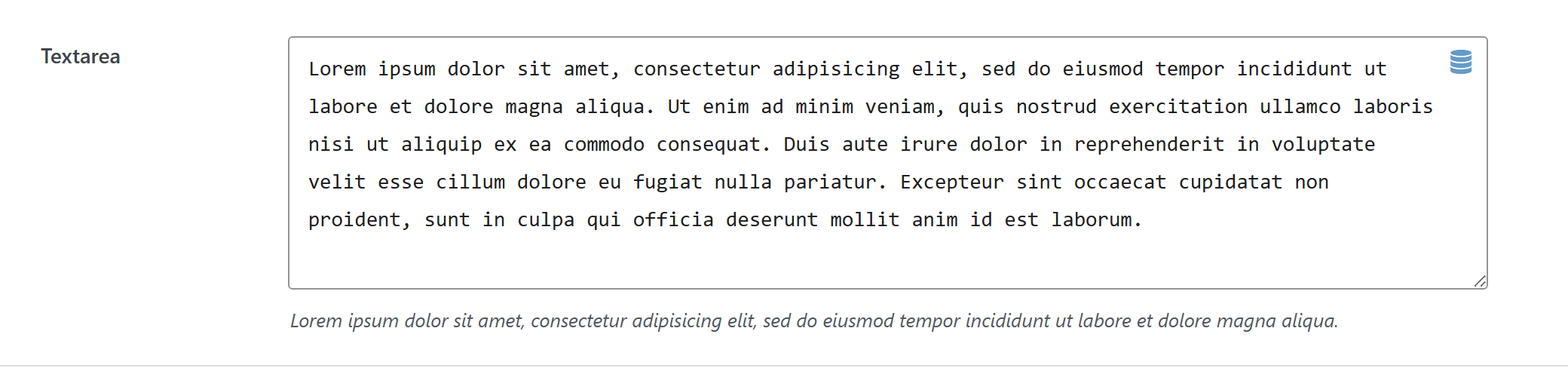
Regular textarea.
$options = [
	'demo_textarea' => [
		'label' => __( 'Textarea', 'unysonplus' ),  // or false to hide the label column
		'type' => 'textarea',
		'value' => 'Lorem ipsum dolor sit amet, consectetur adipisicing elit, sed do eiusmod tempor incididunt ut labore et dolore magna aliqua. Ut enim ad minim veniam, quis nostrud exercitation ullamco laboris nisi ut aliquip ex ea commodo consequat. Duis aute irure dolor in reprehenderit in voluptate velit esse cillum dolore eu fugiat nulla pariatur. Excepteur sint occaecat cupidatat non proident, sunt in culpa qui officia deserunt mollit anim id est laborum.',
		'desc' => __( 'Lorem ipsum dolor sit amet, consectetur adipisicing elit, sed do eiusmod tempor incididunt ut labore et dolore magna aliqua.',
			'unysonplus' ),
		'help' => [
			'icon' => 'video',
			'html' => '<iframe width="420" height="236" src="https://player.vimeo.com/video/101070863" frameborder="0" allowfullscreen></iframe>'
		],
		// — Optional attributes you can add —
		// 'attr' => [ 'class' => 'my-class', 'data-foo' => 'bar' ],  // extra HTML attributes
		// 'dynamic_content' => false,  // hide the Dynamic Content (database) picker
	],
];
Reading the value
textarea returns a string — output it directly.
In a shortcode
The shortcode framework passes the option values into view.php as $atts:
echo esc_html( $atts['demo_textarea'] );
In a page template — a per-page option
Options defined on a post/page (a metabox) are read with fw_get_db_post_option():
$value = fw_get_db_post_option( get_the_ID(), 'demo_textarea' );
echo esc_html( $value );
When the field is one of several inside a box/group, read the whole group once and pick fields by key — the common CPT pattern (e.g. a review or book box):
$book = fw_get_db_post_option( get_the_ID(), 'book' );
echo esc_html( $book['demo_textarea'] );
In Theme Settings — a global option
Global options are read with fw_get_db_settings_option():
$value = fw_get_db_settings_option( 'demo_textarea' );
echo esc_html( $value );
Saved value
fw_print( fw_get_db_settings_option( 'demo_textarea' ) ) outputs — the shape of this option type's stored value:
First line of the description.
Second line with more detail.
In Gutenberg blocks (the React control)
textarea is one of the option types that also has a React version, so it can appear inside a Gutenberg block's sidebar.
Everything above is rendered by PHP — _render() builds the HTML and jQuery makes it interactive. That works in the page builder and on Theme Settings, which are ordinary admin pages. A block's settings sidebar is a React app, which draws the whole panel itself and will not accept ready-made HTML from PHP.
So the option type gets a second renderer. Both read the same schema — the array you write in options.php — and both produce the same saved value. The PHP path stays authoritative; the React path is additive. See text for the full explanation of how the two fit together.
What the textarea control does
It wraps WordPress's TextareaControl:
| Schema key | Becomes |
|---|---|
label | the field label |
desc | the help text under the field |
attr.placeholder | the textarea's placeholder |
attr.rows | the visible row count |
The dynamic_content picker beside the field in wp-admin is server-rendered jQuery UI, so it is not reproduced in a block sidebar — you get a plain textarea. The stored value is identical either way, because dynamic content is a token inside the same string. A value authored in the page builder round-trips through the React control untouched.