Headless WordPress extension
The Headless WordPress extension (in the Extensions list as Headless WordPress) lets WordPress manage the content while a separate website or app shows it. It gives a front end outside WordPress (Next.js, plain JavaScript, a mobile app)
what it needs from a Unyson+ site, beyond what the core REST API provides: images it can put straight
into an <img> tag, the site's menus and basic settings, and a screen that shows exactly what the API
returns. Everything it adds is read-only and public, like the rest of the WordPress REST API's public
data.
:::info Status: version 0.1, in testing The extension is built and being tested; it is not in the Extensions manager yet. This page documents what it does. Until it is published, the Headless WordPress guides work without it: Post Types puts your content types in the REST API and Custom Fields adds their values. :::
What it adds
| Feature | Where |
|---|---|
| Ready-to-use images (URL, size, alt text, every image size) | Inside unysonplus_fields on every post |
| The site's menus as nested trees | GET /wp-json/unysonplus/v1/menus and /menus/<location> |
| Site name, tagline, logo, icon and chosen Theme Settings | GET /wp-json/unysonplus/v1/settings |
| The Headless WordPress admin screen with a JSON preview | Unyson+ → Headless WordPress |
Two related controls live in Custom Fields (0.1.23 and later), so they work with or without this
extension: a Show in REST API switch on every field, and a JSON schema for unysonplus_fields.
Before you start
- Unyson+ with the Post Types and Custom Fields extensions active, a content type in the REST API and a field group with Show in REST API on. Headless with Unyson+ walks through that setup.
- Pretty permalinks (Settings → Permalinks: anything but Plain), so
/wp-json/addresses work. - Activate Headless WordPress under Unyson+ → Extensions.
Ready-to-use images
Custom Fields stores an image as its attachment ID and a URL that starts with //. With Headless WordPress active,
every image value in unysonplus_fields (at the top level, in galleries and inside repeater rows) comes
back ready to use:
"cover_image": {
  "attachment_id": 3630,
  "url": "https://your-site.com/wp-content/uploads/2026/10/quiet-garden-cover.jpg",
  "width": 600,
  "height": 900,
  "alt": "The Quiet Garden cover",
  "sizes": {
    "thumbnail": { "url": "https://your-site.com/…/quiet-garden-cover-150x150.jpg", "width": 150, "height": 150 },
    "medium": { "url": "https://your-site.com/…/quiet-garden-cover-200x300.jpg", "width": 200, "height": 300 }
  }
}
attachment_idandurlstay, so front ends written for the stored shape keep working; theurlis now absolute.altis the image's Alternative Text from the Media Library;sizeslists every resized copy WordPress made.- Add
?unysonplus_raw=1to any request to get the stored values instead. - Turn the whole feature off with Ready-to-use images in the extension's settings.
Keeping a field private
Every Custom Fields field has a Show in REST API checkbox (Unyson+ → Custom Fields → the group → the field), on by default. Turn it off for a value that must not be public, such as an internal note or a cost you calculate a price from: the field disappears from the API while the rest of its group stays. The group's own Show in REST API switch still decides whether the group is in the API at all.
The schema
unysonplus_fields publishes a JSON schema with one property per field in the API, typed from the field
type (Text → string, Number → number, Image → object, Gallery → array, and so on). Clients read it
from the post type's OPTIONS request or from /wp-json, and type generators can turn it into
TypeScript types:
curl -X OPTIONS https://your-site.com/wp-json/wp/v2/book
# … "unysonplus_fields": { "type": "object", "properties": {
#       "subtitle": { "type": "string" }, "pages": { "type": "number" }, "cover_image": { "type": "object" } … } }
Menus
GET /wp-json/unysonplus/v1/menus lists every menu location of the theme and the menu assigned to it:
[
  { "location": "primary", "label": "Primary menu", "menu": { "id": 256, "name": "Main menu", "slug": "main-menu" },
    "href": "https://your-site.com/wp-json/unysonplus/v1/menus/primary" },
  { "location": "secondary", "label": "Secondary menu", "menu": null, "href": "…/menus/secondary" }
]
GET /wp-json/unysonplus/v1/menus/<location> returns that menu as a tree. Each item has id, title,
url, target, classes, object and object_id (what it links to), description, parent and its
children:
{
  "location": "primary",
  "menu": { "id": 256, "name": "Main menu", "slug": "main-menu" },
  "items": [
    { "id": 11, "title": "Books", "url": "https://your-site.com/books/", "target": "", "classes": [],
      "object": "book", "object_id": 0, "description": "", "parent": 0,
      "children": [
        { "id": 12, "title": "Fiction", "url": "https://your-site.com/genre/fiction/", "parent": 11, "children": [] }
      ] }
  ]
}
An unknown location, or one with no menu assigned, returns a 404.
Site settings
GET /wp-json/unysonplus/v1/settings returns what a front end needs to brand its pages:
{
  "name": "Your Site",
  "description": "Your tagline",
  "url": "https://your-site.com/",
  "language": "en-US",
  "logo": { "attachment_id": 41, "url": "…", "width": 400, "height": 120, "alt": "", "sizes": {} },
  "icon": { "attachment_id": 42, "url": "…", "width": 512, "height": 512, "alt": "", "sizes": {} },
  "theme": { "footer_copyright": "© 2026 Your Site" }
}
logo is the theme's custom logo and icon the Site Icon (or null). theme holds only the Theme
Settings you choose in the extension's settings; nothing else from Theme Settings is ever exposed.
The Headless WordPress screen
Unyson+ → Headless WordPress shows the API addresses, every Custom Fields group in the API with each field marked public or private, and a Preview of the JSON a visitor who is not logged in gets for any post.
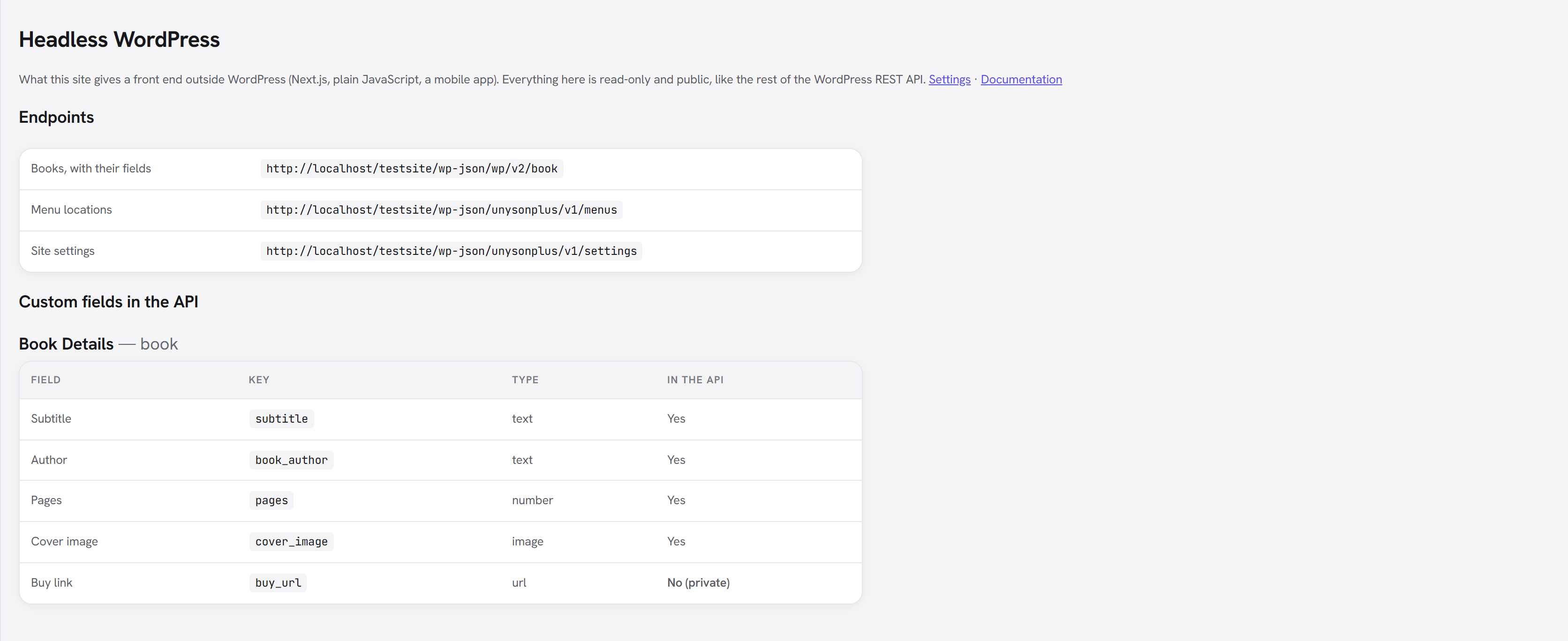
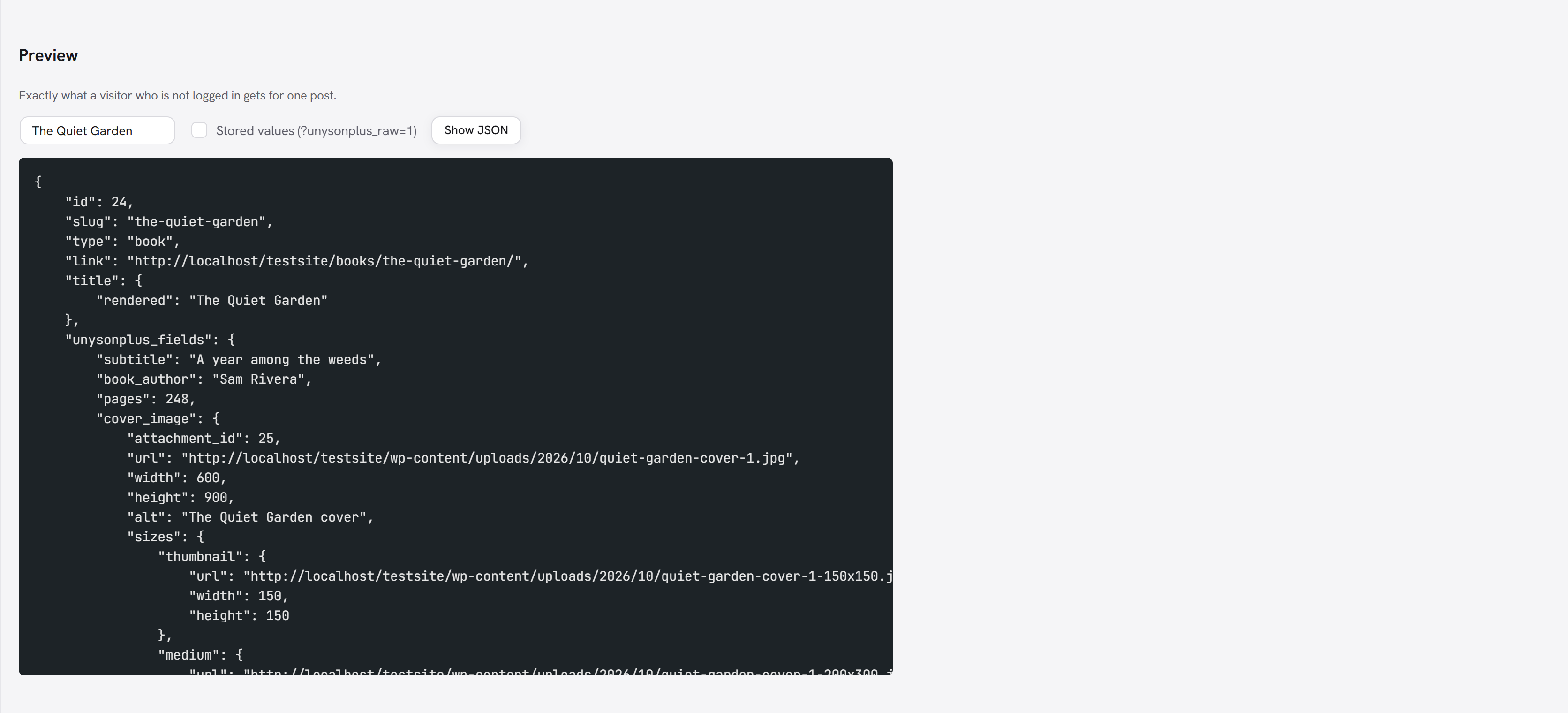
Tick Stored values to preview the response as ?unysonplus_raw=1 returns it.
Settings
Unyson+ → Extensions → Headless WordPress → Settings.
| Setting | Default | What it does |
|---|---|---|
| Ready-to-use images | On | Turns image values into the full object above. Off returns the stored values. |
| Theme Settings to expose | Empty | Theme Settings option ids to include in /settings under theme, one per line. Unknown ids come back null. List only what is public. |
Limits
- Read-only: nothing here saves data. Forms and other writes still go through their own features.
- Field groups can target post types only, so terms and users have no fields in the API yet.
- Page Builder content reaches the API as the finished HTML (
content.rendered), without the CSS it needs; Phase 2 below changes that. - Mega-menu columns are not in the menu tree yet.
Roadmap
Coming soon items are intended; Exploring items are under consideration and may not happen. Shipped items move into the extension's main documentation.
No dates. Items ship when they are properly done, and the order below is a rough intent, not a queue.
What already exists
The extension builds on these; it does not replace them.
- Post Types registers its post types and taxonomies with
show_in_reston by default, so they already appear under/wp/v2/. - Custom Fields can expose a field group in the REST API ("Show in REST API" on the group). The
values appear under
unysonplus_fieldson each post. Today that output is read-only, gives raw stored values (an image is its attachment ID and a protocol-relative URL, with no sizes or alt text), and covers posts only.
Phase 1 — Clean, read-only content API In progress
Version 0.1 of the extension is built and being tested; it is not in the Extensions manager yet. Items marked Built are in it.
- Built for images and galleries: Resolved field values. Each option type gets a REST formatter, so the API returns something a
front end can use directly: images and galleries as URL, width, height, alt and sizes; links to posts
as ID, slug and URL; colours, typography and icons as plain values; repeaters and groups as nested
arrays. The raw value stays available behind
?unysonplus_raw=1. - Built One switch per field, as well as per group, so a private field in a public group never leaks.
- Terms and users. Field groups attached to taxonomies and user profiles appear on
/wp/v2/<taxonomy>and/wp/v2/users. - Built Settings endpoint —
/unysonplus/v1/settings: the site name, tagline, address, logo and icon, plus the Theme Settings the site owner lists as public in the extension's settings. - Built Menus endpoint —
/unysonplus/v1/menus(the locations) and/unysonplus/v1/menus/<location>: a nested menu tree. Mega-menu columns are still to come. - Built Schema. Each REST field publishes a JSON schema, so clients can generate types (for example
TypeScript) from
/wp-json. - Built Admin screen under Unyson+ → Headless: which post types, groups, fields and settings are exposed, with a live preview of the JSON for a chosen post.
Phase 2 — Page Builder content Coming soon
Builder pages are stored as a tree of shortcodes and normally render to HTML on the server. The API offers both forms, and the front end picks one:
- Rendered —
content.renderedplus the CSS that page needs (generated preset and page CSS, shortcode styles) asunysonplus_assets. This is the simplest option: any front end can show a builder page exactly as WordPress would. - Structured —
/unysonplus/v1/layout/<id>: the builder tree as JSON (sections → columns → elements, each with its type and resolved options). The front end maps each element type to its own component. This is the truly headless option, and the more work for the front end.
Phase 3 — Front-end integration Coming soon
- Front-end URL and preview. Set the front-end address once; "Preview" and "View" in the admin open the front end, with a short-lived token so drafts can be previewed there.
- Rebuild webhooks. On publish or update, call a deploy hook (a static-site build) or a revalidate URL, with the changed post's type and slug.
- CORS. A list of allowed front-end origins.
- Redirect the WordPress front end (optional), so visitors who reach the WordPress address are sent to the real site.
Phase 4 — Writes and starter kit Exploring
- Write support. Update callbacks that check each value against its option type, for front ends that submit content (application passwords or another token for auth).
- Forms over REST. Submit Unyson+ forms from the front end, with the same validation and mailer.
- A starter front end with components for the common builder elements, and the typed client.
- A GraphQL bridge (WPGraphQL) for sites that prefer GraphQL.
Not in scope
- Animation Engine effects and other front-end scripts do not travel through the API; a headless front end rebuilds them itself.
- Theme Builder headers and footers are only available as rendered HTML or as a structured layout, like any other builder content.
Keeping the guides current
The Headless WordPress guides put a year in their search titles (title: "… ({year})"), and
show "Updated