Short Links
yoursite.com/deal → anywhere. Counted, and private by default.
Short, branded links on your own domain, with click reports, categories, import and export, and an API with signed webhooks so your other apps can create, change and measure links too.
Short Links turns any long URL into a short address on your own site. Affiliate links, campaign URLs, a podcast's "find us at yoursite.com/show", a printed QR code that must keep working after the destination moves. You change where a link goes at any time, and every place it was shared follows.
It is off by default. Activate it from Unyson+ → Extensions, then open Unyson+ → Short Links.
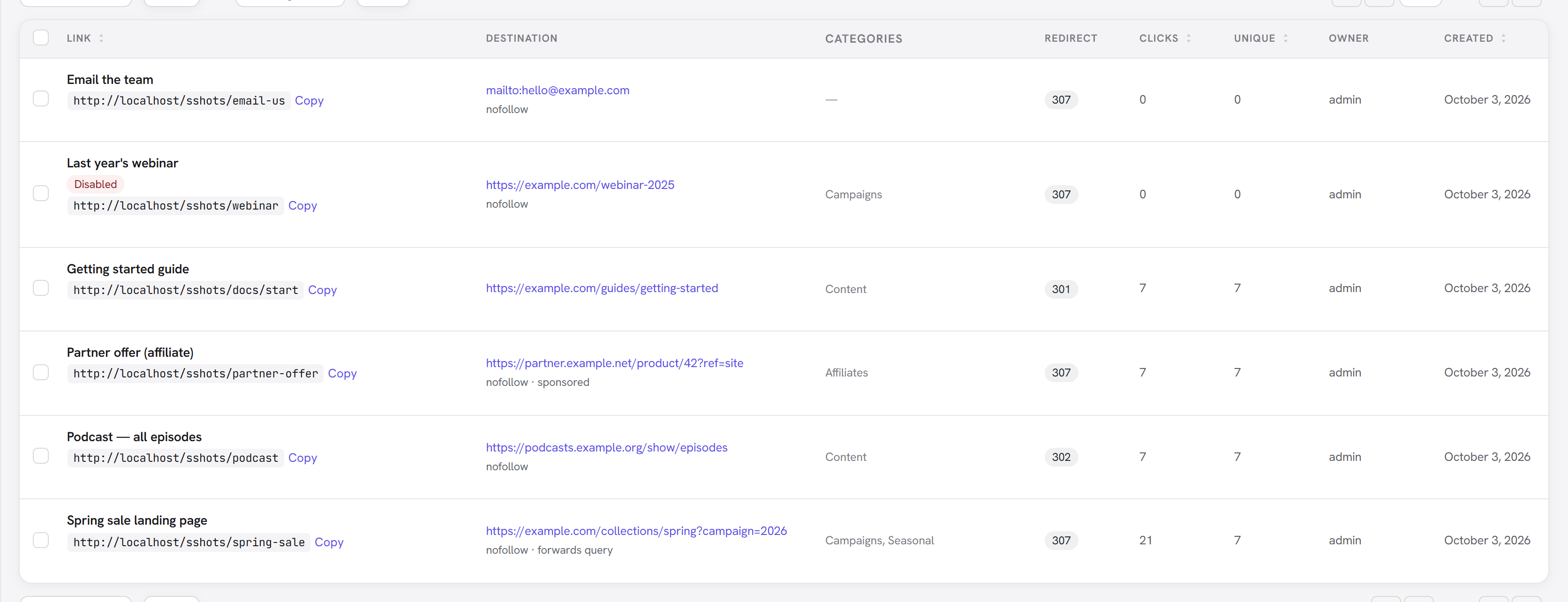
Create a link
- Go to Unyson+ → Short Links → Add New, or use + New → Short Link in the admin bar, or the Quick Add Short Link box on the Dashboard.
- Paste the Destination URL.
mailto:,tel:andsms:links work too. - Type a Short link slug, or press Generate for a random one. Availability is checked as you type, and a slug that is taken, reserved by WordPress, or already the address of one of your posts or pages is refused, so a short link can never hide your content.
- Leave Title empty and the destination page's own title is filled in for you.
- Create Link. The new address is shown at the top with Copy and Test buttons.
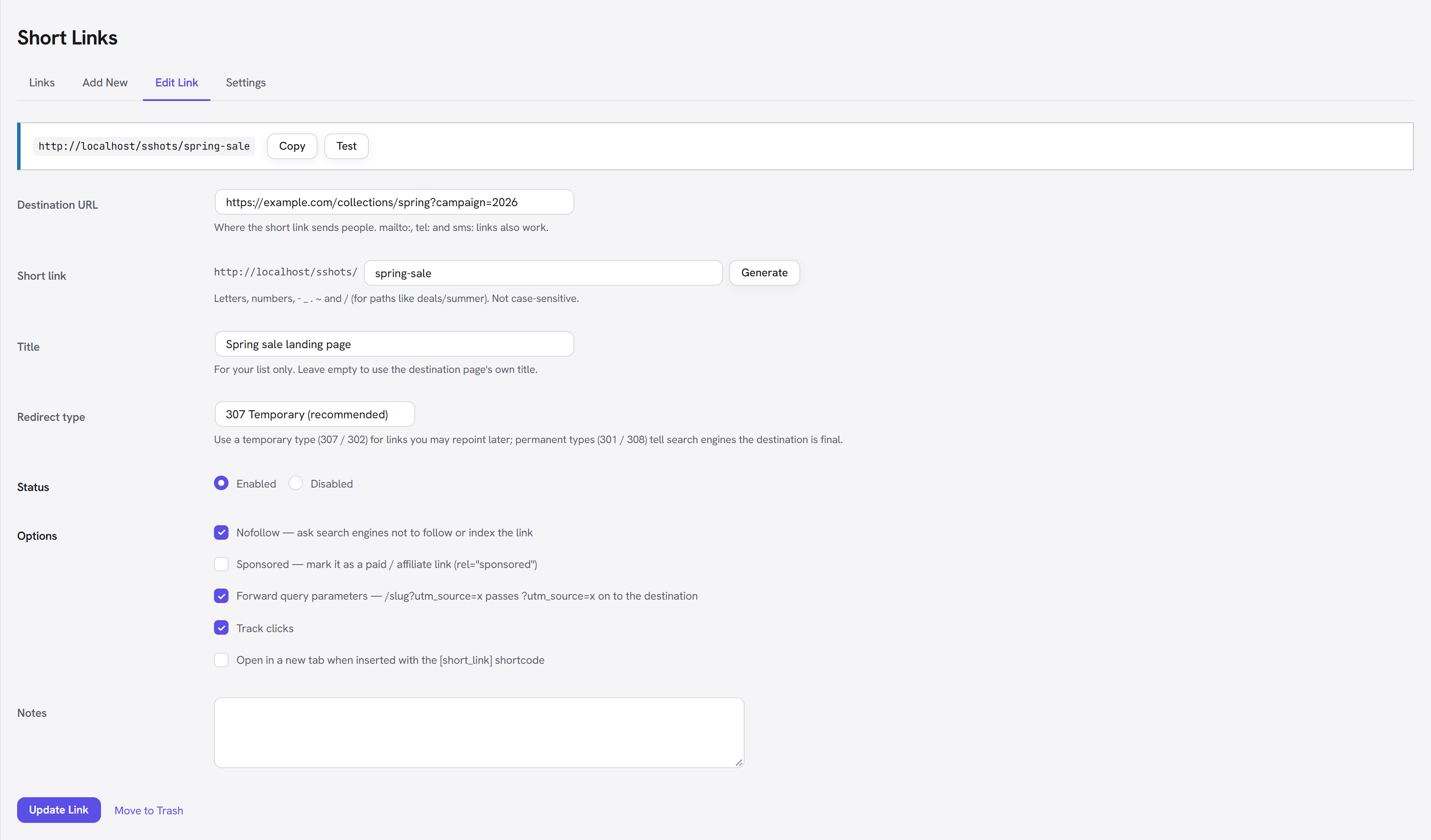
The options on a link
| Option | What it does |
|---|---|
| Redirect type | 307 (default) and 302 are temporary: browsers and search engines keep asking your site, so you can repoint the link later. 301 and 308 say the move is permanent. 307 and 308 also keep the request method. |
| Status | Disabled stops the redirect without deleting anything. Give a disabled link a fallback URL to send its visitors somewhere else; with no fallback, they see your site's normal 404 page. |
| Nofollow | Sends X-Robots-Tag: nofollow and adds rel="nofollow" when the link is inserted with the shortcode. On by default. |
| Sponsored | Marks paid and affiliate links (rel="sponsored"). |
| Forward query parameters | /deal?utm_source=newsletter passes ?utm_source=newsletter on to the destination, encoding intact, ahead of any #fragment. |
| Track clicks | Turn counting off for one link. |
| Open in a new tab | The default target when the link is inserted with the shortcode. |
Slugs may contain letters, numbers, - _ . ~ and /, so deals/summer is fine. They are not
case-sensitive: /Deal and /deal are the same link.
Categories
Group links into categories (campaigns, affiliates, content…). Tick them on the link form or type new ones there, filter the list by category, and manage them under Manage categories. Exports, imports and the API all carry them.
Reports
Short Links → Reports shows every link at once for the last 7, 30 or 90 days or 12 months: total clicks and unique visitors, clicks per day, the top links, and where clicks came from (referrers, countries, devices, browsers). Hover a day in the chart for its exact numbers.
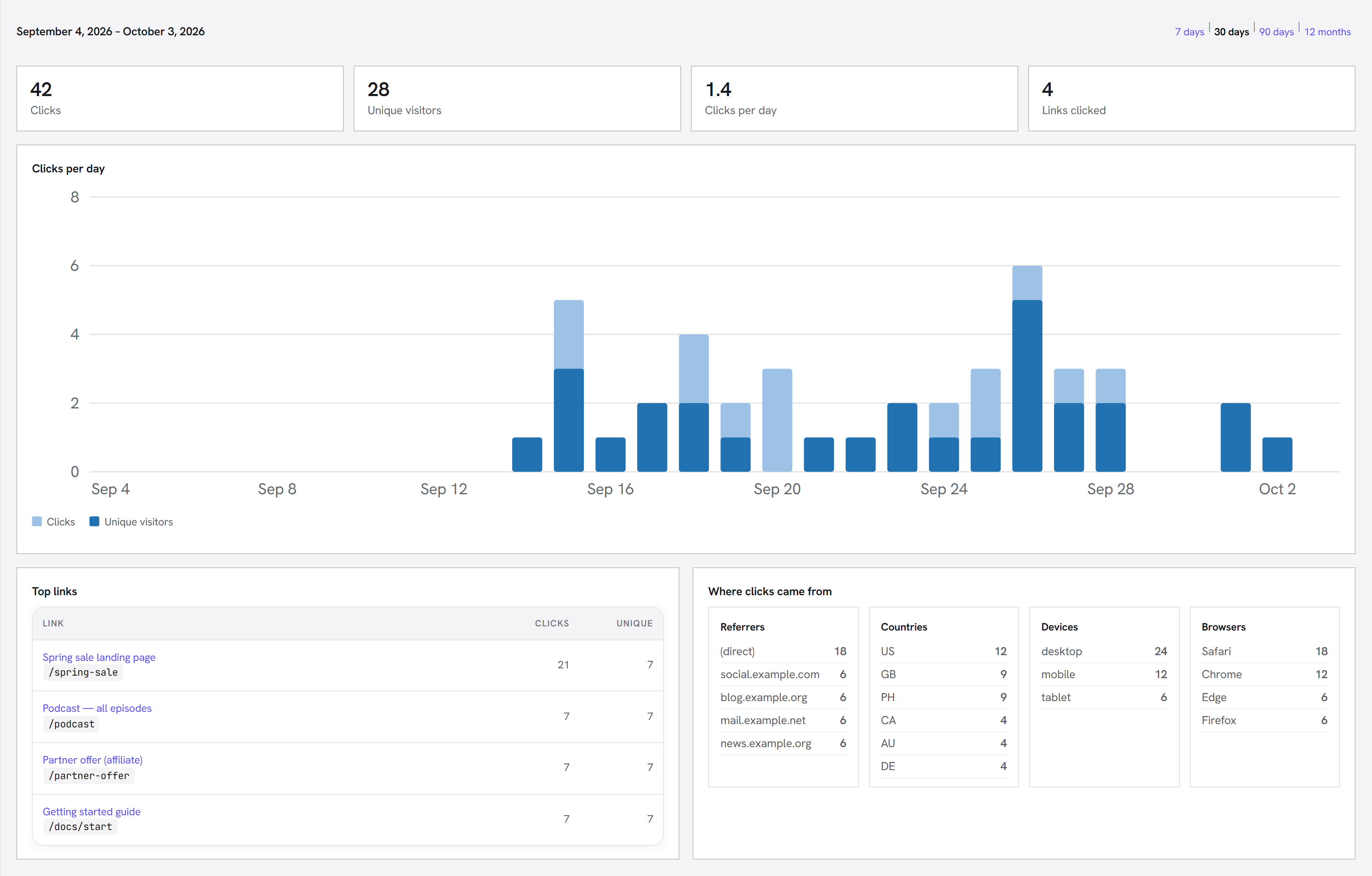
Totals and the chart come from a daily summary that is kept forever, even when you limit how long individual clicks are stored. The referrer / country / device breakdowns need the individual clicks, so they cover only the history you keep.
Clicks and unique visitors
Each link's edit screen shows its totals, its top referrers, countries, devices and browsers, and a log of recent clicks.
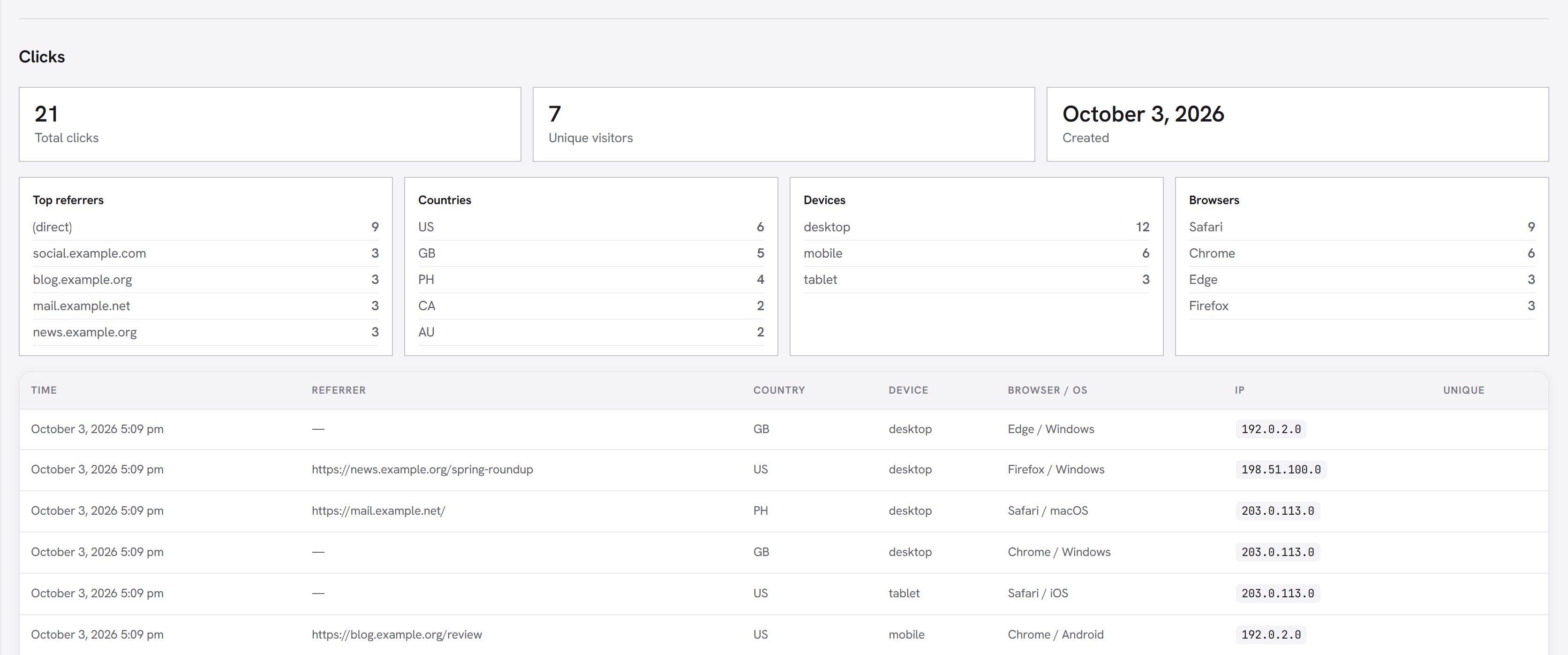
What is counted: a real visit to the link.
What is not counted (they are still redirected):
- Search crawlers, link previews, uptime monitors, HTTP scripts, headless browsers and AI fetchers.
- Addresses on your Excluded IPs list.
- You and your team. Clicks from logged-in users who can edit links are skipped, so testing your own links does not inflate the numbers. Turn Count clicks from link editors on to include them.
Unique visitors are counted per link over 30 days. A small first-party cookie remembers a returning visitor. Without cookies, a visitor is recognised by a hash of their IP and browser that changes every day and cannot be turned back into an address, so a browser that blocks cookies is not counted as new on every click.
Privacy by default:
- IP addresses are stored with the last part zeroed (
203.0.113.0). - The browser's user-agent string is never stored, only its family (Chrome, iOS, mobile).
- Country comes only from a header your CDN or host already adds. Visitor addresses are never sent to a lookup service.
Import and export
Short Links → Import / Export.
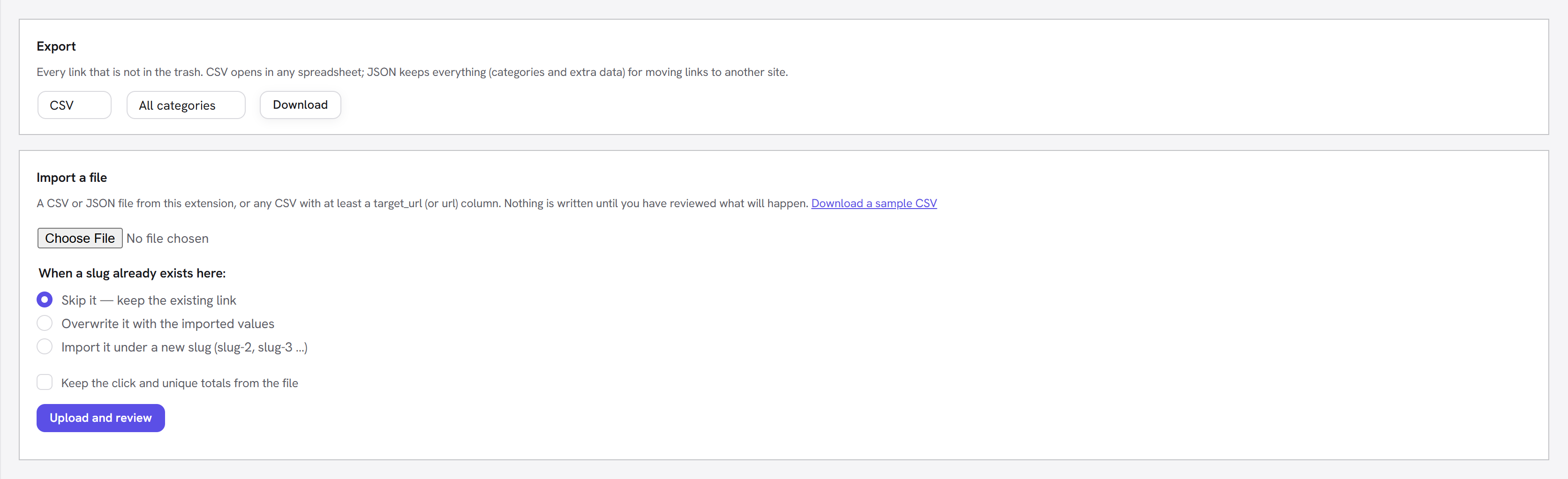
- Export every link as CSV (opens in any spreadsheet) or JSON (keeps everything, for moving links to another site). Pick a category to export just that one.
- Import a CSV or JSON file. Any CSV with at least a
target_url(orurl) column works; Download a sample CSV shows every column. Choose what happens when a slug already exists: skip it, overwrite it, or import it under a new slug (deal-2).
Nothing is written until you have seen the review: how many links are new, will be overwritten, renamed, skipped, or can't be imported, with the reason for each problem row.
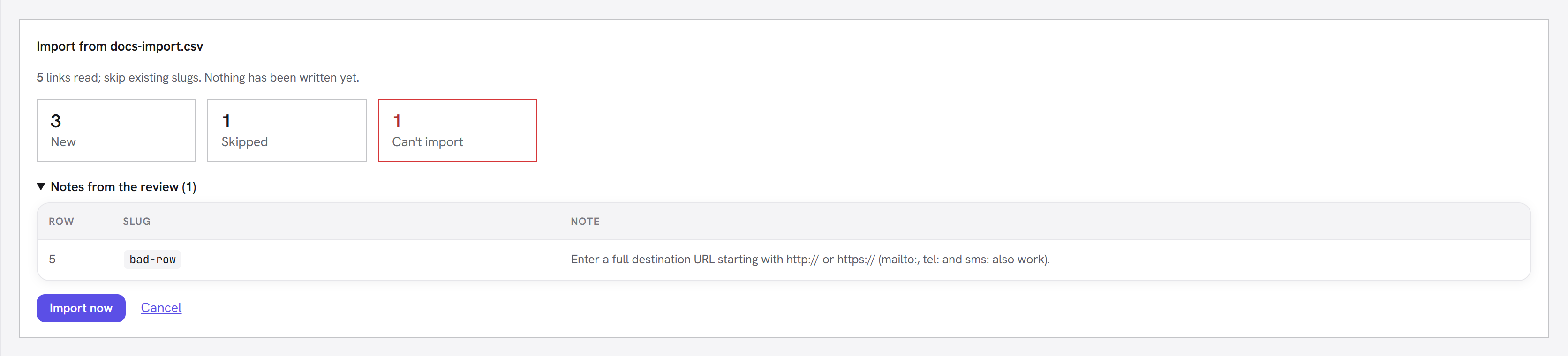
Import now then runs in small batches with a progress bar, so a file with thousands of links never times out. A slug that appears twice in the file is imported once.
Moving from Pretty Links
If Pretty Links (free or Pro) is installed — or was, and its tables are still in the database — an Import from another link plugin panel appears on this tab. It reads them directly — nothing to export first — and leaves them untouched, so both can run side by side until you switch over. It brings across each link's slug, destination, title, notes, redirect type, nofollow / sponsored, query forwarding, categories and click totals, and can also copy the click history so your reports show past days. Redirect kinds Short Links does not offer (framed, meta-refresh, JavaScript) become 307 and are listed in the review; payment links are left out (Short Links has no payment links). Pretty Links' categories come across; its tags do not. Running it again skips everything already imported. When you are happy, deactivate Pretty Links so the two do not answer the same addresses.
Settings
There is one settings screen: Unyson+ → Short Links → Settings (administrators). The Settings link on the extension's card opens the same page.
| Setting | Default | |
|---|---|---|
| Default redirect type | 307 | Pre-selected for new links. |
| Link prefix | (none) | go puts every link under yoursite.com/go/…. Changing it moves every existing link. |
| Generated slug length | 5 | Generated slugs avoid look-alike characters such as 0/o and 1/l. |
| Nofollow / sponsored new links | on / off | Defaults for the per-link boxes. |
| Extra reserved slugs | (none) | Wildcard patterns no link may use, e.g. shop/*. WordPress's own paths are always reserved. |
| Tracking | Full | Full keeps a row per click; Totals only keeps just the counts; Off. Switching never deletes data. |
| Count clicks from link editors | off | |
| Use cookies for unique visitors | on | |
| Anonymize IP addresses | on | |
| Keep click history for | Forever | 30 days to 2 years. Older click rows are removed nightly; link totals are kept. |
| Ignore bots / extra bot user agents | on | |
| Excluded IPs | (none) | Addresses or ranges (203.0.113.0/24, 2001:db8::/32). |
| Trusted proxies | (none) | Only if your site sits behind a CDN or load balancer: list its addresses so the real visitor IP is read from the headers it adds. Leave empty otherwise. |
Remove all data at the bottom of Settings deletes every link and its click history after you
type DELETE. Deactivating the extension never deletes anything.
Who can do what
| Role | Can |
|---|---|
| Administrator | Everything, including Settings |
| Editor | Create and edit every link |
| Author | Create links, and see and edit only their own |
The capabilities are edit_short_links (own links) and manage_short_links (all links), so a
role-editor plugin can grant them to any role.
Insert a link in content
[short_link slug="deal"]
[short_link id="12" text="Get the deal" class="button" target="_blank"]
The shortcode prints a normal link to the short address, with rel="nofollow", sponsored and
noopener added from the link's settings. Without text, it uses the link's title.
For developers
PHP helpers:
fw_ext_short_links_url( 'deal' );          // "https://yoursite.com/deal", or '' if there is no such link
fw_ext_short_links_get( 12 );              // the link row, by id or slug
fw_ext_short_links_create( array(          // same rules as the admin screen; returns the row or a WP_Error
	'target_url' => 'https://example.com/spring',
	'slug'       => 'spring',
) );
REST API — namespace fw-short-links/v1. Authenticate with an
Application Password
from another app, or the usual cookie + nonce from the admin.
| Method + route | |
|---|---|
GET /links | List. search, view (all, enabled, disabled, trash), orderby, order, per_page (max 100), page; the total is in X-WP-Total. |
POST /links | Create. target_url is required; every other field is optional. |
GET / PATCH / DELETE /links/{id} | Read, change only the fields you send, or trash (?force=1 deletes permanently). |
POST /links/{id}/restore | Restore from the trash. |
GET /slug · GET /slug?check=x | A fresh free slug, or whether x is usable and why not. |
POST /links/batch | Up to 100 create / update / delete / restore operations, with a result for each. |
GET /links/{id}/stats · GET /stats | Totals and clicks per day for a date range (from, to), optional breakdown[] (referrer, country, device, browser, os), and the top links. |
GET /categories | All categories. |
GET /openapi.json | A machine-readable description of every endpoint (OpenAPI 3.1). Most API tools and AI agents can import it. |
Every link carries a version number. Send it back with a PATCH (as version, or an If-Match
header): if someone else changed the link in the meantime, you get 409 instead of silently
overwriting their edit. To keep another app in sync, list with view=any&modified_since=<last sync>
(trashed links included) and subscribe to webhooks for permanent deletions.
API keys
Short Links → API & Webhooks (administrators) creates a key per app. Send it as
Authorization: Bearer fwsl_….
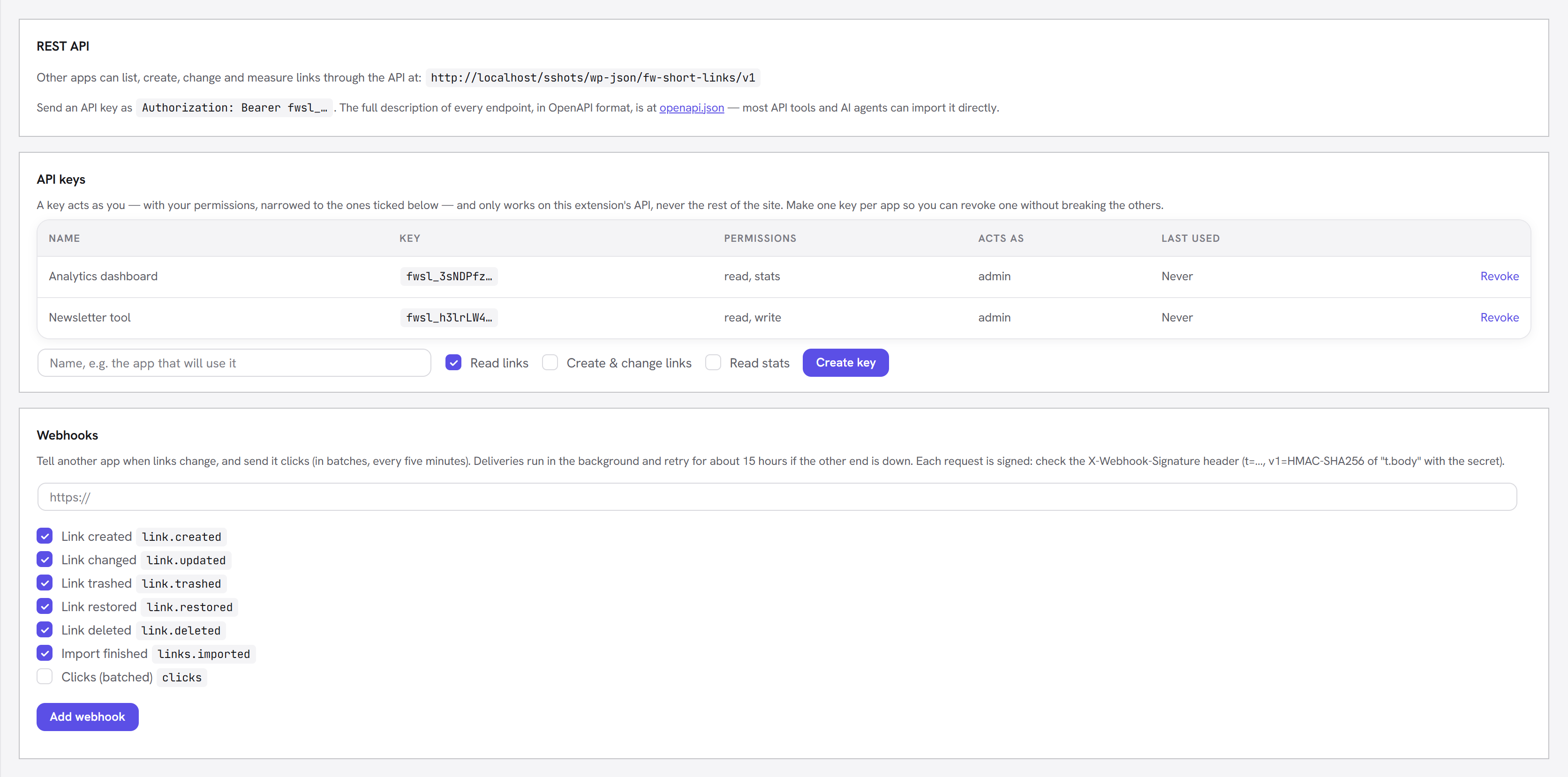
- A key acts as you, narrowed to the permissions you tick: read links, create & change links, read stats. Missing a permission returns 403.
- It works only on the Short Links API — never the rest of your site — so a leaked key cannot touch posts, users or settings. Revoke it in one click.
- Only a fingerprint of the key is stored; the full key is shown once, when you create it.
- Each key may make 120 requests a minute (over that returns 429).
curl -H "Authorization: Bearer fwsl_…" https://yoursite.com/wp-json/fw-short-links/v1/links
curl -H "Authorization: Bearer fwsl_…" -H "Content-Type: application/json" \
     -d '{"target_url":"https://example.com/spring","slug":"spring","categories":["Campaigns"]}' \
     https://yoursite.com/wp-json/fw-short-links/v1/links
Webhooks
Webhooks tell another app the moment something happens: a link is created, changed, trashed,
restored or deleted, an import finishes, or clicks were recorded (sent in batches every five
minutes). Deliveries run in the background and are retried for about 15 hours if the other end is
down; a webhook that keeps failing switches itself off. Send test posts a ping straight away.
Each request is JSON — { "id", "event", "created_at", "site", "data" } — and is signed. To
verify one, take the t and v1 values from the X-Webhook-Signature header and check that
v1 equals HMAC-SHA256 of t + "." + raw body using the webhook's secret (and that t is
recent, to stop replays):
list( $t, $v1 ) = sscanf( $_SERVER['HTTP_X_WEBHOOK_SIGNATURE'], 't=%d,v1=%s' );
$valid = hash_equals( hash_hmac( 'sha256', $t . '.' . file_get_contents( 'php://input' ), $secret ), $v1 )
	&& abs( time() - $t ) < 300;
Hooks:
- Filters:
fw_ext_short_links_prepare,fw_ext_short_links_target_url,fw_ext_short_links_should_track,fw_ext_short_links_reserved_slugs,fw_ext_short_links_bot_regex,fw_ext_short_links_resolve. - Actions:
fw_ext_short_links_saved,fw_ext_short_links_deleted,fw_ext_short_links_restored,fw_ext_short_links_before_redirect,fw_ext_short_links_click.
Privacy requests
Clicks are anonymous unless a logged-in visitor followed a link. Those clicks are included in Tools → Export Personal Data, and Erase Personal Data anonymises them (keeping your totals right). Suggested wording for your privacy policy is added to Settings → Privacy → Policy Guide.
How it stays fast
Redirects are answered before WordPress loads the page. An ordinary page view that is not a short link costs no database query: the extension keeps a compact index of its slugs and checks that first. The click is written after the visitor has already been sent on, so tracking never slows the redirect down.
Good to know
- Short links need pretty permalinks (any structure except "Plain" under Settings → Permalinks). The screen warns you if they are off.
- Redirects are sent with
Cache-Control: no-store, even permanent ones. Browsers then always come back to your site, so an edited destination takes effect immediately and every click is counted. - On a multisite network installed in subdirectories, the main site cannot use a slug that is a
subsite's address (for example
shopwhenyoursite.com/shop/is a site) — WordPress sends that path to the subsite, so the link could never work. - A link in the trash keeps its slug, so nobody can reuse a shared address by accident. Delete it permanently to free the slug.