Import / Export
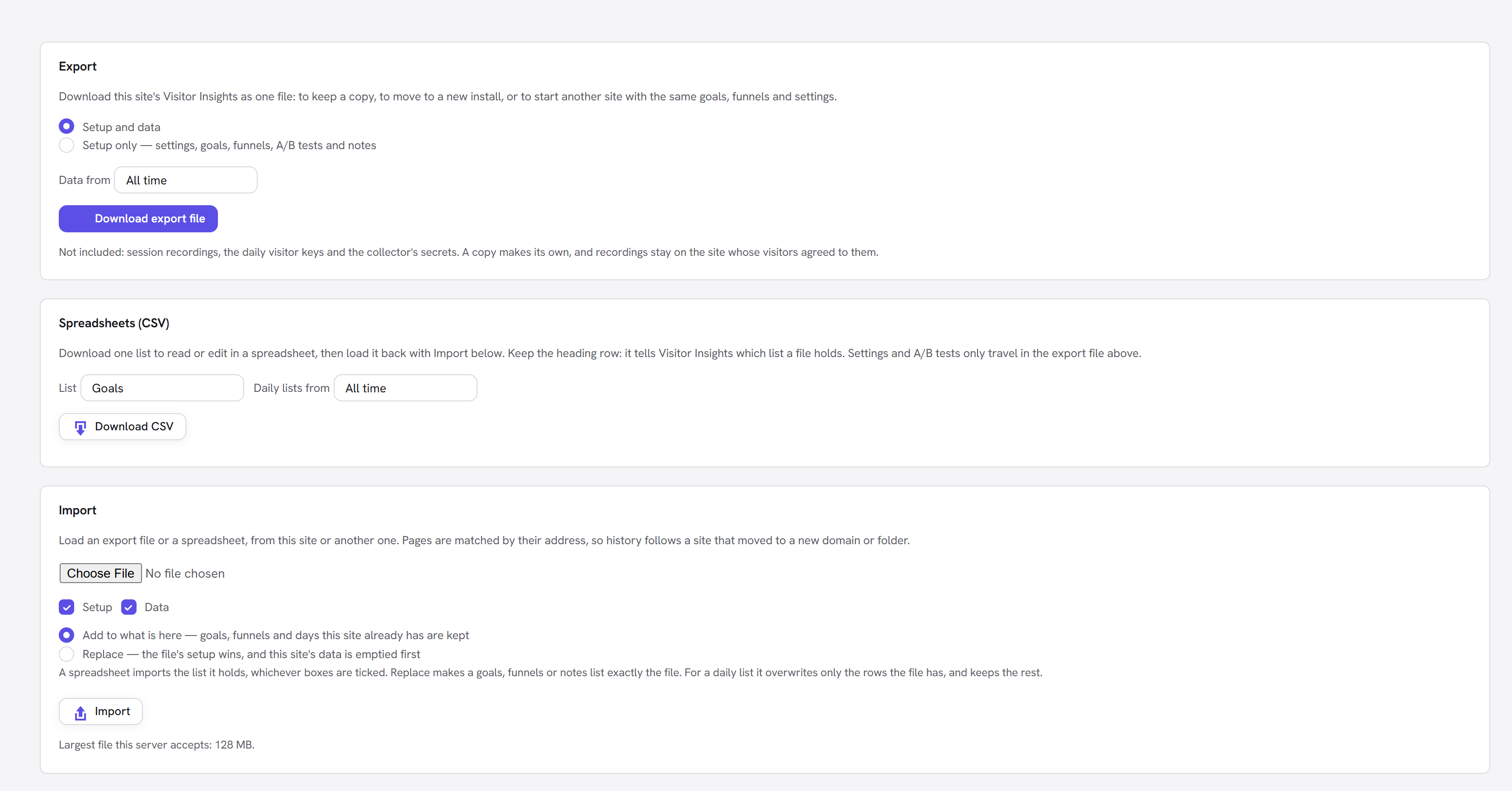
Setup → Import / Export has two ways to move data, and everything you export imports back unchanged.
| Use | When you want to |
|---|---|
| The full file (JSON) | Keep a backup, move to a new install, or start another site with the same setup |
| Spreadsheets (CSV) | Read or edit one list, or bring in history from another tool |
The full file
Choose Setup and data or Setup only, pick how far back the data goes, and Download export file. It is JSON, compressed when your server can.
| Part | Holds |
|---|---|
| Setup | Settings, goals, automatic-goal switches, element goal names, funnels, A/B tests and chart notes |
| Data | The daily summaries: traffic, sources, heatmaps, sections, goals, funnels, frustration, errors, missing pages, performance, forms, site search, A/B results, channels, exit links and bots |
What the export file leaves out
- Session recordings and visit paths: logs of individual visits stay on the site.
- The daily visitor keys: they only mean something on the day they were written.
- The collector's secrets: a copy makes its own.
Pages are matched by their address, relative to the site's home. History follows a site that moved to a new domain or folder.
Spreadsheets (CSV)
Choose a list, choose a period for the daily lists, and Download CSV. It opens in Excel, Numbers or Google Sheets. Edit it, save it as CSV, and load it back with Import.
Keep the heading row. It tells Visitor Insights which list the file holds, so the file name does not matter. Columns may be in any order, and extra columns are ignored.
Settings and A/B tests travel only in the full file.
Goals
Goals you added yourself: page and event goals. Goals from builder elements and automatic goals are not in this list.
| Column | Value |
|---|---|
key | The goal's ID. Leave it empty on a new row and it is made from the name. |
name | The name you see in reports |
type | page or event |
pattern | For a page goal, the address; * is a wildcard. Empty for an event goal. |
key,name,type,pattern
thank-you,Thank-you page,page,/thank-you/*
signup,Newsletter sign-up,event,
Funnels
One row per step. Rows with the same key belong to one funnel.
| Column | Value |
|---|---|
key | The funnel's ID. Keep it so its history stays attached. On a new funnel leave it empty; a row with no key joins the funnel of that name if there is one. |
funnel | The funnel's name |
step | The step's number, which sets the order |
type | page or goal |
value | The page address, or the goal's key |
key,funnel,step,type,value
,Pricing to demo,1,page,/pricing/
,Pricing to demo,2,page,/contact/
,Pricing to demo,3,goal,request-demo
A funnel needs 2 to 6 steps, and a site keeps up to 10 funnels.
Chart notes
| Column | Value |
|---|---|
date | YYYY-MM-DD |
note | Up to 140 characters |
Daily traffic
| Column | Value |
|---|---|
date | YYYY-MM-DD |
page | The address, such as /pricing/, a full address, or (all pages) |
device | desktop, tablet or mobile |
page_views | A whole number |
unique_visitors | A whole number |
engaged_seconds | Total time in view, in seconds |
(all pages) rows are the site totals that Overview reads. They are separate rows because unique
visitors cannot be added up across pages. If your file has no (all pages) rows, the days appear on
each page but not on Overview, and the import warns you.
Daily sources
| Column | Value |
|---|---|
date, page | As above |
dimension | channel, referrer, referring_page, keyword, utm_source, utm_medium, utm_campaign, utm_term, device, browser, os, country, city or map_point |
value | Up to 150 characters |
page_views | A whole number |
Two values have their own shape: keyword is engine-host|search words, and city is
CC|Region|City. Export a file first to see them.
Daily goal completions
| Column | Value |
|---|---|
date, page, device | As above |
goal | The goal's key |
completions | A whole number |
value | The total value, such as 19.99, or 0 |
Import
Choose the file, then choose how it should land:
| Add to what is here | Replace | |
|---|---|---|
| Full file | Goals, funnels and days this site already has are kept | The file's setup wins, and this site's data is emptied first |
| Goals, funnels, notes (CSV) | New entries are added; existing ones are kept | The list becomes exactly the file, so a row you deleted is removed |
| Daily lists (CSV) | New rows are added; rows already here are kept | Rows in the file overwrite the same rows here; everything else stays |
With the full file, Setup and Data choose which part to load. A spreadsheet imports the list it holds, whichever boxes are ticked.
When it finishes, a message says how many rows were imported, how many were already there and how many were skipped.
Example: bring in history from another tool
- Download Daily traffic to see the format.
- Make a sheet with the same headings, using your other tool's daily numbers.
- Add one
(all pages)row per day and device for the site totals. - Check Settings → Keep reports for covers those dates, then import with Add to what is here.
date,page,device,page_views,unique_visitors,engaged_seconds
2026-03-01,(all pages),desktop,812,540,41200
2026-03-01,/pricing/,desktop,190,160,9800
When a row is skipped
Bad rows are skipped, the good ones are imported, and the message names the first problem and its line. If no row is usable, nothing changes.
| Message | What to do |
|---|---|
| the date must be written YYYY-MM-DD | Spreadsheets often rewrite dates when saving. Format the column as text, or as yyyy-mm-dd. |
| must be a whole number | Remove thousands separators and decimals. |
| the device must be desktop, tablet or mobile | Fix the value. |
| the type must be page or event | Fix the value. |
| a funnel needs at least two steps | Add steps, or check that its rows share one key. |
Things to watch
- Older than your retention setting. The nightly clean-up deletes days past Keep reports for. The import warns you; raise the setting first to keep them.
- Report downloads cannot be imported. The CSVs on the Overview and Pages views and the visit log are totals or logs for reading. Import refuses them and says why.
- Formulas. A cell that could run as a formula, such as
=SUM(1), is saved with a leading apostrophe, which the import takes off again. - File formats. Import reads comma, semicolon and tab files, and files saved in the Windows encoding.
- File size. The screen shows the largest upload your server accepts.
- Who can use it. Administrators only.