How to convert your Framer site to WordPress
Framer builds slick, animated sites from a design canvas — but the result is a hosted site on Framer's platform, with its own plans and no WordPress CMS behind it. Moving to WordPress gives you a self-hosted site you own outright: a real CMS, thousands of plugins, your own SEO and forms, and hosting you choose.
The free Site Converter rebuilds your Framer design into a native, fully editable WordPress site — real page-builder pages, a matching theme, menus and Media Library. Because Framer renders in the browser, the reliable path is to convert from its published URL: the converter opens the live page in real Chrome and reads the computed styles, so it reproduces the real design rather than guessing at it.
Step 1 — Publish your Framer site (get a URL)
In Framer, Publish your project so it's live on your *.framer.website / *.framer.app address
or your custom domain. Make sure the page you want is publicly reachable.
Step 2 — Install Unyson+ and Site Converter
- Install and activate Unyson+ (free).
- Unyson+ → Extensions → activate Site Converter.
- Start the capture service — for a URL conversion this is what renders the page in Chrome and captures the real colors, fonts and layout. (One-time local setup.)
Step 3 — Convert from the URL
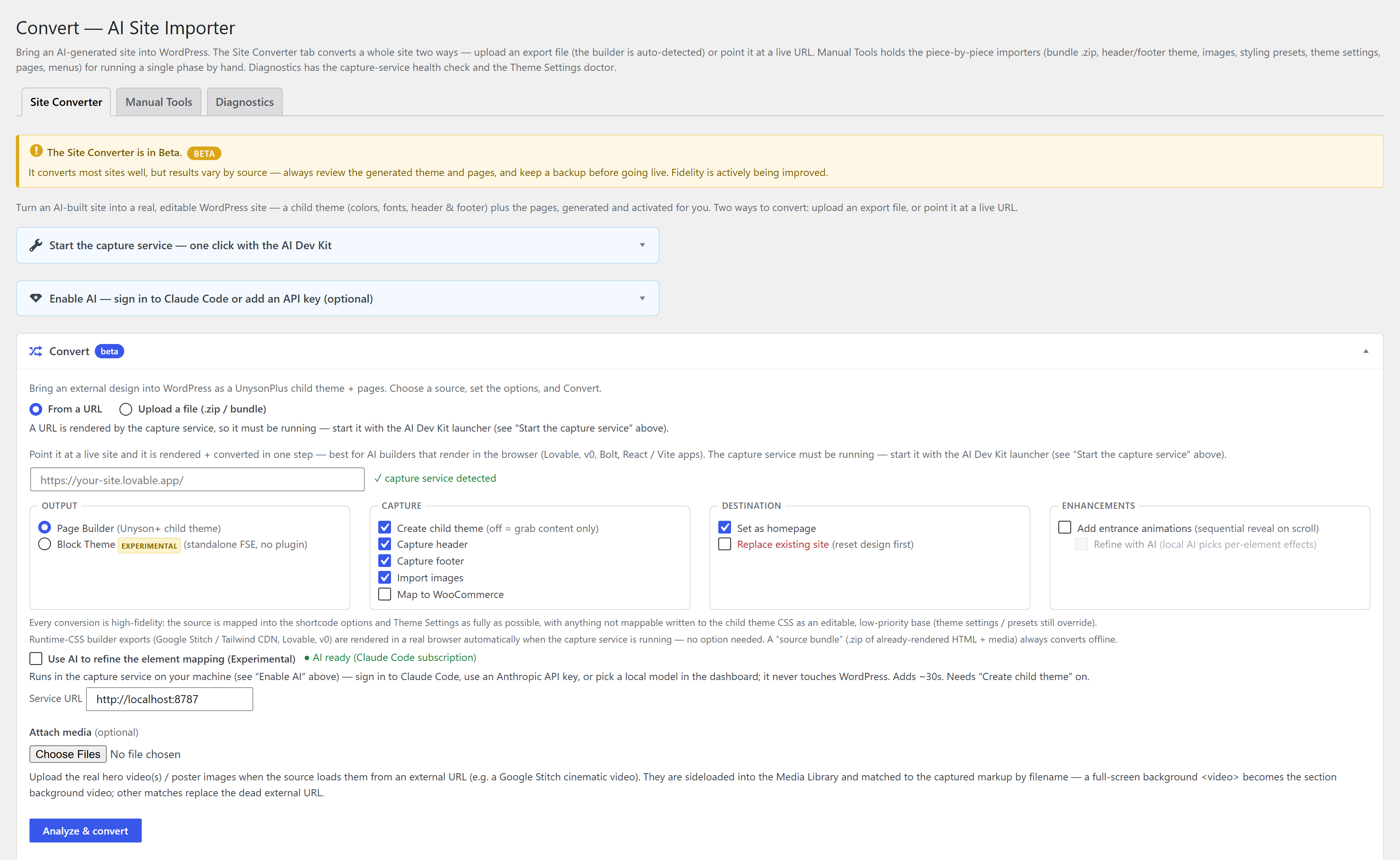
- Unyson+ → Convert → Convert tab → From a URL.
- Paste your published Framer URL.
- Set options — Create child theme, Capture header/footer, Import images, optional AI assist (an optional Claude pass that only refines the section mapping; the design is always reproduced deterministically).
- Click Convert to WordPress, or Review mapping first, then Build the site.
Full walkthrough: Convert from a URL.
Step 4 — Edit in the builder
Every page comes across fully editable in the page builder — tweak sections, swap content, then add the things a hosted Framer site can't give you: posts, forms, WooCommerce, SEO plugins. It's a normal WordPress site now.
Convert each page from its own published URL. Menus and the footer are rebuilt as real WordPress menus and widget areas.
An automatic conversion is a close, editable starting point — not always pixel-perfect. To get it the rest of the way, hand it to an AI agent like Claude: it runs the conversion, compares the result to your original section by section, and refines it until it matches. See Convert a site to WordPress with an AI agent.
FAQ
Does Framer export to WordPress? Not natively — a Framer site stays on Framer's platform. Converting from the published URL rebuilds the design as native, editable WordPress pages instead.
Is it free? Yes — Unyson+ and the Site Converter are free, with no pro tier.
What about my animations? The layout, styling and content are rebuilt as editable pages; re-add motion with the free Animation Engine, which does scroll, parallax and text effects natively in WordPress.
Is it a static copy? No — it rebuilds the design as editable Unyson+ pages, not an iframe or a screenshot.