Presets
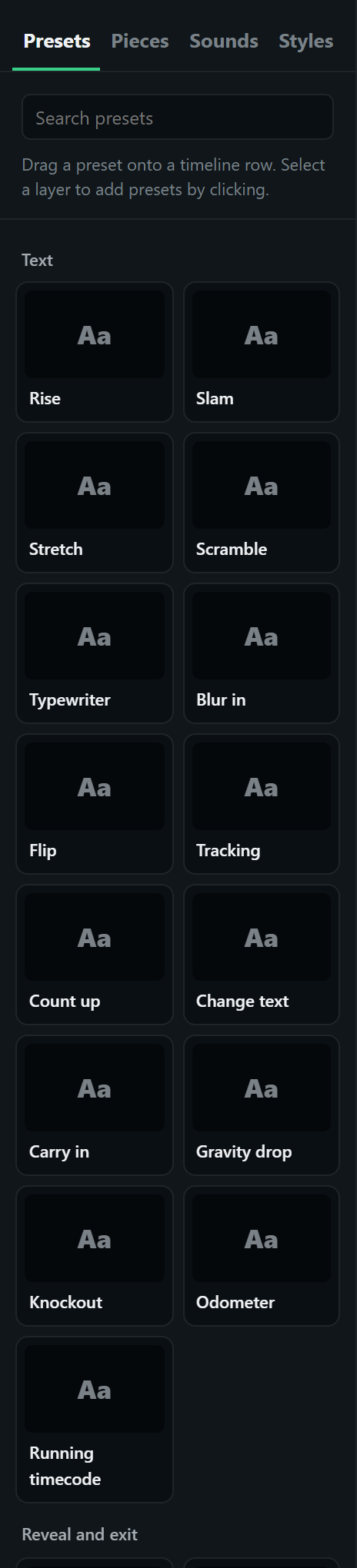
A preset is one animation placed on a layer as a clip: it starts at a moment, lasts a length, has an easing and its own settings. Drag one from the library onto a timeline row, or select a layer and click it to add it at the playhead. Hover a preset in the library to see it play.
Direction. Presets that bring something in can also take it out: set Direction to Out. An exit is not the entrance played backwards: exits default to the Leave ease, which speeds up out of frame.
Easing. Each preset has a default ease measured from professional motion design; the Easing menu lists twelve measured eases first, with what each is for (see Timeline and animation).
Sound. Any clip can carry a sound that moves with it (see Sound).
Staggered text presets (Rise, Stretch, Blur in, Flip…) animate letter by letter or word by word, with a Stagger and a Rhythm: natural (uneven, but the same on every play) or even.
This page is generated from the Studio's own preset catalogue, so it lists every preset with its exact settings.
Text
| Preset | What it does | Works on | Settings |
|---|---|---|---|
| Rise | Letters or words rise into place one after another, from behind an invisible mask. | text | Direction, Animate by, Stagger, Rhythm, Distance, Mask |
| Slam | Lands from a large, blurred scale, as if thrown at the screen. | any layer | Direction, Start scale, Blur |
| Stretch | Letters grow out of a line, squashed, then spring to full size. | text | Direction, Axis, Stagger, Rhythm, Squash |
| Scramble | Letters flicker through random characters and settle on the real text, left to right. | text | Characters, Flicker rate |
| Typewriter | Letters appear one at a time, as if being typed. Caret adds a typing cursor that blinks once the line is done (a prompt box, a search field). | text | Direction, Caret |
| Blur in | Letters or words sharpen out of a soft blur, one after another. | text | Direction, Animate by, Stagger, Rhythm, Blur |
| Flip | Letters or words flip up into place in 3D, like a departure board. | text | Direction, Animate by, Stagger, Rhythm |
| Tracking | Letter spacing opens out (or closes in) as the text fades in. | text | Direction, Start spacing |
| Count up | The number in the text counts up to its value, keeping any prefix, separators and suffix ("$12,500+"). A clock ("0:45") counts in minutes and seconds. | text | Count from |
| Change text | Swaps the words for new ones on cue ("booting" to "ready in 45 s", "1 / 10" to "2 / 10"): the old text leaves as the new one arrives. Chain several on one layer to step through a sequence; each starts from the text the one before it left. | text | New text, Style |
| Carry in | The first word slides in big and fast and each following word travels less, so the line arrives with momentum instead of an even stagger. | text | From, First word travels, Each next word, Stagger |
| Gravity drop | Letters (or words) fall from above one after another, bounce and settle, each with a little tilt that straightens as it lands. Out, they drop away under gravity. Big, bold words suit it: a hook, the name of a thing. | text | Direction, Animate by, Drop from, Bounce, Stagger |
| Knockout | The words are cut out of a solid block that wipes on, so the footage (or whatever is behind) shows through the letters. Knockout captions: big, heavy words over a talking head. | text | Direction, Block colour (light), Padding |
| Odometer | The number in the text rolls into place like a car's odometer: every digit turns, and each only moves on when the one to its right passes 9. Write the final number in the text. | text | Roll from |
| Running timecode | A timecode in the text (00:00:00:00, hours to frames) runs while the clip plays, like a camera or an editor. Write a timecode in the text; the clip sets how long it runs. | text | Start at, Frames a second |
Reveal and exit
| Preset | What it does | Works on | Settings |
|---|---|---|---|
| Fade | Fades in or out with a small drift, optionally scaling or blurring as it goes. | any layer | Direction, Drift X, Drift Y, Scale, Blur |
| Wipe | Reveals or hides behind a straight edge sweeping across. | any layer | Direction, From |
| Iris | Opens (or closes) through a growing circle. | any layer | Direction, Centre X, Centre Y |
| Slide | Slides in from a side (or out to one) while fading. Motion blur smears it along the move while it is fast, so a quick move reads as speed. | any layer | Direction, From, Distance, Motion blur |
| Grow | Draws out from one edge or the centre. Made for lines and bars. | any layer | Direction, Axis, From |
| Stack | Drops in from just above and settles, like a card landing on a pile. Stagger several to build a stacking list. | any layer | Direction, Drop from |
| Draw | A line (or flow lines) draws itself from its start to its end; out erases it. Arrowheads ride the tip. | line, flow lines | Direction |
| Fly-in strip | Flies in from a side and lands at a slant with a little overshoot, like a headline strip slapped on the screen. Give several tilted headline pills this, a moment apart and from alternating sides, for a headline storm. | any layer | Direction, From, Slant |
| Receipt printer | Prints out of a slot at the top of its box in short jerky feeds, like a receipt or a ticket: good for a slip, a card or a list arriving. | any layer | Direction, Feeds |
| Soft wipe | A wipe with a feathered edge: the layer fades in (or out) along a moving soft line. | any layer | Direction, From, Feather |
| Blinds | Revealed (or hidden) in strips, one after another, like a stair wipe. | any layer | Direction, From, Strips, Stagger |
Move and scale
| Preset | What it does | Works on | Settings |
|---|---|---|---|
| Pop | Scales up into place with a little overshoot (or down and away). | any layer | Direction, Start scale |
| Zoom | Eases in from smaller (or larger) with a fade, no overshoot. A start scale above 1 lands it from close up. | any layer | Direction, Start scale |
| Spin | Turns into place while scaling up. | any layer | Direction, Turns |
| Keyframes | Hand-set values at moments within the clip: position, scale, rotation, opacity and blur. | any layer | – |
| Progress bar | A bar fills the shape from one value to another over the clip: the shape is the track. Use the None ease for a steady load. | shape | From, To, Bar colour, Fills |
| Morph into | Glides into another layer: to its place and size (and, between two shapes, its colour and corners), then hands over to it in a short crossfade, so the same word, card or screenshot carries on into the next act instead of fading out and in again. The other layer stays hidden until the handover. | text, shape, image, footage, 3D, group, diagram, code | Into layer, Handover |
| Follow path | Travels along a line layer (or one of the lines of a flow layer), from one point of it to another. Turn to follow makes it face along the line; Trail leaves a fading streak behind it (a comet). | text, shape, image, footage, 3D, group, diagram, code, list | Line or flow layer, Which flow line, From, To, Turn to follow, Trail length, Trail colour, Trail width |
| Orbit around | Circles round its own place on a tilted ring, smaller and dimmer on the far side: icons orbiting a head, logos round a product. Place it where the centre of the orbit should be. | any layer | Radius, Flatness, Turns, Start angle |
| Snap zoom | A sharp punch-in on a point of the picture (the face, a detail), then held; out, it snaps back. On a talking head, on the punchline. | footage, image, shape, group | Direction, Zoom, Towards (across), Towards (down) |
| Digital zoom | A camera's digital zoom: the picture steps in with a blur as the focus hunts, inside a recording frame (corners, REC, the zoom readout). | footage, image | Direction, Zoom, Towards (across), Towards (down) |
| Portal | The picture shrinks into a ringed circle in a corner, picture in picture (out), or grows back out of one to fill the frame (in): make room for a demo, then come back. | footage, image | Direction, Corner, Circle size, Ring colour |
| Follow the face | Keeps the layer on the face in a piece of footage while the clip runs: a circle drawn round it (live markup), a label above the head, captions below it, icons orbiting it. The footage needs its face found first (Footage, Follow the face, in the AI Dev Kit). | text, shape, image, 3D, group, line, cursor, captions | Footage, Where, Gap, Grow and shrink with the face |
| Turn | Turns into place in 3D, around the vertical or horizontal axis, as if on a hinge through its middle. | any layer | Direction, Axis, Angle, Depth |
| Scroll | Scrolls a tall screenshot inside its frame (or pans a wide one across), from one point to another. Make the frame shorter than the picture. Repeat makes it endless: the picture follows on from itself, and 0 to 100 is one full pass, so a looping ending joins up seamlessly (use the None ease for a steady speed). | image | From, To, Direction, Repeat (endless) |
| Custom code | Your own GSAP code, for an effect no preset covers. It only runs where the page allows custom code (the Studio, downloaded pages and embeds; in WordPress, pages by authors trusted with unfiltered HTML). | any layer | Code |
Emphasis
| Preset | What it does | Works on | Settings |
|---|---|---|---|
| Wave | A ripple runs through the letters: each one hops and settles. | text | Height, Stagger, Rhythm |
| Pulse | Swells and settles, a set number of times. | any layer | Scale, Times |
| Shake | A quick, jittery side-to-side shake that dies away. | any layer | Strength |
| Float | Drifts gently up and down, like it is floating. | any layer | Height, Cycles |
| Recolour | Changes the text colour, or a shape’s solid fill, to a new colour. | text, shape | Colour |
| Glow | A neon glow lights up around the letters (or the outline) and stays on. Flicker makes it catch like a neon tube. | any layer | Direction, Colour, Size, Strength, Flicker |
| Burst | A one-off burst of sparks, shards, dots or rings from the layer on a hit. Land it with a sound and the word it punctuates. | any layer | Kind, How many, Reach, Colour, From X, From Y |
| Make solid | A dashed outline closes up into a solid one, for something becoming ready. | shape | Direction |
| Strike | A line is drawn through it, then it falls away, crossed out ("not this one"): an app icon struck off, a wrong answer, an old way of doing things. | any layer | Direction, Colour, Thickness, Angle, Then it falls away |
| Jiggle | The phone home-screen wobble: quick, slight back-and-forth tilting, as before a delete or to say "you can change this". | any layer | Tilt, Wobbles a second |
| Tick | A tick drawn in a circle beside it: a checklist item done. Give each item of a list this in turn for a checklist that ticks off. | any layer | Direction, Side, Colour |
| Colour grade | A colour grade fades in on the picture (not on words over it): black and white, noir, warm, cool, film, vivid, faded, teal and orange. | footage, image, shape, group | Direction, Look |
| Grade wipe | A colour grade sweeps across behind a line with a handle, before on one side, after on the other: a grade slider (across), a mood curtain (down). It stays graded when the line has passed. | footage, image, shape, group | Direction, Look, Sweep, Before and after labels |
| Liquid glass | A lens of liquid glass glides across the picture, blurring, brightening and saturating what is under it, with a bright rim and a slight wobble. | footage, image, shape, group | Size, From (across), From (down), To (across), To (down) |
| Sticker outline | A white outline grows round the shape with a soft shadow and a slight pop, like a cut-out sticker: a person cut out of footage on a coloured backdrop (paper cut-out), a logo, an icon. | footage, image, shape, text, 3D, group | Direction, Outline, Colour |
| Sheen | A band of light sweeps across once. Best after the layer has settled. | shape, image, footage | Angle, Width, Strength, Colour |
| Select box | Draws a coloured box with square corner handles around one word (or a few) of the text, like a selected object in a design tool, and tints the word to match. The key word of a headline. | text | Direction, Word, How many words, Colour, Tint the words, Corner handles, Padding, Line width |
Cursor and tours
| Preset | What it does | Works on | Settings |
|---|---|---|---|
| Move to | The cursor travels to a layer (a point on it, in % of the layer: 50 / 50 is its centre) along a gentle curve with a pointer's easing, or to a point on the stage when no layer is given (beyond the edges to leave). Over a link or a button it turns into a pointing hand as it arrives. | cursor | To layer, Point across it, Point down it, Or stage X, Or stage Y, Curve, Pointing hand |
| Click | The cursor presses: it dips, a ring ripples out from the tip and the layer under it dips too, all on the same frame. Give it a click sound, and start what the click causes on its last frame. | cursor | The layer under it dips |
| Before and after | A second picture of the same screen takes over (the menu opened, the setting saved): cut on the frame a click lands, or a quick fade or wipe. Several on one picture step through screens. | image | Picture after (address or data URL), Change |
| Spotlight | Everything but this layer dims, with a rounded window around it, and stays that way until an Out clip. Follows the layer through camera moves. | any layer | Direction, Room around it, Corners, Shade |
| Callout | A labelled pill beside this layer, joined to it by a short line, saying what it is ("Save your changes here"). Stays until an Out clip. | any layer | Direction, Label, Side, Distance, Colour, Text size |
Scene transitions
| Preset | What it does | Works on | Settings |
|---|---|---|---|
| Shatter | The picture cracks from a point and breaks into shards that fly apart and fall (out), or fly together into place (in). With the person cut out above it, the background breaks while they stay: a frame break. | footage, image | Direction, Impact (across), Impact (down) |
| Slash | A glowing diagonal line sweeps across the stage; the scene appears (or disappears) behind it. | any layer | Direction, Slant, Line colour, Glowing line |
| Flash | A burst of light: the scene cuts at its brightest moment. | any layer | Direction, Colour, Strength |
| Dip to colour | The screen fills with a colour, holds a beat, and opens on the next scene. | any layer | Direction, Colour |
| Whip pan | One fast camera swing: the scene speeds away with a blur along the move and the next arrives from the same side at the same speed, settling into place. Light streak flares across the screen on the cut to hide the join. | any layer | Direction, From, Distance, Blur, Light streak, Streak colour |
| Zoom through | The scene rushes past the camera, or approaches from the distance. | any layer | Direction, Zoom, Blur |
| Light streak | A horizontal flare of light races across the screen and the scenes swap at its brightest. | any layer | Direction, Colour, Sweeps from |
| Glitch | Slices jump and colours split for a few frames, then the cut, like a broken signal. | any layer | Direction, Intensity |
Ambient and backgrounds
| Preset | What it does | Works on | Settings |
|---|---|---|---|
| React to music | Breathes with the music: its loudness or its bass gently drives a glow, a slight scale or brightness. Find the music’s beats first (in the music clip’s settings). Use it on one or two things, never as equaliser bars. | any layer | Follows, Drives, Amount, Glow colour |
| Marching outline | The dashes of a dashed outline travel round it while something is working. Give the shape an outline and a dash length. | shape | Speed |
| Projected film | Old projected film for as long as the clip lasts: grain, flicker, a vignette and the sprocket holes of the film strip running past (turn them off for a plain film look). | footage, image, shape, group | Sprocket holes, Grain, Flicker |
| Copies | The picture in copies, all playing: a grid, a contact sheet filling up frame by frame, a picture dive (the frame inside the frame inside the frame, the camera diving in) or a feed of cards scrolling past. | footage, image | Kind, Columns, Rows, Gap, Background, Stay after the clip, Feed: cards scrolled |
| Drift | A slow, steady move and scale creep that keeps a held frame alive. | any layer | Move X, Move Y, Scale to, Rotate |
| Gradient flow | A shape’s gradient fill flows across it and back. Give the shape a gradient fill. | shape | Direction, Cycles |
| Particles | A field of small dots rising, falling or drifting inside the shape. Clear the shape’s fill to show the particles on their own. | shape | Count, Size, Speed, Direction, Colour, Twinkle |
Code
| Preset | What it does | Works on | Settings |
|---|---|---|---|
| Type code | Types lines of the code in, character by character with a caret, in a natural rhythm: quick within a word, a beat at punctuation and new lines, indentation arriving with the line. The lines are hidden until typed. Several clips can type a file part by part, in step with a voice-over. Suggest shows an autocomplete popup while longer words are typed. | code | From line, To line (0 = the end), Autocomplete popup |
| Change code | Turns the code into a new version the way a person would edit it: each changed part is selected and deleted, then the new text is typed in its place, and lines slide to make room or close up. Give the whole new version; only what differs is touched. | code | New version, Autocomplete popup |
| Highlight code | Marks lines with a coloured band, or one word on a line with a box (give the word in Word). Stays until an Out clip for the same line. | code | Direction, Line, To line, Word, Which one on the line, Colour |
| Run code | Presses the Run button and shows the output in a panel under the code, one line at a time over the clip. | code | Output, Panel height (lines, 0 = fit) |
| Code note | A pill beside a line of the code, joined to it by a short dashed connector, explaining it ("sc.nextLine() reads the text into name"). Stays until an Out clip for the same line. | code | Direction, Line, Note, Side, Colour |
3D
| Preset | What it does | Works on | Settings |
|---|---|---|---|
| Spin 3D | The object turns around one of its axes, a set number of times. | 3D | Axis, Turns |
| Tumble in | The object tumbles into its pose from a turned, smaller start (or tumbles away). | 3D | Direction, Turn, Tilt, Start scale |
| Orbit | The camera circles the object, rising or dipping as it goes. | 3D | Around, Rise |
| Camera push | The camera moves in from further away (or pulls back out). | 3D | Direction, Start distance |
Custom code
Custom code runs your own GSAP code for an effect no preset covers, with the layer (el), the scene timeline (tl),
gsap, and the clip's start (at) and duration. Because it is real JavaScript it runs only where the page allows it:
the Studio, your own downloads and embed codes (which add data-upw-allow-code, and the Export window says so), and
WordPress pages whose author may publish unfiltered HTML. Elsewhere the player skips it and plays the rest; a clip that
throws is logged and skipped. AI assist never writes one.