Checks and clean-up for videos
These tools come with the AI Dev Kit and run on your computer. Your AI agent uses them while it makes a
video in a project; you can run them yourself from the kit's tools/design-capture folder with
node studio-cli.mjs …. Nothing is uploaded.
| Tool | What it answers | Command | Agent tool |
|---|---|---|---|
| Project notes | What was planned, decided and left to do? | notes "<project>" | project_notes |
| Timeline at a glance | Do the words, the cuts and the subtitles line up? | timeline <scene.json> | scene_timeline |
| Video check | Is the finished video right: every line heard, no black, loud enough, no clipping? | cut-check <video> (runs after every render) | video_check |
| Voice check and best take | Does this voice line say the script, without odd pauses? Which take is best? | voice-check, best-take | voice_best_take |
| Clean up recorded speech | Can the false starts, ums and long pauses go? | cleanup <clip> | footage_cleanup |
| Connect your agents | Can my agent use all of this? | connect | — |
Project notes
Every project keeps a notes.md beside its scene: Plan, Decided and Still to do. Videos are often made over
several sessions (yours and your agent's, sometimes more than one agent), and the notes are how they agree: which hook was
approved, which take was chosen and why, which music, what was rendered.
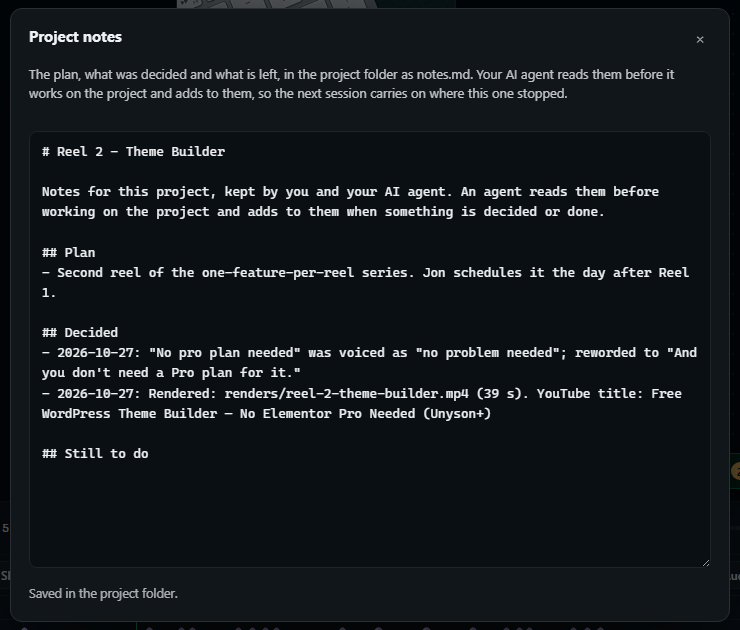
- In the Studio: File › Project notes… (with a project open). It saves as you type. What your agent adds appears while the notes are open.
- For agents: read the notes before working on a project, and add a dated line when something is decided or done:
notes "Reel 1 - Live Editor" --add "Hook approved: take 3" --section Decided. Agents are told to write only facts, never that something was published unless you said so.
A timeline at a glance
One picture of a stretch of the video: a strip of frames, the sound wave (voice in blue, music in grey), every spoken word at its time, and every text layer on screen as a bar. Pauses inside a phrase are marked in red.
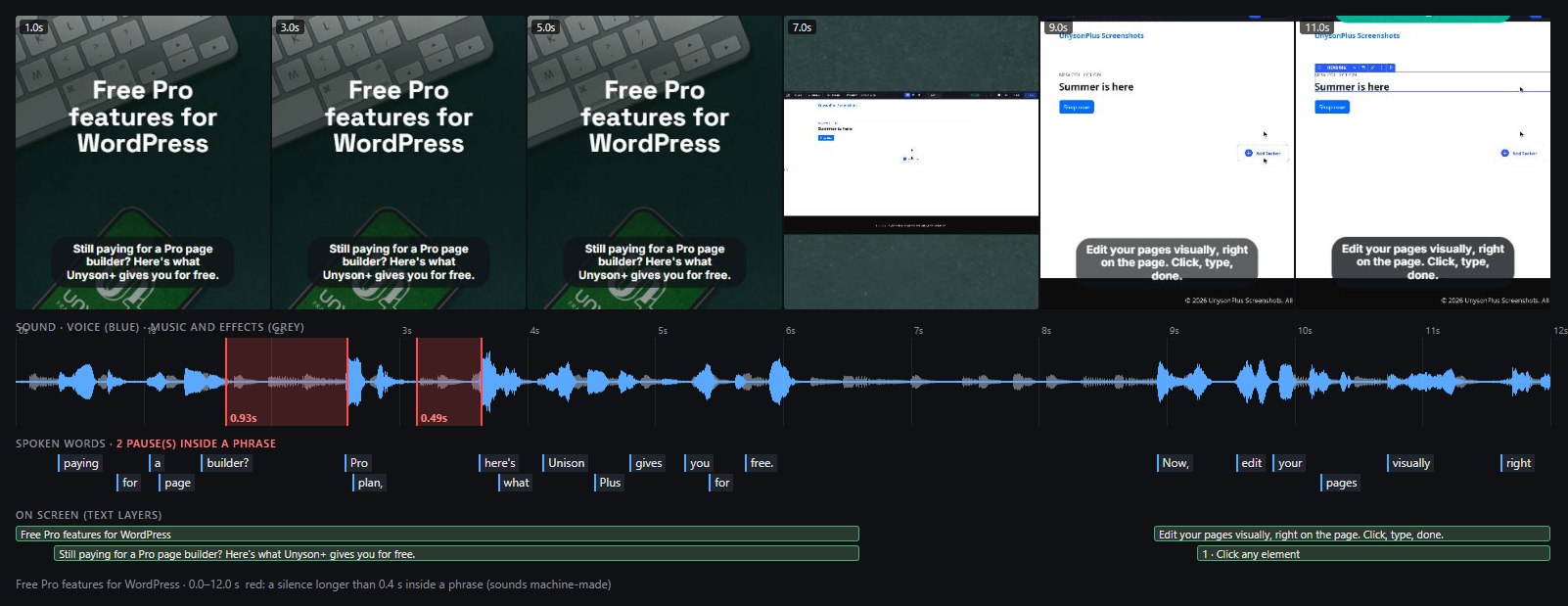
The example above is a first take of a hook: the voice stops for 0.93 s between "builder" and "Pro", which sounds machine-made. The words all matched the script, so only the timing shows it.
node studio-cli.mjs timeline "E:/Documents/Kinetic Scenes/Reel 1/scene.json" --from 0 --to 12
--from,--to: the stretch, in seconds (default: the whole scene).--frames: how many frames in the strip (3–16).--out: where to save the PNG.- Pauses are measured in the sound itself (the speech recogniser stretches a word over the silence after it, so word times hide pauses), and judged against the subtitle on screen: a pause after a comma or full stop in the subtitle is natural; one in the middle of a phrase is marked.
- Use it wherever there is a voice-over: to see a subtitle that leaves before its words are said, a line that starts on the cut, or a long stretch with no narration.
The video check after a render
When a video is rendered through the kit (the agent's scene_render, or render on the command line), the finished
file is checked before it is handed over, and problems come back to fix:
- Every voice line is heard, at about its time. A wrong file path once dropped every line of an explainer silently; the check reports it as "0 of 11 voice lines heard" and names each one.
- No unintended black: a stretch of black picture after the start usually means a layer failed to load.
- Loudness about -14 LUFS, the level for social video (outside -20 to -10 is reported).
- No clipping: a true peak above -1 dBTP may distort on phones.
node studio-cli.mjs cut-check renders/reel-2.mp4 --scene scene.json
Cut check: PROBLEMS (1 cut(s), -16.0 LUFS, 5/5 voice lines heard)
  - The sound peaks at -0.9 dBTP and may distort on phones: keep it under -1 (lower the loudest clip).
Clicks at cuts are prevented rather than measured. The renderer fades every sound clip in and out by at least 12 ms, so a clip cut mid-sound cannot click. (Measuring clicks in the finished sound mistook drum hits and "s" sounds for clicks.)
The voice check and the best take
voice-check compares a voice line with its script: words that came out differently, and pauses inside a phrase
(longer than 0.4 s where the script has no punctuation). best-take ranks several takes of the same line by it, so you
keep the first that passes.
node studio-cli.mjs best-take --text "And you don't need a pro plan for it." take1.wav take2.wav take3.wav
1. PASS  take2.wav
2. 3 problem(s)  take1.wav
     - heard "problem" where the script has "pro" …
Lessons that came from these checks, now part of how agents write narration:
- A question needs a word that announces it ("Still paying for…?", not "Paying for…?"), or the voice reads it as a statement.
- Long chains of nouns ("a Pro page builder plan") make the voice break before the last one: shorten them.
- Write the spoken text in lower case ("pro", not "Pro"); the subtitle keeps the capitals.
- When the same break comes back take after take, reword the line rather than retrying.
Clean up recorded speech
For a talking head or a recorded voice-over: cleanup finds, from the words and their times,
- false starts, a phrase broken off and said again ("build your own… build your own header"): the last one stays;
- fillers (um, uh, er, hmm) when the recogniser writes them;
- long pauses, over 0.6 s, shortened to 0.25 s,
and renders the clip with those parts cut out, each cut faded so it cannot click. An edit list (.edl.json) beside the
result shows every cut.
node studio-cli.mjs cleanup talk.mp4
talk-clean.mp4: 9.88 s → 6.88 s (3.00 s cut, 2 cut(s))
  - 0.03-1.52 s: false start: "Build your own header,"
  - 4.80-6.31 s: pause of 1.76 s shortened to 0.25 s
Options: --max-pause (default 0.6 s), --keep-pause (0.25 s), --no-fillers, --out. Look at the result before
using it: a repeated phrase that was meant ("very, very good") is kept for common words, but not for every case.
Connect your agents
The first time the AI Dev Kit starts, it asks whether to connect the AI agents it finds on your computer (Claude Code, Cursor, Codex). Yes registers all of these tools with each, and adds the Kinetic Scenes skill to Claude Code; the answer is remembered. To see what it would change, or to do it later:
node studio-cli.mjs connect          # shows the plan
node studio-cli.mjs connect --yes    # applies it (running it again changes nothing)
It adds kinetic-scenes to Claude Code (claude mcp add --scope user), to Cursor (~/.cursor/mcp.json, keeping what is
there) and to Codex (~/.codex/config.toml). See AI agents and projects for working with an agent.