Plans
A plan is what someone gets when they join your site: "Free", "Member", "Pro". It has a name, optional prices, a length, and a few options. On its own a plan does not open anything; access rules say which content each plan may see. When a person holds a plan, that is a membership.
Plans live under Unyson+ → Membership → Plans.
Free plans and paid plans
- A free plan has no prices. People get it from a sign-up form, from the checkout (with the Payments module), or because you add them by hand. Typical use: a registration wall ("create a free account to read this"), a newsletter tier, or a waiting list.
- A paid plan has one or more prices. Prices only take money once the Payments module is on (see Payments). Until then you can still give the plan to people by hand, for example after a bank transfer.
You can mix both: the Larkspur Garden Club has Free (no price), Member (GBP 8.00 a month or GBP 80.00 a year) and Pro (includes Member, plus more).
The plans list
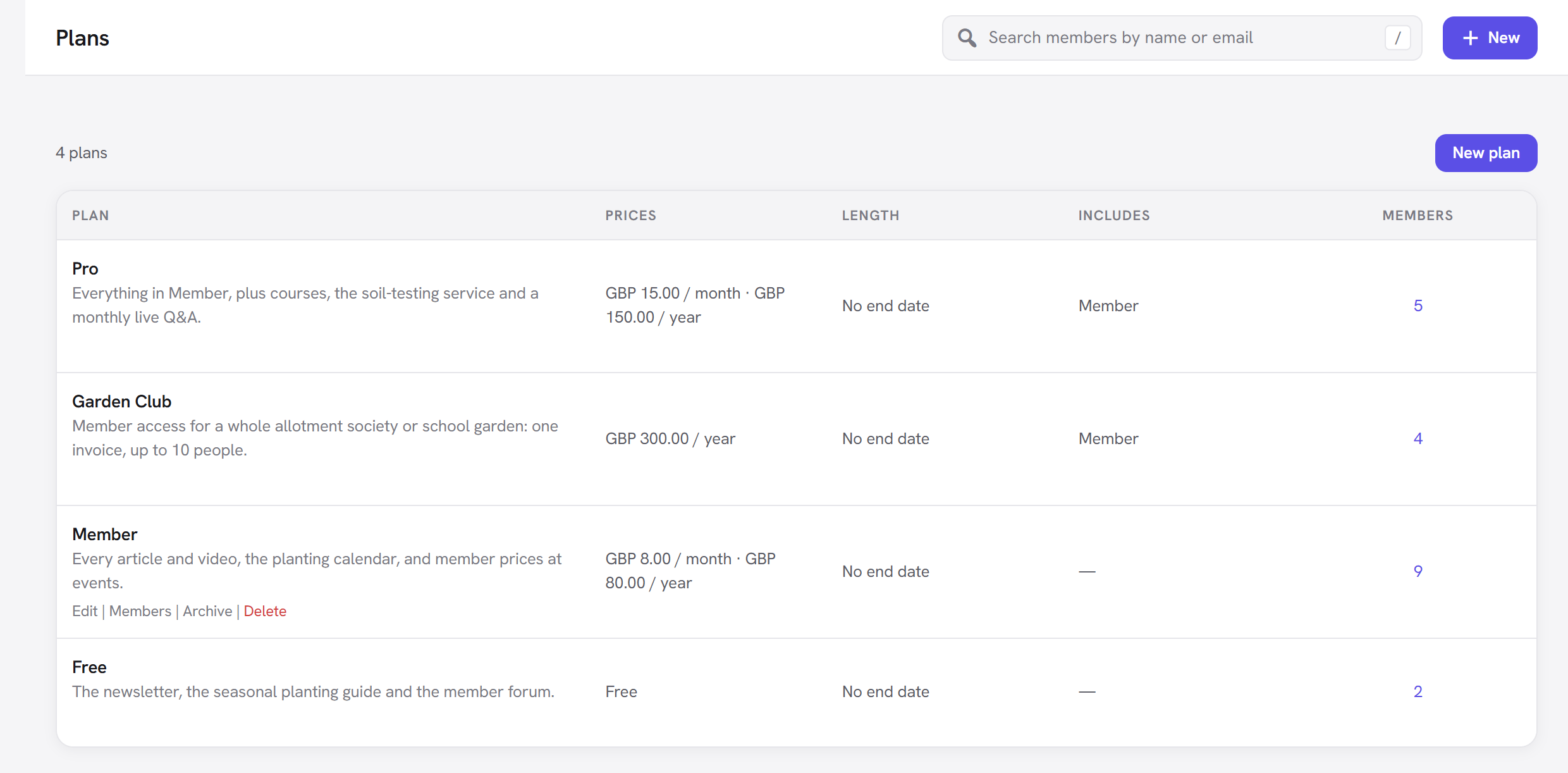
The list shows every plan with:
| Column | Shows |
|---|---|
| Plan | The name, a short description, and badges: Archived for a plan closed to new members, Page sold on its own or Download sold on its own for the hidden plans the Payments module makes when you sell a single item. |
| Prices | Every active price, such as "GBP 8.00 / month · GBP 80.00 / year", or Free. |
| Length | No end date, "Lasts 1 year", or "Until" a date. |
| Includes | The plan this one also includes, or a dash. |
| Members | How many memberships with access the plan has. Click the number to see them. |
Hover a plan for its actions: Edit, Members, Archive (or Restore) and Delete.
How to create a plan
- Open Plans and click New plan (or New → Plan in the top bar).
- Fill in the Name, and optionally a Description.
- Under Prices, click Add a price for each way to pay (leave it empty for a free plan).
- Under How long it lasts, choose until cancelled, a set time, or a date.
- Set any Options you need (the defaults are fine for a first plan).
- Click Create plan. You land back on the plan, now saved; the button reads Save plan from then on.
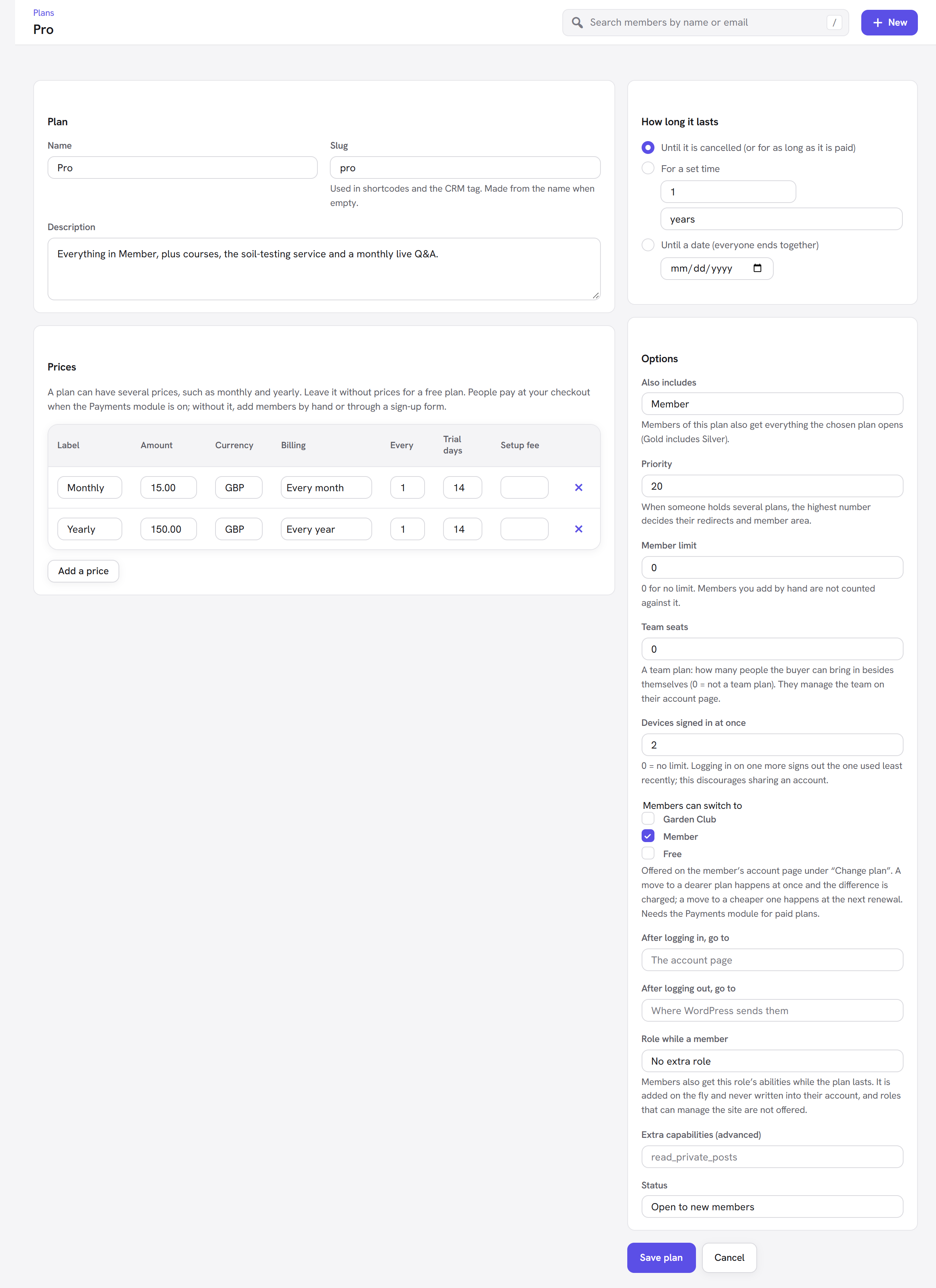
Every option explained
Plan
| Field | What it does | Default | When to change it |
|---|---|---|---|
| Name | What members and visitors see: on the pricing table, the account page, the prompt on protected pages and in emails. Required. | empty | Pick a name people understand at a glance: "Member", not "Tier 2". |
| Slug | A short code name for the plan, used in shortcodes ([member_content plans="member"]) and as the CRM tag. | Made from the name when left empty (Member → member). | Only if you want a different code. Two plans cannot share a slug. Changing it later breaks shortcodes that use the old one. |
| Description | A sentence or two about the plan, shown on the pricing table and in the plans list. | empty | Say what the plan gives: "All member articles and the seed swap." |
Prices
A plan can have several prices, such as monthly and yearly. Click Add a price for each one; the cross at the end of a row removes it. The panel itself reminds you: "Leave it without prices for a free plan. People pay at your checkout when the Payments module is on; without it, add members by hand or through a sign-up form."
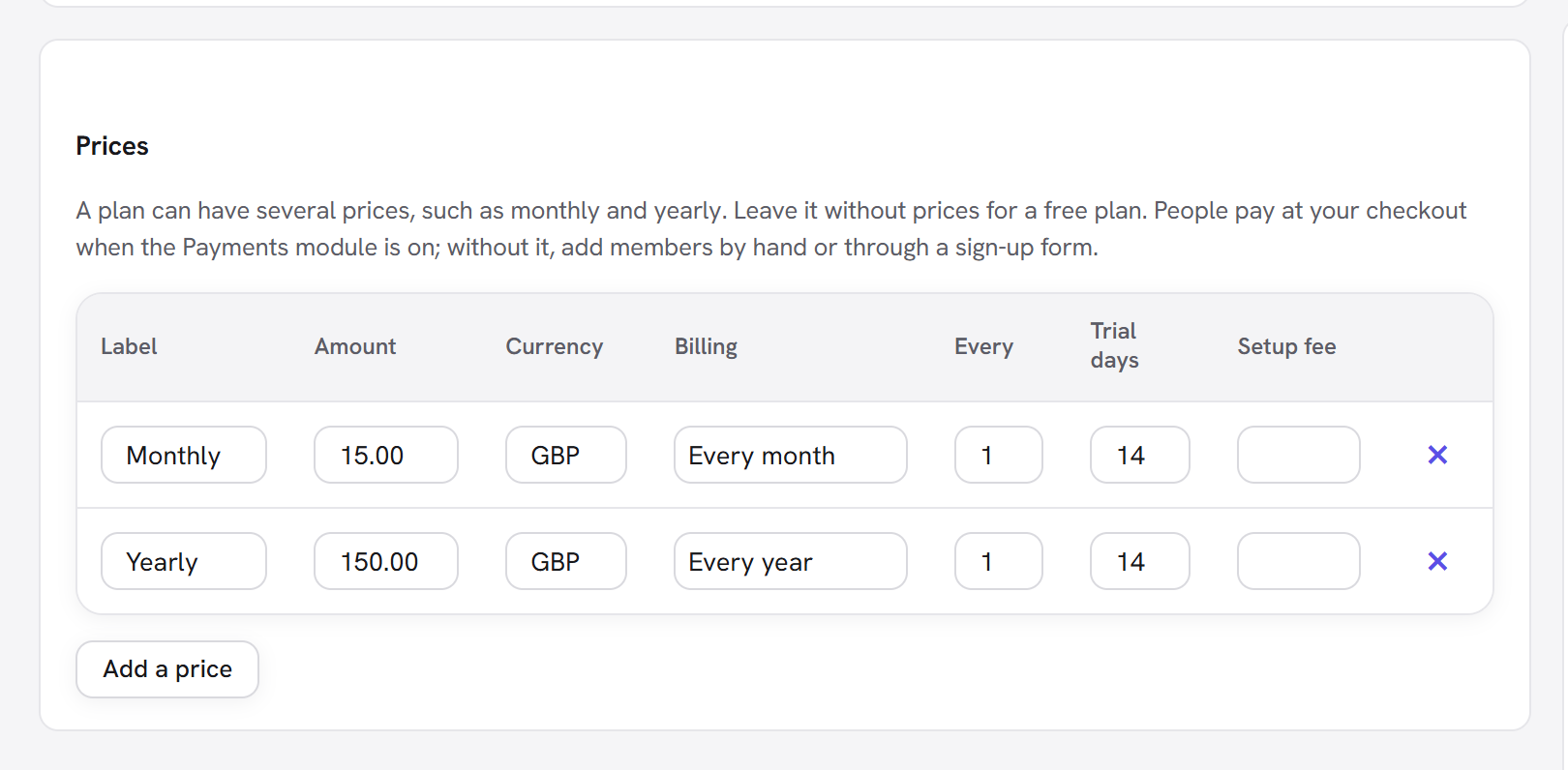
| Column | What it does | Default |
|---|---|---|
| Label | A name for this price, such as "Monthly" or "Founding member". | empty (placeholder "Monthly") |
| Amount | The price, with up to two decimals. A row with no amount is skipped when you save, unless its billing is Free. | empty |
| Currency | Three letters: USD, EUR, GBP… Each price can have its own. | Your WooCommerce currency if WooCommerce is installed, otherwise USD |
| Billing | How it is charged (see below). | Every month |
| Every | For repeating billing, how many periods between charges: 3 with Every month bills every three months. | 1 |
| Trial days | Free days before the first charge. The member has full access during the trial, and their membership shows as Trial. | 0 (no trial) |
| Setup fee | A one-off amount charged with the first payment, on top of the price. During a trial, the setup fee is what is charged up front. | empty (none) |
The Billing choices:
| Billing | Means |
|---|---|
| Free | No charge. Useful for a free price beside paid ones, such as a free tier on the same plan. |
| One payment | Paid once. The membership lasts as long as How long it lasts says. |
| Lifetime (one payment, never ends) | Paid once, access for ever. |
| Every day, Every week, Every month, Every year | A subscription that renews automatically through your payment service until it is cancelled. Repeating prices need card (Stripe) or PayPal at the checkout; bank transfer only takes one-off prices. See Payments. |
Examples:
- Member, monthly: Label
Monthly, Amount8.00, Billing Every month, Every1. - Member, yearly: Label
Yearly, Amount80.00, Billing Every year, Every1. When a plan on the pricing table has both a monthly and a yearly price, the table shows a monthly / yearly switch. - Quarterly: Amount
22.00, Billing Every month, Every3. - A trial: Trial days
14on the monthly price: two weeks free, then GBP 8.00 a month. - A one-off workshop pass: Billing One payment, with How long it lasts set to For a set time, 3 months.
:::note Changing a price later When you change a price's amount, currency, billing, interval, trial or setup fee, Membership saves it as a new price and retires the old one. Subscriptions already running at the payment service keep what they were sold at. Changing only the label keeps the same price. :::
How long it lasts
| Choice | What it does | When to use it |
|---|---|---|
| Until it is cancelled (or for as long as it is paid) | No end date of its own. A free plan lasts until someone ends it; a subscription lasts as long as it is paid. | The default, and right for most plans. |
| For a set time | Each membership ends a set time after it starts: a number and days, weeks, months or years. | Fixed-term access: a 1-year pass, a 30-day trial plan, a 3-month course. |
| Until a date (everyone ends together) | Every membership on this plan ends on the same date, whenever it started. | A season, an event, a cohort: "Spring 2027 programme" ending on 30 June. |
The length is used when a membership starts and when you Extend it "by the plan's own length". You can always give one member a different end date on their page.
Options
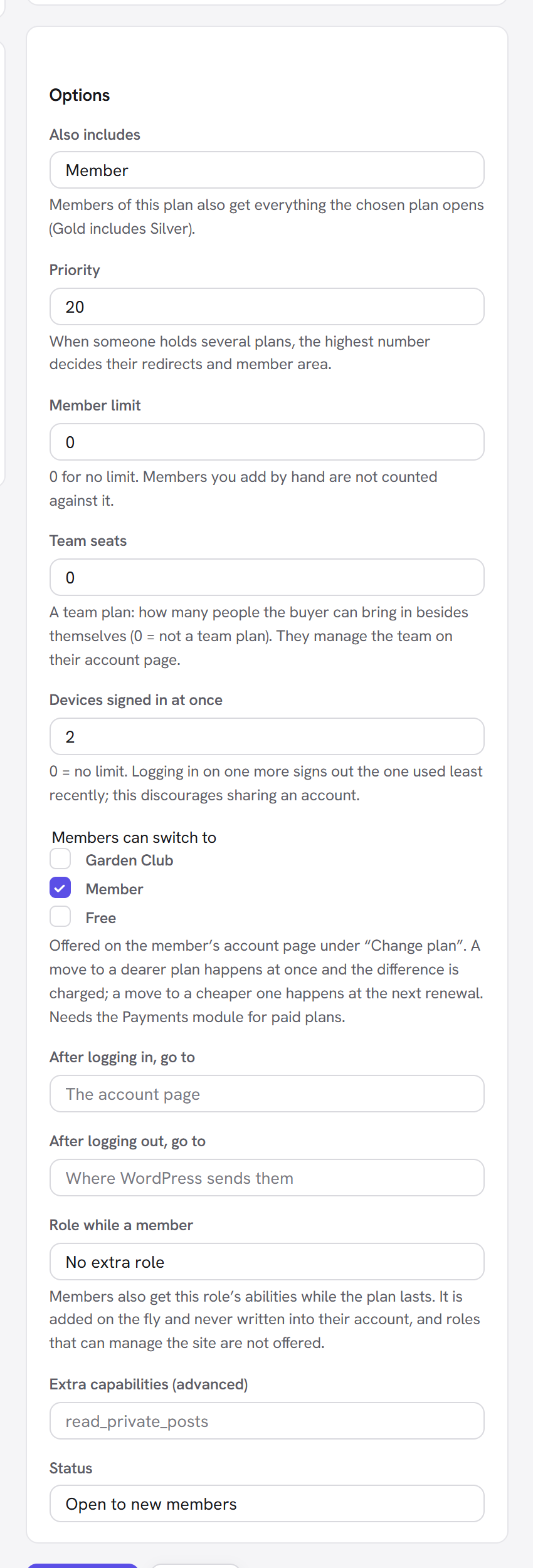
| Field | What it does | Default | When to change it |
|---|---|---|---|
| Also includes | Members of this plan also get everything the chosen plan opens. Pro includes Member: a Pro member passes every rule that lets Member in. It chains: if Member included Free, Pro would include both. A plan cannot include itself, directly or through another plan. | Nothing else | For tiers. Set it on the higher plan, pointing at the plan below. |
| Priority | When someone holds several plans, the plan with the highest number decides their redirects after logging in and out, and their member area. | 0 | Give higher tiers higher numbers (Free 0, Member 10, Pro 20) so a Pro member who also kept Free is sent where Pro members go. |
| Member limit | The most people who can hold the plan at once. When it is full, sign-up forms and the checkout refuse new people ("This plan is full."). Members you add by hand are not counted against it. | 0 (no limit) | Limited places: a 25-seat masterclass, founding members. |
| Members can switch to | The plans a member of this plan may move to by themselves from their account page, under Change plan. A move to a dearer plan happens at once and the difference is charged; a move to a cheaper one happens at the next renewal. Paid moves need the Payments module. Shown only when you have more than one plan. | none ticked | Tick Pro on Member (an upgrade) and Member on Pro (a downgrade). |
| After logging in, go to | Where members of this plan land after logging in. | empty: the account page | Send members straight to their dashboard page, such as /members/. |
| After logging out, go to | Where members of this plan go after logging out. | empty: where WordPress sends them | Your home page or a "see you soon" page. |
| Role while a member | Members also get this WordPress role's abilities while the plan lasts. It is added on the fly and never written into their account, so it disappears when the membership ends. Roles that can manage the site (Administrator, Editor and any role with similar powers) are not offered. | No extra role | When another plugin checks for a role, such as Author so members may write posts. |
| Extra capabilities (advanced) | Individual WordPress capabilities to add while the plan lasts, separated by commas, such as read_private_posts. Capabilities that could take over the site (managing users, plugins, themes or options, unfiltered HTML) are dropped. | empty | Only if you know the capability another plugin checks. |
| Status | Open to new members, or Archived (existing members only). | Open to new members | Archive a plan you no longer sell. See below. |
Options that modules add. These appear in the same panel when their module is on:
| Field | Module | What it does | Default |
|---|---|---|---|
| Team seats | Groups and teams | Makes this a team plan: how many people the buyer can bring in besides themselves. They manage the team on their account page. | 0 (not a team plan) |
| Devices signed in at once | Account security | Logging in on one more device signs out the one used least recently. This discourages sharing an account. When a member holds several plans, the largest limit applies. | 0 (no limit) |
| Store discount for members (%) | WooCommerce | A percentage off products in your store. Members see it as a "Member price". If they hold several plans, the best discount applies. | 0 |
| On products in | WooCommerce | The product categories the discount applies to. | none ticked: every product |
| Free shipping for members | WooCommerce | Members' orders ship free. | off |
Example, the Garden Club team plan: Name Garden Club, a yearly price of 300.00, Team seats 10
(the buyer plus ten), Also includes Member. Each seat member gets Member access for as long as the
buyer's membership lasts. See Groups and teams.
Archive or delete a plan
- Archive (in the list, or Status → Archived (existing members only) on the plan) closes the plan to new members. People who hold it keep their access until their membership ends; it no longer appears in sign-up forms, the Add a member form or View as. Restore opens it again.
- Delete removes a plan for good, but only one that nobody has ever held. A plan with memberships (even ended ones) is archived instead, so the history and payments keep their meaning, and you see "This plan has members, so it was archived instead of deleted."
Good to know
- A plan opens nothing until a rule says so. After creating a plan, tick it under Who can see it in an access rule, or in a page's Membership box.
- "Any plan" includes free plans. An access rule with no plan ticked lets in members of any plan, Free included. To keep content for paying members, tick the paid plans.
- Someone can hold several plans. A member can have Free and Member at once. Access counts every plan they hold; the Priority only decides redirects and the member area.
- One of each plan per person. Giving someone a plan they already hold is refused ("This person already holds that plan. Extend it instead.").
- Prices do nothing on their own. Turn on Payments under Modules and set up a payment service to sell them.
Next steps
- Access rules: choose what each plan opens.
- Members: give plans to people by hand.
- The pricing table and checkout and Payments: sell your plans.
- Back to Getting started.