Reports
Membership → Reports answers the questions every membership site owner asks sooner or later: How much money comes in each month? Are members staying or leaving? Which plans earn the most? Do free trials turn into paying members? Which members-only pages are actually read?
You do not have to set anything up or add tracking code. Every number is worked out from what Membership already keeps: the memberships, their history (joined, renewed, changed plan, ended…) and the payments. That also means the numbers are right for the past, not only from the day you switched the screen on.
:::info Module Reports is the Reports module. Switch it on under Membership → Modules (it is off by default). Until then, the Reports item under Insights in the sidebar carries an Off badge, and opening it shows "Reports is switched off", what the screen does, "Switch on the Reports module to use it." and an Open Modules button. Money figures need the Payments module, because that is where payments come from; without it you still see members, joins and losses. :::
How to open your reports
- Go to Unyson+ → Membership → Modules, switch on Reports and click Save modules.
- In the Membership sidebar, under Insights, click Reports.
- Read the six cards at the top for the headline numbers, then scroll down for the chart and the tables.
- To work with the numbers in a spreadsheet, click Download as CSV at the top right.
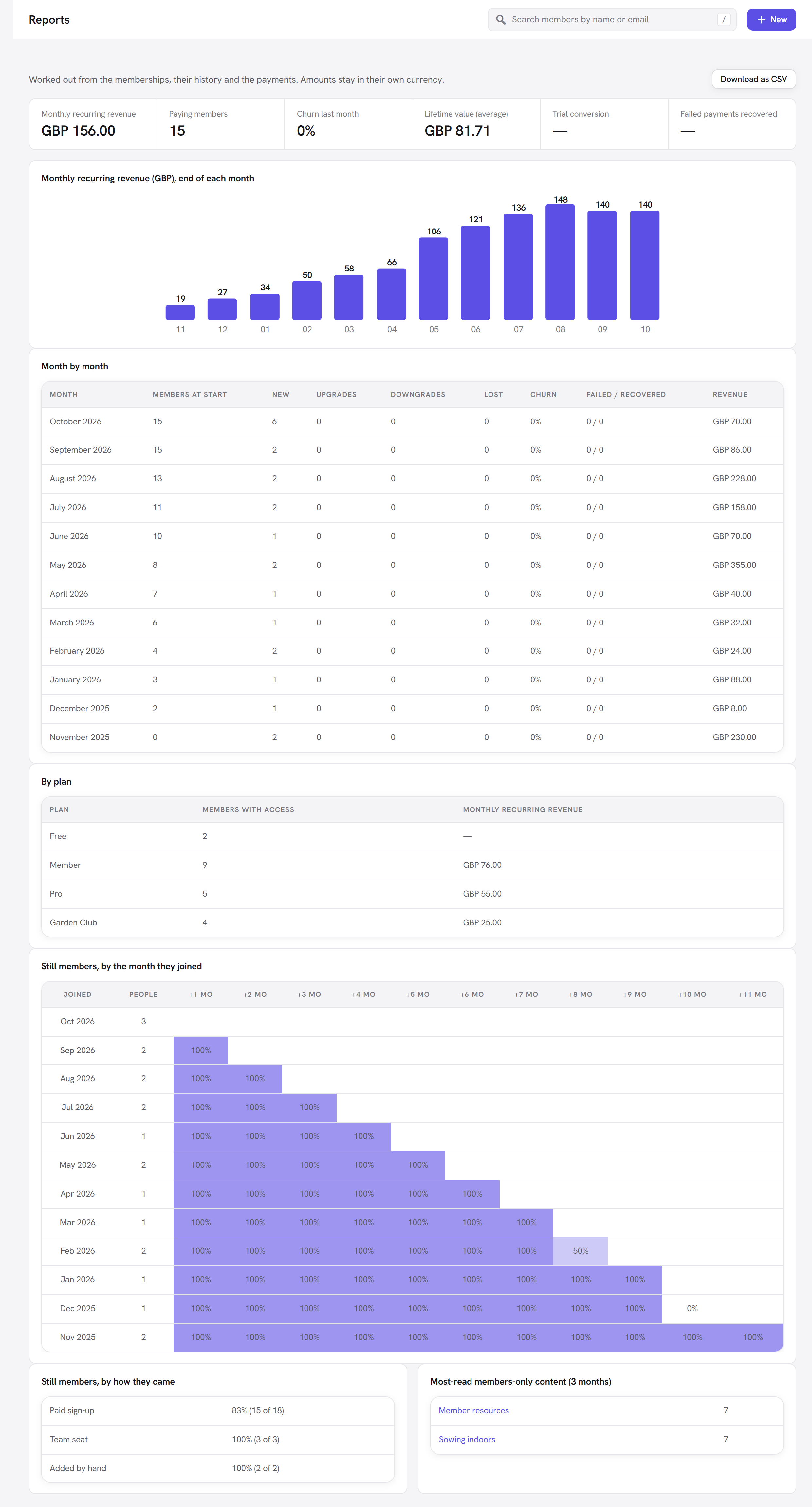
The line at the top of the screen reminds you how it works: "Worked out from the memberships, their history
and the payments. Amounts stay in their own currency." If you sell in more than one currency, every money
figure is shown per currency (for example GBP 120.00 · EUR 40.00). Amounts in different currencies are never
added together, because the total would be meaningless.
A quick glossary
If the terms are new to you, here is what they mean in plain words.
| Term | In plain words |
|---|---|
| Monthly recurring revenue (MRR) | The money your repeating memberships bring in per month, if nothing changed. A yearly price counts as one twelfth per month. |
| Churn | The share of members you lost in a month. 5% churn means 5 out of every 100 members left that month. |
| Lifetime value (LTV) | How much an average paying member has paid you in total so far. |
| Trial conversion | Of the free trials that have finished, how many turned into paying memberships. |
| Cohort | A group of people who joined in the same month, followed over time. |
| Recovered payment | A renewal that failed at first (an expired card, not enough funds) and then went through. |
The headline cards
| Card | What it shows | How it is worked out |
|---|---|---|
| Monthly recurring revenue | What your repeating prices bring in per month, right now. | Every membership that has access today, is not in a free trial and has a repeating price adds that price's monthly value. A monthly price counts in full; a yearly price counts as 1/12; a price "every 3 months" counts as 1/3; weekly and daily prices are converted to a month (30.44 days). One-off and free prices count as 0. |
| Paying members | How many memberships make up the MRR above. | The memberships counted in MRR (with access, not in a trial, on a repeating price above zero). |
| Churn last month | The share of members lost in the most recent month of the table. | Members lost in the month ÷ members with access on the 1st of that month, as a percentage. A dash means there is nothing to compare yet. |
| Lifetime value (average) | What a paying member has paid, on average. | Everything paid through Membership (payments with the status paid and an amount above zero) ÷ the number of different people who paid, per currency. Refunded payments are not counted. |
| Trial conversion | How often a free trial becomes a paid membership. | Trials started in the last 180 days. Of the ones that are over, the share that has a paid payment. Trials still running are left out, so a trial that started yesterday does not drag the rate down. |
| Failed payments recovered | How many failed renewals you got back. | Over the 12 months in the table: recovered payments ÷ failed payments. Retention's failed-payment recovery is what moves this number. |
:::tip Example The Larkspur Garden Club has 40 members on Member monthly at 8.00 and 10 on Member yearly at 80.00. MRR is 40 × 8.00 + 10 × (80.00 ÷ 12) = 320.00 + 66.67 = 386.67 per month. Members on the Free plan add nothing to MRR, but they do count as members for churn. :::
The monthly recurring revenue chart
Monthly recurring revenue ({currency}), end of each month shows a bar for each of the last 12 months: the
MRR on the last day of that month, in your site's main currency (the currency set in Payment settings). Hover
over a bar to see the exact figure.
Until members pay monthly or yearly, the chart says "No repeating payments yet. The chart fills in as members pay monthly or yearly."
Month by month
A table of the last 12 months, newest first. One row per month:
| Column | What it counts |
|---|---|
| Month | The calendar month. |
| Members at start | Memberships that had access on the 1st of the month (free and paid, including trials). |
| New | Memberships that started in the month: joins and free trials started. A trial that turns into a paid membership is not counted again as new. |
| Upgrades | Plan changes to a plan worth more per month. Plans are compared by their highest monthly price. |
| Downgrades | Plan changes to a plan worth less per month. |
| Lost | Memberships that ended or were refunded in the month while they still had access. A membership replaced by another one (for example when someone changes plan through the checkout) is not counted as lost. |
| Churn | Lost ÷ Members at start, as a percentage with one decimal. |
| Failed / recovered | Renewal payments that failed in the month / renewal payments that went through after failing. |
| Revenue | Everything paid in the month, per currency. Refunded payments are left out. |
"Members" here means memberships. Someone who holds two plans counts twice in Members at start.
By plan
One row per plan: Plan, Members with access (how many memberships of that plan have access now) and Monthly recurring revenue (that plan's share of MRR). Use it to see which plan carries the site, and whether a cheap plan with many members earns less than an expensive plan with few.
Still members, by the month they joined (cohorts)
This grid follows the people who joined in each of the last 12 months.
- Joined is the month of each person's first membership.
- People is how many people joined that month.
- +1 mo, +2 mo … +11 mo show what share of them still had access 1, 2 … 11 months later. The cells are shaded: the darker the cell, the more people stayed.
Read it row by row. If the people who joined in March are at 80% after three months but those who joined in June are at 50%, something changed in between: a price, the welcome email, the content.
Team seats are left out of the cohorts, because a seat follows the team owner rather than the person's own choice. Months that have not happened yet stay empty.
Still members, by how they came
How many memberships from each source still have access, for example Paid sign-up 72% (36 of 50). The sources are Paid sign-up, Free sign-up, Added by hand, Gift, Team seat, Store order (WooCommerce), CRM automation and Import. Memberships still waiting for email confirmation or approval are left out.
This tells you which ways of joining bring members who stay. Free sign-ups that rarely stay may need a better welcome; gifts that rarely stay may need a reminder before they end.
Most-read members-only content (3 months)
The protected pages and posts members opened most in the last three months, up to 15, with how many times each was opened.
Only the number of views per item per month is kept, with no record of who read what. A view is counted when a member with a plan opens a single page or post that an access rule protects and they are allowed to see. Not counted: visitors without a plan, people who were turned away, previews, and anyone who can edit the post (you and your editors).
Counting starts when the Reports module is switched on, so the panel is empty at first: "Counted from now on, each time a member opens a protected page or post (no record of who)."
Download as CSV
Download as CSV saves a file named membership-report-YYYY-MM-DD.csv with 24 months of the
month-by-month figures (twice what the screen shows), one row per month, oldest first. Open it in Excel,
Google Sheets, Numbers or LibreOffice.
| Column | Meaning |
|---|---|
month | The month as YYYY-MM. |
members_at_start | Members at start. |
new | New. |
upgrades | Upgrades. |
downgrades | Downgrades. |
lost | Lost. |
churn_percent | Churn, as a number (no % sign). |
failed_payments | Failed renewal payments. |
recovered_payments | Recovered renewal payments. |
revenue | Revenue in the month, per currency (for example GBP 120.00 · EUR 40.00). |
mrr_at_end | MRR on the last day of the month, per currency. |
Good to know
Why is my MRR lower than what I took this month? MRR counts only repeating prices and spreads yearly prices over 12 months. A yearly member who paid 80.00 this month adds 6.67 to MRR. One-off payments, single purchases and gifts appear in Revenue, never in MRR.
Why do members in a free trial not count in MRR? They have not paid yet and may not. They count as soon as the trial turns into a paid membership.
Churn says 0% but people left. Churn is worked out from the members you had on the 1st of the month. On a new site with no members on the 1st, churn shows 0 because there is nothing to divide by.
Do cancelled members count as lost straight away? No. A cancelled membership keeps access until the end of what was paid for. It counts as lost in the month it actually ends.
Do the numbers include test payments? They include every payment Membership recorded. If you tested the checkout on the live site, refund or remove those test memberships so they do not skew the figures.
Can I see older months? The screen shows 12 months; the CSV goes back 24.
Next steps
- Lower churn with Retention: failed-payment recovery, pausing, a save offer and reminders.
- Bring members' value into the CRM for segments and follow-ups: Connect the CRM.
- Back to the Membership overview.