Retention
Members leave for two kinds of reason. Some do not mean to: their card expired or a renewal failed, and the membership quietly ends. Others decide to: it costs too much right now, they are busy, they are not using it. The Retention module works on both:
- When a renewal payment fails, the member keeps access for a few days, gets follow-up emails with a one-click link to update their card, and is warned in advance when their card is about to expire.
- When a member wants to leave, they can pause for a few months instead, and the cancel button first asks why and makes one offer (a discount, a pause or a cheaper plan).
- Reminders go out before a renewal, before a free trial ends and before a membership that will not renew runs out, and a win-back email with a discount code goes to people whose membership ended.
- Membership → Retention shows why people leave and what kept them.
:::info Module This is the Retention module. Switch it on under Membership → Modules (off by default). It adds Retention under Insights in the sidebar and a Keeping members panel to Membership → Settings. Failed-payment recovery, pausing a subscription and the discount offer work with members who pay through the Payments module. The win-back coupon needs the Coupons module. :::
Set it up in five minutes
- Go to Unyson+ → Membership → Modules, switch on Retention and click Save modules.
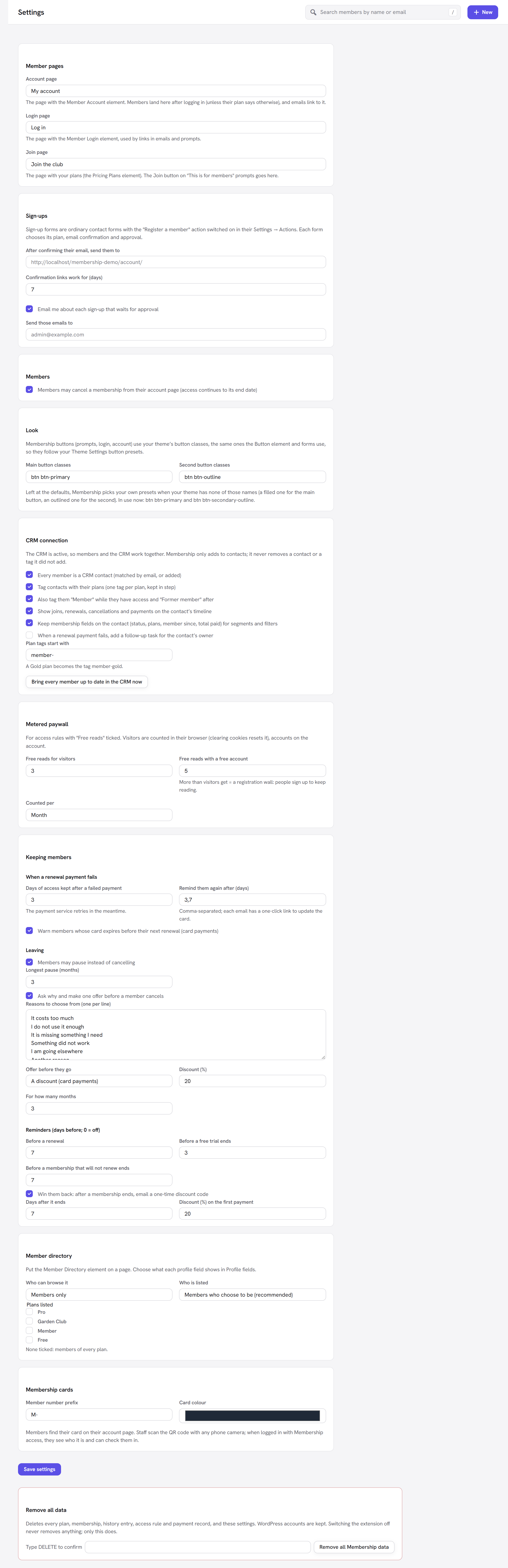
- Go to Membership → Settings and scroll to the Keeping members panel (also listed in Settings).
- Check the defaults (they are sensible for most sites, see Every option explained). For the Larkspur Garden Club we keep 3 days of access after a failed payment, reminders on days 3 and 7, pauses of up to 3 months and a 20% discount for 3 months as the save offer.
- Click Save settings.
- Go to Membership → Emails and read the new emails the module adds (listed below). Change the wording to sound like you.
- Make sure scheduled jobs run on time (reminders and follow-ups are sent by a daily job): see Scheduled jobs.
When a renewal payment fails
This is called dunning or failed-payment recovery. Here is what happens when, say, a Member monthly renewal is declined:
- The member keeps access. The membership becomes payment due (past due) and stays open for the number of days in Days of access kept after a failed payment (3 by default).
- The payment service tries again. Stripe and PayPal retry the card on their own schedule (Stripe's retries, PayPal's retry setting). If a retry goes through, the membership is active again and the report counts it as a recovered payment.
- The member is told straight away. The Payment failed email goes out with a link to update the card.
- Follow-up emails (Payment still due) go out on the days in Remind them again after (days), counted from the failure: by default 3 days and 7 days after. At most one follow-up is sent per day.
- If the payment never goes through, the membership ends when the grace period is over.
The one-click card link
Every Membership email can carry the placeholder {update_card_url}. It is a signed link, valid for 14 days,
that takes the member straight to the payment service's own card page:
- A member who is logged in goes straight to the card page.
- Anyone else is asked to log in first. The link does not log anyone in by itself, so a forwarded email cannot be used to get into the account.
- A link that is too old, or for a member with no subscription, goes to the account page.
Expiring cards
With Warn members whose card expires before their next renewal ticked, a member whose card on file runs out before the next renewal gets the Card expiring email. It is sent when the payment service announces the upcoming renewal (card payments through Stripe), once per card.
Pause instead of cancel
Someone who is busy for a season may cancel and never come back. A pause keeps them:
- The member picks 1 to N months (N is Longest pause (months), 3 by default).
- Billing stops and access stops for that time. Stripe resumes the subscription by itself on the day; PayPal subscriptions and memberships without a subscription are resumed by the daily job.
- A membership without a subscription (for example one with a fixed end date) gets the paused time added to its end date, so nothing paid for is lost.
- The member sees "Paused until
{date}." on their account page, with a Resume now button to come back early. - They get the Membership paused email.
Who can pause: members whose membership is active or in a trial and has an end date (subscriptions always have one). A subscription can be paused when it is with Stripe or PayPal. Memberships that never end (no end date) cannot be paused, because there is nothing to move.
Where the pause appears depends on the cancellation steps:
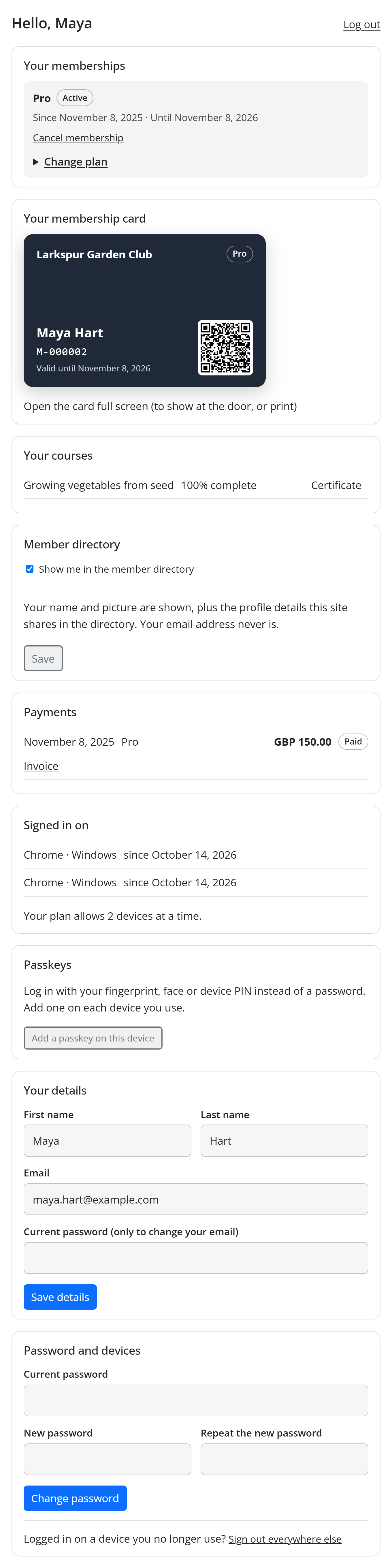
- With Ask why and make one offer before a member cancels off, the account page shows Pause for (a list of months) and a Pause button under each membership that can be paused.
- With it on, the pause is offered inside the cancellation steps instead (as the offer, or as the fallback when the chosen offer cannot be made), so members see it at the moment it matters.
The cancellation survey and save offer
With Ask why and make one offer before a member cancels ticked, Cancel membership on the account page opens two short steps instead of cancelling at once.
Step 1: why. The title is "Before you cancel {plan}". The member picks the main reason from your list
(What is the main reason you are leaving?) and can add a comment (Anything you would like to tell us?
(optional)). They click Continue, or Never mind, keep my membership to go back.
Step 2: one offer. The title is One last thing, with one offer:
| Offer | What the member sees | What happens if they accept |
|---|---|---|
| A discount (card payments) | "Stay, and get 20% off for the next 3 months." and Yes, keep my membership with the discount | The discount is applied to their subscription at the payment service for the number of months you set. Each membership gets this offer only once. |
| A pause | "Need a break? Pause instead: nothing is charged, and your membership waits for you." and Pause for + Pause my membership | The membership is paused for the months they pick. |
| A cheaper plan | "Keep going for less: switch to {plan} ({price}) at your next renewal." and Yes, switch me | The plan changes at the next renewal. The offer is the smallest step down: the dearest paid plan that is cheaper than theirs, chosen from the plan's Members can switch to list. |
Below the offer the member reads what cancelling means ("If you cancel, you keep access until {date} and
nothing more is charged.") and can click Cancel anyway, or Never mind, keep my membership.
If the offer you chose cannot be made for this member (for example the discount for someone paying by PayPal, or a second discount for the same membership), a pause is offered instead when it is possible. If nothing can be offered, the second step is titled Confirm the cancellation and shows only the cancel button.
Members who accept see "Thank you for staying! Your membership carries on." Every answer (the reason, the comment, the offer accepted or the cancellation) is kept in the membership's history and counted on the Retention screen.
Renewal reminders
Three reminder emails go out a set number of days before a date. Each is sent once per membership and date. Set a value to 0 to turn that reminder off.
| Reminder | Who gets it | |
|---|---|---|
| Before a renewal (7 days) | Active members with a subscription that will renew. | Renewal reminder: the date and the amount, with a link to the account to change the card or plan. |
| Before a free trial ends (3 days) | Members in a free trial. | Free trial ending: when it ends, what it will cost, how to cancel. |
| Before a membership that will not renew ends (7 days) | Cancelled members, and memberships with an end date and no subscription. | Membership ending soon: the end date and a link to renew. |
The renewal reminder is especially worth keeping on for yearly plans: a charge nobody expected is a common reason for a refund request.
Win them back
With Win them back: after a membership ends, email a one-time discount code ticked, people whose membership ended get a Win-back offer email a number of days later (Days after it ends, 7 by default).
The email carries a fresh discount code made just for them with the Coupons module:
- Discount (%) on the first payment (20% by default), on the first payment only.
- It can be used once, only for the plan they had, and it expires after 30 days.
- The code starts with
BACKand is listed under Membership → Coupons (batch win-back), so you can see which ones were used. - The renew link in the email opens the checkout with the code already filled in.
Nobody gets it twice for the same membership, and it is not sent to someone who has already come back (has access again). It looks at memberships that ended in the week after the chosen number of days, so a membership that ended long before you switched this on does not suddenly get an email.
The Retention screen
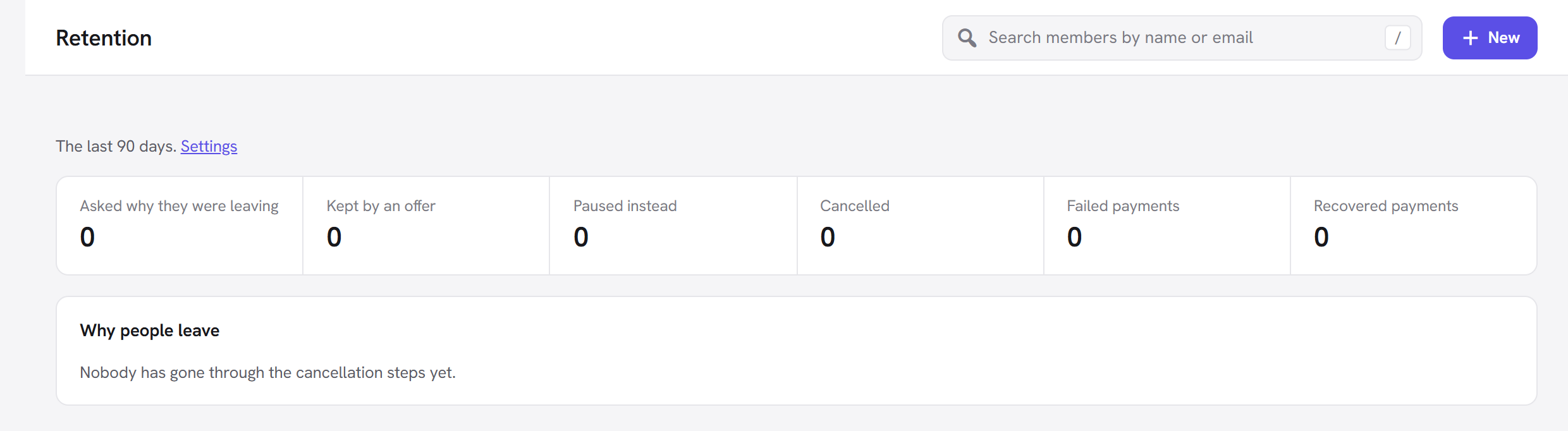
Membership → Retention shows the last 90 days:
| Card | What it counts |
|---|---|
| Asked why they were leaving | Members who answered the first cancellation step. |
| Kept by an offer | Members who accepted the offer. |
| Paused instead | Pauses started. |
| Cancelled | Cancellations. |
| Failed payments | Renewal payments that failed. |
| Recovered payments | Renewal payments that went through after failing. |
Below the cards:
- Why people leave: each reason with how many chose it and its share, most common first. Before anyone has gone through the steps it says "Nobody has gone through the cancellation steps yet."
- What kept them (once someone has accepted an offer): A discount, A pause or A cheaper plan, with how many each kept.
The Settings link next to the period takes you to the Keeping members panel.
Every option explained
All of these are in Membership → Settings → Keeping members.
When a renewal payment fails
| Option | What it does | Default | Tip |
|---|---|---|---|
| Days of access kept after a failed payment | How long a member keeps access after a renewal fails, while the payment service retries. 0 to 30. | 3 | Raise it to 7 if your members often pay late but always pay. Lower it to 0 if access must stop the moment a payment fails. |
| Remind them again after (days) | The days after a failure when the Payment still due email is sent, comma-separated. Each email has the card link. | 3,7 | Keep the last reminder inside the grace period, or it arrives after access has ended. Leave empty for no follow-ups. |
| Warn members whose card expires before their next renewal (card payments) | Sends Card expiring before a renewal when the card on file will have expired. | On | Leave on: it prevents failures before they happen. |
Leaving
| Option | What it does | Default | Tip |
|---|---|---|---|
| Members may pause instead of cancelling | Lets members pause their membership. | On | Turn off if a pause makes no sense for your content (for example a membership that is all about one live season). |
| Longest pause (months) | The longest pause a member can choose, 1 to 12 months. | 3 | Three months covers holidays and busy periods without people drifting away for good. |
| Ask why and make one offer before a member cancels | Turns on the two cancellation steps. | On | Leave on: even without an offer, the reasons alone tell you what to fix. |
| Reasons to choose from (one per line) | The reasons shown in step 1. | It costs too much / I do not use it enough / It is missing something I need / Something did not work / I am going elsewhere / Another reason | Keep the list short (4 to 7) and specific to your site, for example "The workshops do not suit my schedule". |
| Offer before they go | The one offer in step 2: A discount (card payments), A pause, A cheaper plan (from "Members can switch to") or No offer. | A discount | A discount suits price complaints; a pause suits "I do not use it enough"; a cheaper plan suits sites with a lighter plan. |
| Discount (%) | The discount for the discount offer, 1 to 100. | 20 | 20% to 30% is common. |
| For how many months | How many months the discount lasts, 1 to 24. | 3 | Long enough to get past the reason they wanted to leave. |
Reminders (days before; 0 = off)
| Option | What it does | Default |
|---|---|---|
| Before a renewal | Days before a subscription renews to send Renewal reminder. | 7 |
| Before a free trial ends | Days before a trial ends to send Free trial ending. | 3 |
| Before a membership that will not renew ends | Days before a cancelled or fixed-length membership ends to send Membership ending soon. | 7 |
Win-back
| Option | What it does | Default |
|---|---|---|
| Win them back: after a membership ends, email a one-time discount code | Turns the win-back email on. Greyed out, with (needs the Coupons module), until Coupons is on. | On |
| Days after it ends | How many days after the end to send it. | 7 |
| Discount (%) on the first payment | The discount the code gives, 1 to 100. | 20 |
The emails it adds
The module adds these to Membership → Emails, where you can edit the subject and text of each:
| Sent when | Useful placeholders | |
|---|---|---|
| Payment failed (changed) | A renewal fails. The module adds the card link to the standard text. | {plan}, {update_card_url} |
| Payment still due | On the follow-up days, while still unpaid. | {plan}, {ends_at}, {update_card_url} |
| Card expiring | Before a renewal, when the card expires first. | {card_last4}, {renewal_date}, {update_card_url} |
| Membership paused | A member pauses. | {plan}, {paused_until}, {account_url} |
| Renewal reminder | Before a renewal. | {plan}, {renewal_date}, {amount}, {account_url} |
| Free trial ending | Before a trial ends. | {plan}, {renewal_date}, {amount}, {account_url} |
| Membership ending soon | Before a membership that will not renew ends. | {plan}, {ends_at}, {renew_url} |
| Win-back offer | Days after a membership ended. | {plan}, {coupon_code}, {coupon_label}, {renew_url} |
Good to know
When do the reminders and follow-ups go out? A daily job (Retention: reminders, payment follow-ups, pauses ending) sends them, first run at 08:00 the day after you switch the module on. On a quiet site WordPress may run it late; see Scheduled jobs.
Can a member pause a membership paid by bank transfer? Yes, if it has an end date: the pause moves the end date out. A bank-transfer membership has no subscription to stop.
Why did a member get a pause offer when I chose a discount? The discount needs a Stripe subscription and is given only once per membership. When it cannot be made, a pause is offered instead, if the membership can be paused.
Does the cancellation survey stop people leaving? No. Cancel anyway is always on the second step. The steps ask and offer once, then get out of the way.
What does switching the module off do? Settings and history are kept. Without it, cancelling is immediate again, pauses are not offered, no reminders or follow-ups are sent, and the grace period goes back to 3 days. Paused PayPal subscriptions and paused memberships without a subscription are brought back only by this module's daily job, so keep the module on while anyone is paused.
Next steps
- Watch the effect on churn and recovered payments in Reports.
- Edit the emails in Membership → Emails.
- Follow up failed payments personally from the CRM: Connect the CRM.
- Back to the Membership overview.