For developers
Membership has four ways in for code and other apps:
| You want to… | Use |
|---|---|
| Ask the site something from another app (plans, a member, whether someone may see a page), or change a membership | The REST API |
| Be told the moment something happens (someone joins, pays, cancels, finishes a course) | Webhooks |
| React inside WordPress (in a plugin or your theme) | PHP hooks |
| Add a whole feature to Membership, with its own switch, screen and settings | Your own module |
There is also a command line (wp membership) and the
AI Assistant.
REST API
Every route lives under /wp-json/fw-membership/v1/ on your site.
Signing in
- Public routes (plans, the access check) need nothing.
/meneeds a logged-in member: a browser request from your own site, with WordPress's REST nonce.- Manager routes need a user with the Membership capability (administrators have it). From another app,
use a WordPress Application Password: in Users → Profile → Application Passwords, type a name and
click Add New Application Password, then send it with HTTP Basic authentication as
username:application-password. Application Passwords need your site on https.
curl -u "admin:abcd efgh ijkl mnop qrst uvwx" \
  "https://example.com/wp-json/fw-membership/v1/members?plan=pro&status=access"
Routes
| Method and route | Who | What it does |
|---|---|---|
GET /plans | anyone | The plans open to new members, with their prices. |
GET /plans/{id} | anyone | One plan. |
GET /access?post={id} | anyone | Whether the visitor making the request may see that post or page, and if not, which plans would let them. |
GET /me | a logged-in member | Their plans (slugs), memberships and profile fields. |
GET /members | managers | Memberships with the person, filtered by plan (slug or id), status (a status, or access for everyone who currently has access) and search; page, per_page (up to 100). The total is in the X-WP-Total header. |
GET /members/{user_id} | managers | One person: memberships, history and profile fields. |
POST /memberships | managers | Give a plan: user_id or email, plan (slug or id), optional ends (a date, or never), note, notify (send the welcome email). Answers 201, or 409 when the person already holds the plan. |
GET /memberships/{id} | managers | One membership. |
POST /memberships/{id}/extend | managers | until: a date or +1 month style; empty adds one more plan length. |
POST /memberships/{id}/cancel | managers | Stops renewing; access continues to the end date. now=1 ends access now. |
POST /memberships/{id}/expire | managers | Ends access now. |
POST /memberships/{id}/reactivate | managers | Makes a cancelled or ended membership active again. |
POST /memberships/{id}/activate | managers | Starts a membership waiting for confirmation or approval. |
POST /memberships/{id}/change-plan | managers | plan: slug or id. |
GET /rules | managers | The access rules with what they protect. |
Cancelling, ending and reactivating are passed on to the payment service for memberships paid by card or PayPal, exactly as on the Members screen.
What comes back
A membership:
{
  "id": 33,
  "user_id": 17,
  "plan": { "id": 2, "slug": "member", "name": "Member" },
  "status": "active",
  "source": "manual",
  "started_at": "2026-10-15T08:14:51",
  "ends_at": "2027-01-31T23:59:59",
  "cancelled": null,
  "gives_access": true
}
The access check, for a visitor on a members-only post:
{ "post": 18, "protected": true, "can_view": false,
  "denied": { "action": "prompt", "plans": ["member"], "login_needed": true } }
Errors use the WordPress format: { "code": "fw_mbr_no_plan", "message": "That plan does not exist.", "data": { "status": 400 } }.
Webhooks
A webhook posts each event to an address you choose, as it happens. Use it to add new members to a mailing tool, post in a team chat when someone cancels, update your own database, or start an automation in Zapier, Make or n8n.
Set one up
- Switch on the Webhooks module: Membership → Modules.
- Open Membership → Webhooks.
- Paste the address that should receive the events (the receiving app gives you one), tick the events you want (none ticked means every event) and click Add webhook.
- Copy the webhook's Secret (click Show) into the receiving app, so it can check that each request really came from your site.
- Click Send a test. The webhook's Last answer should show
200.
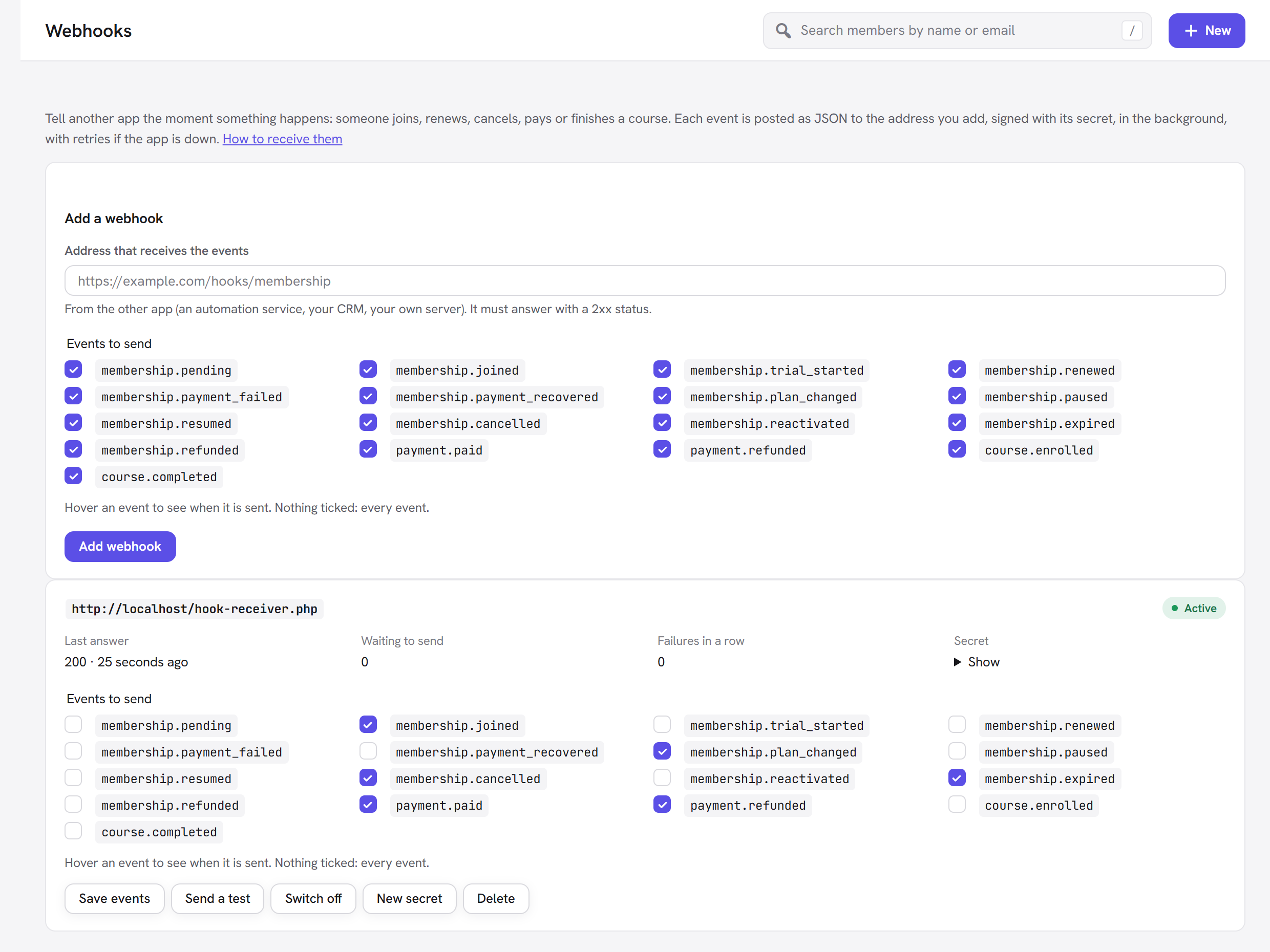
On each webhook you can change the events (Save events), Switch off (nothing is kept for it while it is off), make a New secret (the old one stops working at once) or Delete it.
Events
| Event | Sent when |
|---|---|
membership.pending | A membership was created but waits for email confirmation or approval. |
membership.joined | A membership started: any plan, free or paid, however it began. |
membership.trial_started | A membership started with a free trial. |
membership.renewed | A membership renewed or was extended. |
membership.payment_failed | A renewal payment failed; the membership is past due. |
membership.payment_recovered | A past-due membership was paid and is active again. |
membership.plan_changed | A member moved to another plan; previous_plan says from which. |
membership.paused, membership.resumed | A membership was paused or resumed (Retention module). |
membership.cancelled | A membership was cancelled; access continues to its end date. |
membership.reactivated | A cancelled or ended membership was made active again. |
membership.expired | A membership ended and no longer gives access. |
membership.refunded | A membership was refunded and ended. |
payment.paid | A payment arrived: a first payment, a renewal or a one-off purchase. |
payment.refunded | A payment was refunded. |
course.enrolled, course.completed | A student started or finished a course (Courses module). |
ping | The Send a test button. |
What is sent
A POST with a JSON body:
{
  "id": "6f1c2a9e-1b7d-4e55-9a51-2c8f0d1e3b44",
  "event": "membership.joined",
  "created_at": "2026-10-15T08:14:51+00:00",
  "site": "https://example.com/",
  "data": {
    "membership": { "id": 33, "user_id": 17, "plan": { "id": 2, "slug": "member", "name": "Member" },
                    "status": "active", "source": "payment", "started_at": "2026-10-15T08:14:51",
                    "ends_at": "2026-11-15T08:14:51", "cancelled": null, "gives_access": true },
    "member": { "id": 17, "email": "[email protected]", "name": "Ivy Clarke", "first_name": "Ivy", "last_name": "Clarke" },
    "plan": { "id": 2, "slug": "member", "name": "Member" },
    "previous_plan": null,
    "from": "", "to": "active", "by": 0, "note": ""
  }
}
payment.* events carry payment (id, type, status, amount, tax, currency, paid_by,
reference, invoice_number, coupon, membership_id, created_at), member and plan. course.*
events carry member and course (id, title, url); course.completed adds the certificate link.
Each request has these headers:
| Header | Value |
|---|---|
X-Webhook-Event | The event, for example membership.joined. |
X-Webhook-Id | The delivery's id (the same as id in the body). Use it to ignore a repeat. |
X-Webhook-Signature | t=<unix time>,v1=<signature> |
Check the signature
Compute HMAC-SHA256 of "<t>.<raw body>" with the webhook's secret and compare it with v1. Use the raw
body exactly as received, before any JSON parsing, and refuse a t more than five minutes old.
PHP:
$secret = 'the webhook secret';
$body   = file_get_contents( 'php://input' );
parse_str( str_replace( ',', '&', $_SERVER['HTTP_X_WEBHOOK_SIGNATURE'] ?? '' ), $sig );
$expected = hash_hmac( 'sha256', ( $sig['t'] ?? '' ) . '.' . $body, $secret );
if ( ! hash_equals( $expected, $sig['v1'] ?? '' ) || abs( time() - (int) ( $sig['t'] ?? 0 ) ) > 300 ) {
	http_response_code( 401 );
	exit;
}
$event = json_decode( $body, true );
// … use $event['event'] and $event['data'] …
http_response_code( 200 );
Node.js (Express):
import crypto from 'node:crypto';
import express from 'express';

const app = express();
app.post('/hooks/membership', express.raw({ type: 'application/json' }), (req, res) => {
  const secret = process.env.MEMBERSHIP_WEBHOOK_SECRET;
  const parts = Object.fromEntries((req.get('X-Webhook-Signature') || '').split(',').map(p => p.split('=')));
  const expected = crypto.createHmac('sha256', secret).update(`${parts.t}.${req.body}`).digest('hex');
  const fresh = Math.abs(Date.now() / 1000 - Number(parts.t)) < 300;
  if (!fresh || !parts.v1 || parts.v1.length !== expected.length ||
      !crypto.timingSafeEqual(Buffer.from(expected), Buffer.from(parts.v1))) {
    return res.sendStatus(401);
  }
  const event = JSON.parse(req.body);
  // … event.event, event.data …
  res.sendStatus(200);
});
app.listen(3000);
Python (Flask):
import hashlib, hmac, json, time
from flask import Flask, request, abort

app = Flask(__name__)
SECRET = b"the webhook secret"

@app.post("/hooks/membership")
def membership_hook():
    body = request.get_data()
    parts = dict(p.split("=", 1) for p in request.headers.get("X-Webhook-Signature", "").split(",") if "=" in p)
    expected = hmac.new(SECRET, parts.get("t", "").encode() + b"." + body, hashlib.sha256).hexdigest()
    if not hmac.compare_digest(expected, parts.get("v1", "")) or abs(time.time() - int(parts.get("t", 0))) > 300:
        abort(401)
    event = json.loads(body)
    # … event["event"], event["data"] …
    return "", 200
Delivery, retries and failures
- Events are queued and sent in the background within moments, so a slow receiver never slows your site. The queue is worked by WordPress's scheduler; on a quiet site, add a real server cron job (Scheduled jobs) so deliveries are never late.
- Answer with any
2xxstatus within 8 seconds. Anything else is tried again after 1 minute, 5 minutes, 30 minutes, 2 hours and 12 hours, then dropped. - After 20 failed deliveries in a row the webhook switches itself off and what was waiting is dropped. Fix the receiver, then click Switch on.
- The same event can, rarely, arrive twice (for example when your receiver took too long to answer). Use
X-Webhook-Idto ignore a repeat. - Addresses inside your server's private network are refused, so a webhook cannot be aimed at internal
services. A developer testing a receiver on their own machine can allow them with the
unysonplus_membership_webhook_allow_localfilter (returntrue).
PHP hooks
Everything Membership does announces itself with WordPress actions and filters, so a plugin or your
theme's functions.php can react or change the result.
Membership events
Every change fires two actions:
// One event: joined, trial_started, renewed, payment_failed, payment_recovered, plan_changed,
// paused, resumed, cancelled, reactivated, expired, refunded, pending.
add_action( 'unysonplus_membership_joined', function ( array $membership, array $context ) {
	// $membership: id, user_id, plan_id, status, started_at, ends_at, …
	// $context: from, to, plan, actor_id, note (plan_changed adds previous_plan_id)
}, 10, 2 );

// Every event, with its name.
add_action( 'unysonplus_membership_changed', function ( $event, array $membership, array $context ) {
	error_log( "Membership {$membership['id']}: {$event}" );
}, 10, 3 );
Other actions
| Action | Arguments | When |
|---|---|---|
unysonplus_membership_payment_paid | $payment | A payment arrived. |
unysonplus_membership_payment_refunded | $payment | A payment was refunded. |
unysonplus_membership_checkout_completed | $quote, $user_id, $membership_id, $payment_id | A checkout finished. |
unysonplus_membership_registered | $user_id, $plan_id, $context | Someone signed up through a form. |
unysonplus_membership_renewal_upcoming | $membership, $context | A renewal is coming up (Retention module). |
unysonplus_membership_access_denied | $denied, $post_id | A visitor was turned away from a page. |
unysonplus_membership_course_enrolled, unysonplus_membership_course_completed | $user_id, $course_id | A student started or finished a course. |
unysonplus_membership_lesson_completed | $user_id, $lesson_id, $course_id | A lesson was completed. |
unysonplus_membership_quiz_taken | $user_id, $lesson_id, $score, $passed | A quiz was submitted. |
unysonplus_membership_profile_saved | $user_id, $values | A member saved their profile fields. |
Useful filters
| Filter | Use it to |
|---|---|
unysonplus_membership_capability | Let a role other than administrators manage Membership (default manage_options). |
unysonplus_membership_rule_passes | Open a rule for people your own logic decides ($passes, $rule, $persona). |
unysonplus_membership_denied_html | Change what people without access see. |
unysonplus_membership_email_vars | Add placeholders to member emails ($vars, $key, $user). |
unysonplus_membership_email_catalogue | Add an email of your own to Membership → Emails. |
unysonplus_membership_quote | Change a checkout price ($quote, $plan, $price, $args). |
unysonplus_membership_gateways | Add a payment method. |
unysonplus_membership_export_columns, unysonplus_membership_export_row | Add columns to the CSV export. |
unysonplus_membership_webhook_events, unysonplus_membership_webhook_data | Add webhook events, or change what one sends. |
Your code can also call the same PHP classes the screens use, for example
FW_Membership_Service::grant( $user_id, $plan_id, array( 'source' => 'manual' ) ) or
FW_Membership_Access::can( $post_id, $user_id ). The full list is in the
developer reference in the AI Dev Kit.
Your own module
A module is a feature with its own switch on Membership → Modules. While it is off, none of its code loads. Membership's own modules (Payments, Courses, Webhooks…) are built the same way, so yours can do anything they do: add a screen to the Membership app, a panel to each member's page, settings, plan options, emails, webhook events, its own database tables.
How it works
- Register it with the
unysonplus_membership_modulesfilter, from a plugin or your theme. Give it alabel, adescription, a Dashiconsicon, andfile: the full path of the PHP file to load while it is on. - Switch it on in Membership → Modules. From the next page load, Membership loads your file.
- In that file, hook into Membership. The hooks a module usually needs:
| Hook | Adds |
|---|---|
unysonplus_membership_nav (filter) | An item in the Membership app's sidebar. Groups: main, selling, insights, setup. |
unysonplus_membership_render_view (action, $tab) | Your screen, when its item is open. |
unysonplus_membership_admin_action (filter, $back, $action) | The buttons and forms on your screen. Membership checks the nonce and the user's rights first. Build links with FW_Membership_Admin_Page::action_url( 'your_action', $args, 'your-tab' ) and forms with FW_Membership_Admin_Page::form_fields( 'your_action' ); return the query args of the page to go back to. |
unysonplus_membership_member_panels, unysonplus_membership_member_side_panels (action, $user_id) | A panel on each member's page. |
unysonplus_membership_settings_panels + unysonplus_membership_save_settings | A panel on Membership → Settings. |
unysonplus_membership_plan_option_fields + unysonplus_membership_plan_settings | An option on each plan, saved in the plan's settings. |
unysonplus_membership_rule_who_fields + unysonplus_membership_rule_who_extra + unysonplus_membership_rule_passes | A new "who can see it" condition on access rules. |
unysonplus_membership_account_sections (action, $user) | A section on the member's account page. |
unysonplus_membership_email_catalogue | Emails your module sends, editable on Membership → Emails. |
unysonplus_membership_cron_hooks | Your scheduled job, so the Health card watches it and Remove all data clears it. |
FW_Membership_Installer::module_tables( $module, $version, $schema_callback, $tables ) | Database tables, made once per version and removed by Remove all data. |
FW_Membership_Webhooks::emit( $event, $data ) + unysonplus_membership_webhook_events | Your own webhook events. |
A complete example: Welcome calls
This small plugin adds a Welcome calls module: every new member goes on a list of people to phone, the list has its own screen with a Called button, each member's page says whether they have been called, and other apps hear about it through a webhook event.
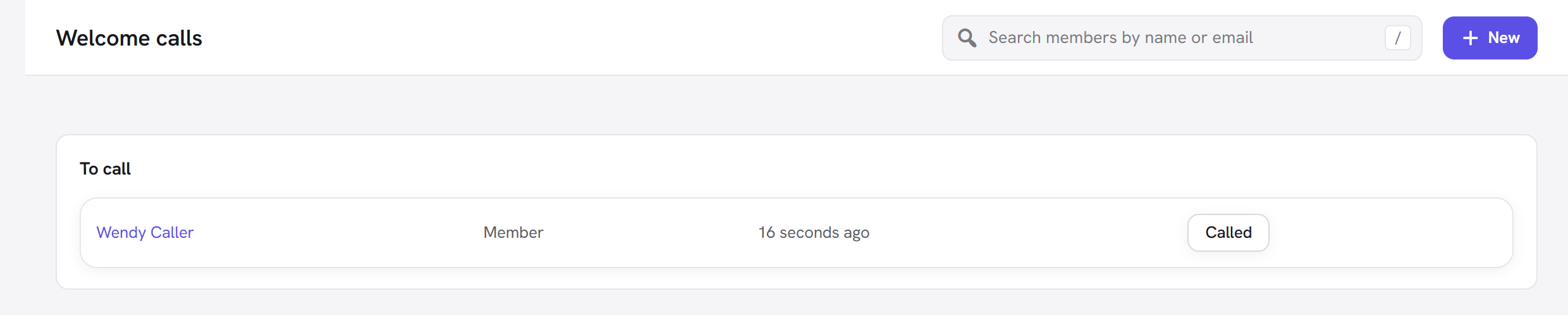
wp-content/plugins/membership-welcome-calls/membership-welcome-calls.php:
<?php
/**
 * Plugin Name: Membership Welcome Calls
 * Description: An example add-on module for Unyson+ Membership: new members go on a "to call" list.
 */

if ( ! defined( 'ABSPATH' ) ) {
	exit;
}

// 1. Register the module. It shows on Membership → Modules; its file loads only while it is on.
add_filter( 'unysonplus_membership_modules', function ( $modules ) {
	$modules['welcome-calls'] = array(
		'label'       => 'Welcome calls',
		'description' => 'Put every new member on a list to phone and welcome personally.',
		'icon'        => 'dashicons-phone',
		'file'        => __DIR__ . '/module.php',
	);
	return $modules;
} );
wp-content/plugins/membership-welcome-calls/module.php:
<?php
/**
 * Welcome calls: loaded by Membership only while the module is switched on.
 */

if ( ! defined( 'ABSPATH' ) ) {
	exit;
}

const WELCOME_CALLS_OPTION = 'welcome_calls_list';

// 2. React to a membership event: every member who joins goes on the list.
add_action( 'unysonplus_membership_joined', function ( $membership, $context ) {
	$list = (array) get_option( WELCOME_CALLS_OPTION, array() );
	$list[ (int) $membership['user_id'] ] = array( 'plan_id' => (int) $membership['plan_id'], 'added' => time(), 'done' => false );
	update_option( WELCOME_CALLS_OPTION, $list, false );

	// Tell other apps too, through Membership's webhooks (when that module is on).
	if ( class_exists( 'FW_Membership_Webhooks' ) ) {
		$user = get_userdata( (int) $membership['user_id'] );
		FW_Membership_Webhooks::emit( 'welcome_call.queued', array( 'email' => $user ? $user->user_email : '', 'name' => $user ? $user->display_name : '' ) );
	}
}, 10, 2 );

// 3. Offer the new event to webhooks (it appears in their event list).
add_filter( 'unysonplus_membership_webhook_events', function ( $events ) {
	$events['welcome_call.queued'] = 'A new member was put on the welcome-call list.';
	return $events;
} );

// 4. A screen of its own in the Membership app (in the main group, under Courses).
add_filter( 'unysonplus_membership_nav', function ( $nav ) {
	$nav['main']['items']['welcome-calls'] = array( 'label' => 'Welcome calls', 'icon' => 'dashicons-phone' );
	return $nav;
} );

add_action( 'unysonplus_membership_render_view', function ( $tab ) {
	if ( 'welcome-calls' !== $tab ) {
		return;
	}
	$list = array_filter( (array) get_option( WELCOME_CALLS_OPTION, array() ), function ( $row ) {
		return empty( $row['done'] );
	} );
	echo '<section class="fw-mbr-panel"><header class="fw-mbr-panel__head"><h2>To call</h2></header>';
	if ( ! $list ) {
		echo '<p class="fw-mbr-muted">Everyone has been welcomed.</p></section>';
		return;
	}
	echo '<table class="widefat striped"><tbody>';
	foreach ( $list as $user_id => $row ) {
		$user = get_userdata( $user_id );
		$plan = FW_Membership_Plans::get( $row['plan_id'] );
		$done = FW_Membership_Admin_Page::action_url( 'welcome_call_done', array( 'user' => $user_id ), 'welcome-calls' );
		printf(
			'<tr><td><a href="%s">%s</a></td><td>%s</td><td>%s</td><td><a class="button" href="%s">Called</a></td></tr>',
			esc_url( FW_Membership_Admin_Page::get_page_url( 'members', array( 'member' => $user_id ) ) ),
			esc_html( $user ? $user->display_name : '#' . $user_id ),
			esc_html( $plan ? $plan['name'] : '' ),
			esc_html( human_time_diff( $row['added'] ) . ' ago' ),
			esc_url( $done )
		);
	}
	echo '</tbody></table></section>';
} );

// 5. Handle the screen's button. The Membership app checks the nonce and the user's
//    rights before calling this; return where to go next.
add_filter( 'unysonplus_membership_admin_action', function ( $back, $action ) {
	if ( 'welcome_call_done' !== $action ) {
		return $back;
	}
	$list    = (array) get_option( WELCOME_CALLS_OPTION, array() );
	$user_id = isset( $_GET['user'] ) ? (int) $_GET['user'] : 0; // phpcs:ignore WordPress.Security.NonceVerification
	if ( isset( $list[ $user_id ] ) ) {
		$list[ $user_id ]['done'] = true;
		update_option( WELCOME_CALLS_OPTION, $list, false );
	}
	FW_Membership_Admin_Page::flash( 'success', 'Marked as called.' );
	return array( 'tab' => 'welcome-calls' );
}, 10, 2 );

// 6. A panel on each member's page.
add_action( 'unysonplus_membership_member_side_panels', function ( $user_id ) {
	$list = (array) get_option( WELCOME_CALLS_OPTION, array() );
	if ( ! isset( $list[ $user_id ] ) ) {
		return;
	}
	echo '<section class="fw-mbr-panel"><header class="fw-mbr-panel__head"><h2>Welcome call</h2></header><p>';
	echo esc_html( $list[ $user_id ]['done'] ? 'Done.' : 'Not called yet.' );
	echo '</p></section>';
} );
Activate the plugin in Plugins, switch Welcome calls on in Membership → Modules, and the new screen appears in the Membership sidebar.
Good practice
- Prefix everything (functions, options, actions) with your own name, and keep your code in your own plugin, never inside the Membership folder, so updates never overwrite it.
- Keep the main plugin file to the registration and put everything else in the module file, so nothing runs while the module is off.
- Check that a module you build on is on before using it, for example
class_exists( 'FW_Membership_Webhooks' ). - Keep members' personal data out of logs and out of webhooks that do not need it.
Next steps
- Modules: the modules that come with Membership.
- Scheduled jobs and WP-CLI: commands and the server cron line.
- Run your site with the AI Assistant.