Modules
Membership is built in two layers. The core is always on: plans, members, access rules, the login, sign-up and account pages, member emails and profile fields. Everything else is a module you switch on only when your site needs it: payments, coupons, drip content, courses, teams and so on.
Why bother? A module that is off loads no code and adds no menus. A small club that only needs free plans and members-only pages gets a fast, simple admin with nothing to ignore. When the club starts selling memberships, switch on Payments and the selling screens appear.
How to switch a module on or off
- Go to Unyson+ → Membership → Modules (under Setup in the Membership sidebar).
- Each module is a row with its icon, name, a one-line description and a switch on the right.
- Flip the switches you want on (or off).
- Click Save modules. The page reloads with "Modules saved.", and any menus the modules add appear in the sidebar.
What a switched-off module looks like in the sidebar. Payments, Coupons and Reports are always listed in the Membership sidebar, so you can see what is there. While their module is off they carry an Off badge. Opening one shows "Payments is switched off" (or Coupons, Reports), a sentence about what the area does, "Switch on the Payments module to use it." (or the Coupons or Reports module) and an Open Modules button that brings you here. The other modules' items (Downloads, Groups, Courses, Gifts, Retention, Import) only appear once their module is on.
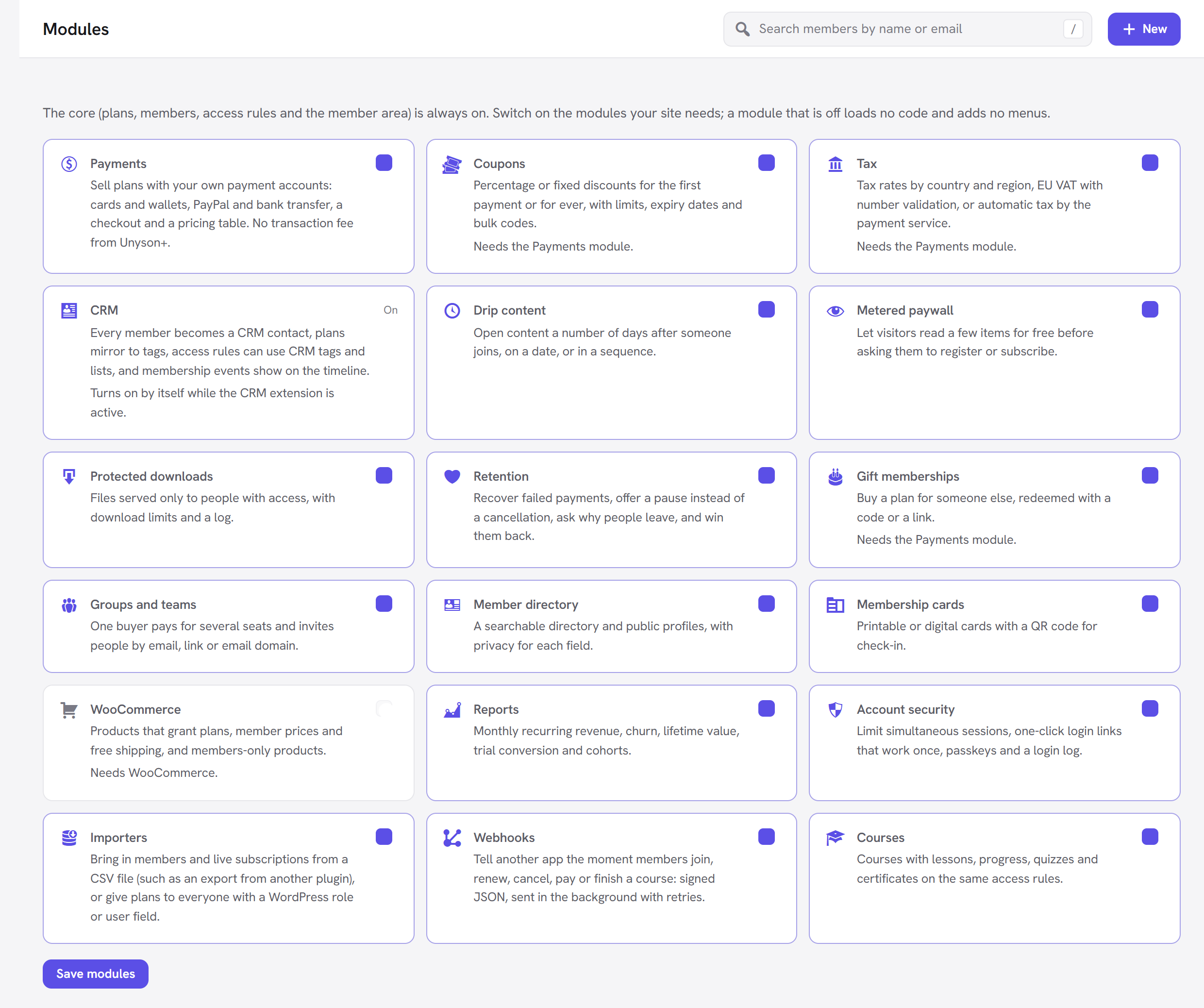
A few rows look different:
- A module that needs something you do not have yet (for example Coupons before Payments is on, or WooCommerce without WooCommerce) has its switch greyed out, with a line saying what it needs.
- CRM has no switch. It shows On or Off, because it follows the CRM extension (see below).
Every module is off on a new site, except CRM, which is on whenever the CRM extension is active.
Every module
| Module | What it adds | Needs |
|---|---|---|
| Payments | Sell plans with your own Stripe, PayPal or bank account: Selling → Payments (the payments list and Payment settings), the checkout, the Pricing Plans and Membership Checkout elements, invoices, single-item purchases, and Change plan on the account page. No transaction fee from Unyson+. See Payments. | Nothing. |
| Coupons | Selling → Coupons: percentage or fixed discounts, for the first payment or for ever, with limits, expiry dates and bulk codes. See Coupons. | Payments. |
| Tax | Tax rates by country and region, EU VAT with number validation, or automatic tax by the payment service. Its settings are a panel in Payment settings. See Tax. | Payments. |
| CRM | Members become CRM contacts, plans become tags, access rules can use CRM tags, lists and segments, and membership events appear on the contact's timeline. A CRM connection panel in Membership → Settings. See Connect the CRM. | The CRM extension (turns on by itself). |
| Drip content | Access rules that open a number of days after someone joins, or on a date; a "coming up" list on the account page; an email when content opens. See Drip content. | Nothing. |
| Metered paywall | Visitors read a few protected items for free before being asked to register or subscribe. A Free reads choice on access rules and a Metered paywall panel in Settings. See Metered paywall. | Nothing. |
| Protected downloads | Downloads in the sidebar: files served only to people with access, with download limits and a log, and the Member Download element. See Protected downloads. | Nothing. |
| Retention | Insights → Retention and a Keeping members panel in Settings: failed-payment recovery, pause instead of cancel, a cancellation survey with a save offer, reminders and win-back. See Retention. | Payments, for the payment parts. Coupons, for win-back codes. |
| Gift memberships | Selling → Gifts: buy a plan for someone else, redeemed with a code or a link. See Gift memberships. | Payments. |
| Groups and teams | Groups in the sidebar and a Team seats setting on plans: one buyer pays for several seats and invites people by email, link or email domain. See Groups and teams. | Nothing. |
| Member directory | The Member Directory element, public profiles, a "show me in the directory" choice on the account page and a privacy setting for each profile field. See Member directory. | Nothing. |
| Membership cards | A card with a QR code on the account page, full screen, and a check page for staff at the door. See Membership cards. | Nothing. |
| WooCommerce | Products that grant plans, member prices and free shipping, and members-only products. See WooCommerce. | WooCommerce. |
| Reports | Insights → Reports: monthly recurring revenue, churn, lifetime value, trial conversion and cohorts. See Reports. | Nothing (money figures come from Payments). |
| Account security | A limit on devices signed in at once, one-click login links, passkeys and a login log. See Account security. | Nothing. |
| Importers | Setup → Import: "Bring in members and live subscriptions from a CSV file (such as an export from another plugin), or give plans to everyone with a WordPress role or user field." See Import and export. | Nothing. |
| Courses | Courses in the sidebar: courses with lessons, progress, quizzes and certificates, on the same access rules, and the Course Outline element. See Courses. | Nothing. |
| Webhooks | Setup → Webhooks: "Tell another app the moment members join, renew, cancel, pay or finish a course: signed JSON, sent in the background with retries." See For developers. | Nothing. |
For the selling modules see Selling plans; for drip, the paywall, downloads and courses see Content tools; for teams, the directory and cards see Teams, directory and cards.
Modules that need another
Coupons, Tax and Gift memberships need Payments. Their switch is greyed out until Payments is on and saved. So switch Payments on first, click Save modules, then switch on the ones that depend on it and save again. If you later switch Payments off, these three go off with it (their switches turn grey); when you switch Payments back on, check them again and switch them on if needed.
WooCommerce needs WooCommerce. The switch is greyed out with "Needs WooCommerce." until the WooCommerce plugin is active.
CRM turns on by itself. While the Unyson+ CRM extension is active the CRM module is on, and there is nothing to switch: its row reads "Turns on by itself while the CRM extension is active." Deactivate the CRM extension and it is off. You choose what the connection does under Membership → Settings → CRM connection.
Some features work better with a partner module. Retention's win-back codes are made by Coupons (the option is greyed out without it); Retention's payment recovery and pause act on subscriptions from Payments; Reports shows money only when Payments has recorded payments.
What switching a module off does to your data
Switching a module off never deletes anything. Its code stops loading, its menus and settings panels disappear, and everything it saved waits in the database until you switch it on again. Only Membership → Settings → Remove all data deletes data (see Privacy and data).
What changes for your members while a module is off:
| Module switched off | What members notice |
|---|---|
| Payments | Nothing can be bought, and the Pricing Plans and Membership Checkout elements say so (to administrators; visitors see nothing). The Payments screen shows "Payments is switched off" instead of the list. The site no longer hears from Stripe or PayPal, so renewals are not recorded and paid memberships end on their end date even though the payment service may still charge. Do not switch Payments off while members have live subscriptions. |
| Coupons | Codes can no longer be used at the checkout. The codes themselves are kept. |
| Drip content | Drip timing on rules is kept but no longer applied: anyone who passes a rule sees the content straight away. |
| Metered paywall | No free reads: visitors see the normal "members only" view at once. |
| Retention | Cancelling is immediate, no pause, reminders or follow-ups, and the grace after a failed payment goes back to 3 days. |
| Account security | No device limit, no login links, passkeys are not offered (saved passkeys are kept), and the login log stops recording. |
| Reports | The Reports item shows its Off badge and the "Reports is switched off" page, and members-only page views stop being counted. |
| WooCommerce | New orders no longer grant plans and member prices stop. Plans already granted stay. |
| Importers | The Import screen goes away. Imported members stay. Members → Export CSV keeps working. |
| Webhooks | Nothing is sent and the Webhooks screen goes away; your webhooks and their secrets are kept for when you switch it back on. |
Other modules (downloads, gifts, groups, directory, cards, courses) take their screens and features away while off and keep their records.
Good to know
Will switching many modules on slow my site? Each module loads only its own code, and most of it runs only in the admin or on the pages that use it. Still, switch on what you use, not everything "just in case".
I switched a module on but I do not see its menu. Reload the page. If it is still missing, check the module's switch was saved (it should read on after Save modules) and that what it needs is on, for example Payments for Gifts.
Some rows say "Coming in phase …". That marks a module whose code is not in your version yet. It cannot be switched on until an update brings it.
Who can change modules? Anyone who can manage Membership (administrators by default).
Next steps
- Start selling: Payments and Pricing table and checkout.
- Keep members: Retention.
- Back to the Membership overview.
Want a module of your own? See Your own module.