Privacy and data
Running a membership site means keeping personal data: who your members are, what they hold, what they paid. Privacy laws such as the GDPR give people the right to see that data and to have it erased. Membership plugs into the tools WordPress already has for this, so you handle a request in a few clicks.
:::info Module All of this is part of the core and always on. Nothing to switch on. :::
When a member asks for a copy of their data
WordPress's Export Personal Data tool gathers everything plugins hold about an email address into one file. Membership adds its part, under the name Memberships.
- Go to Tools → Export Personal Data.
- Type the member's email address (for example
[email protected]) and click Send Request. WordPress emails the person to confirm the request. - Once they confirm, click Download personal data (or Send export link) next to the request.
The file includes these Membership groups:
| Group | Holds |
|---|---|
| Memberships | Each membership: Plan, Status, Started, Ends and Source (how it began). |
| Membership history | Every entry in their history: What happened, When and Note. |
| Member profile | Their answers to your profile fields. |
| Membership account | Email confirmed (when, or no) and Waiting for (confirmation or approval), when either applies. |
When a member asks to be erased
- Go to Tools → Erase Personal Data.
- Type their email address and click Send Request. WordPress asks the person to confirm.
- Once confirmed, click Erase personal data next to the request.
Membership then:
- Deletes their memberships and their membership history.
- Deletes their profile field answers and the account-state records (email confirmation, approval).
- Keeps payment records but anonymises them. Businesses usually have to keep payment records for their accounts, so the payments stay with their amounts, but the link to the person and any personal details in their notes are removed. WordPress reports: "Payment records were kept for accounting but no longer point to the person."
The WordPress account itself is not deleted by the erase tool; that is WordPress's job. To remove the account too, delete the user under Users. Deleting a WordPress user also deletes their memberships and history.
:::caution Cancel subscriptions first Erasing does not cancel a subscription at Stripe or PayPal. If the person still has a live subscription, cancel it first (on their member page, or at the payment service), or they may go on being charged. :::
What Membership stores
So you can describe it accurately in your privacy policy:
About each member (always):
- Memberships: the plan, status, start, end and renewal dates, how it began (sign-up, payment, by hand, gift, team seat, store order, import, CRM automation), and the payment service's subscription id when there is one.
- Membership history: every change (joined, renewed, paused, cancelled, ended…) with its date and any note, including the reasons given in the cancellation survey.
- Payments (with the Payments module): amount, currency, status, dates and invoice details. Card numbers are never stored on your site; they stay with the payment service.
- Profile fields: the answers to the fields you created.
- Account state: whether the email is confirmed and whether the account is waiting for approval.
Kept by modules, while they are on:
- Account security: a login and access log for 90 days, with the browser and system and a keyed hash of the IP address (never the address itself); passkeys (only the public part of the key); a short-lived scrambled copy of a login link. See Account security.
- Protected downloads: a download log per file, with a hashed IP address.
- Courses: enrolments, lessons completed, quiz attempts and answers, certificates.
- Groups and teams: team seats and the email addresses of people invited.
- Gift memberships: who bought a gift and who it is for.
- CRM (when the CRM is active): the member's contact, plan tags and membership fields, in the CRM.
- Reports: how often each members-only page was read per month, with no record of who.
The Export and Erase Personal Data tools cover the "always" list above. Records kept by modules are not part of them yet. For a full erase, also remove the person from the CRM, and note that the security log clears itself after 90 days.
The privacy policy text
Membership adds a suggested paragraph to WordPress's privacy policy guide. Go to Settings → Privacy and click Check out our guide (or open the guide from your privacy policy page in the editor). Under Membership you find:
When you join, we keep which membership plans you hold, when they started and end, and a history of changes to them, so we can give you access to members-only content. If you sign up through a form, we may ask you to confirm your email address. You can ask us to export or erase this information.
Copy it into your privacy policy and add what applies to your site: payments and the payment services you use, the modules from the list above, and how long you keep records.
Remove all data
At the bottom of Membership → Settings is a Remove all data panel. Use it when you want to start again from zero or stop using Membership for good.
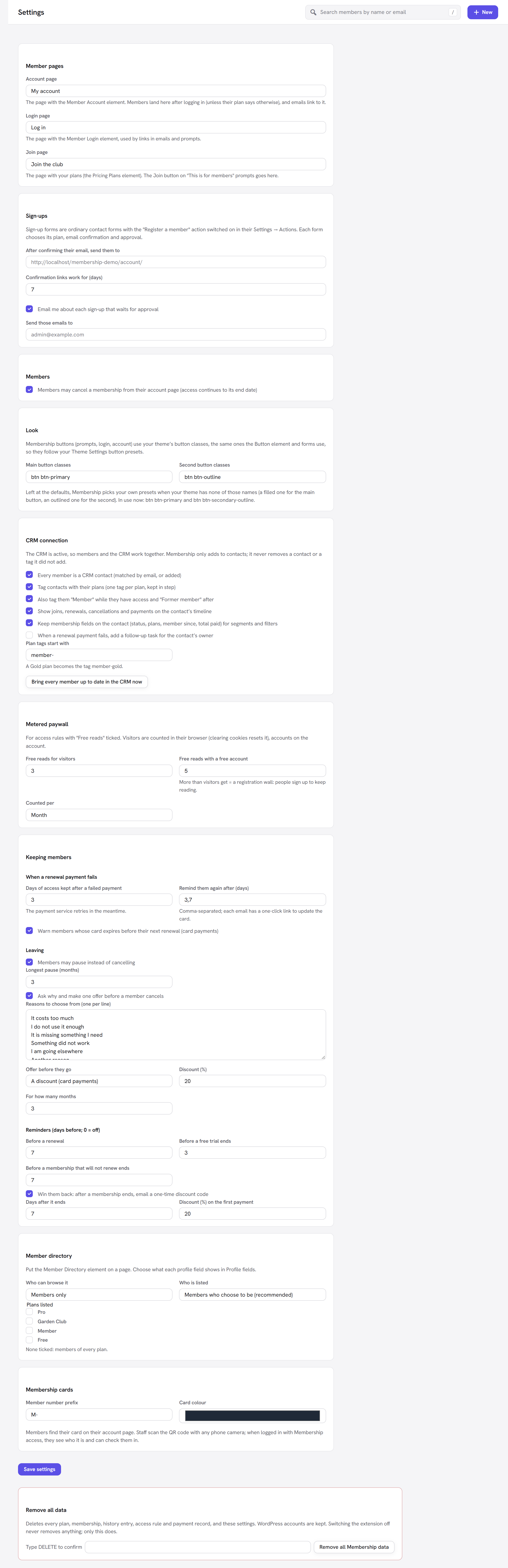
It "Deletes every plan, membership, history entry, access rule and payment record, and these settings. WordPress accounts are kept. Switching the extension off never removes anything; only this does."
To use it:
- Type
DELETEin Type DELETE to confirm. - Click Remove all Membership data.
- Confirm the browser's question, "Remove ALL Membership data? This cannot be undone."
What is removed: every plan and price, every membership and its history, every access rule, every payment record, the tables of every module that kept its own (coupons, downloads, gifts, groups, courses, quizzes, the security log, the reports' page counts), and every Membership setting: the main settings and email texts, which modules were on, and the modules' own settings too (the payment settings, the retention settings, the CRM connection, membership cards, the member directory, the metered paywall, your profile field definitions, and the ids Membership remembered for the payment services). The scheduled jobs are cleared as well. Fresh, empty tables are created so the screens keep working, and you land on Home with "All Membership data was removed: plans, members, rules, payments and settings."
What is kept: WordPress user accounts and the values stored on them (such as a member's answers to profile fields, which a personal-data erasure removes), your pages and posts, and anything in the CRM. Nothing at Stripe or PayPal is changed, so cancel any live subscriptions there first. Every field on the Settings screen is explained in Settings.
:::danger There is no undo
Take a database backup first. If you typed anything other than DELETE, nothing happens: "Type DELETE to confirm.
Nothing was removed."
:::
Switching the Membership extension (or any of its modules) off does not remove its data, so you can switch it off and on again without losing anything. Only this button deletes it.
Good to know
A member wants to leave but keep their account. End their memberships from their member page. Their account stays; their history stays too, unless they ask to be erased.
Can I see what someone's export will contain before sending it? Yes: download the export yourself from Tools → Export Personal Data before you send the link.
Next steps
- Secure accounts with less personal data: Account security.
- Move members out to another site: Import and export.
- Back to the Membership overview.