Scheduled jobs and WP-CLI
Some membership work does not happen when someone clicks a button but at a time: a membership that reaches its end date must end, a drip page opens on day 7, a renewal reminder goes out a week before. WordPress does this with scheduled jobs (WP-Cron). This page shows how to check they run on time, how to fix them when they don't, and how to manage memberships from the command line with WP-CLI.
:::info Module Both are part of the core and always available. The Scheduled jobs card lists extra jobs while the Drip content and Retention modules are on. :::
The Scheduled jobs card
Open Unyson+ → Membership → Home. The Scheduled jobs card lists each job Membership needs:
| Job | How often | What it does |
|---|---|---|
| End memberships that reach their end date | Every hour | Ends memberships whose end date has passed (and their access with them). Always listed. |
| Drip: email what opened today | Once a day | Emails members about drip content that opened for them. Listed while Drip content is on. |
| Retention: reminders, payment follow-ups, pauses ending | Once a day | Renewal, trial and expiry reminders, failed-payment follow-ups, win-back emails and pauses that end. Listed while Retention is on. |
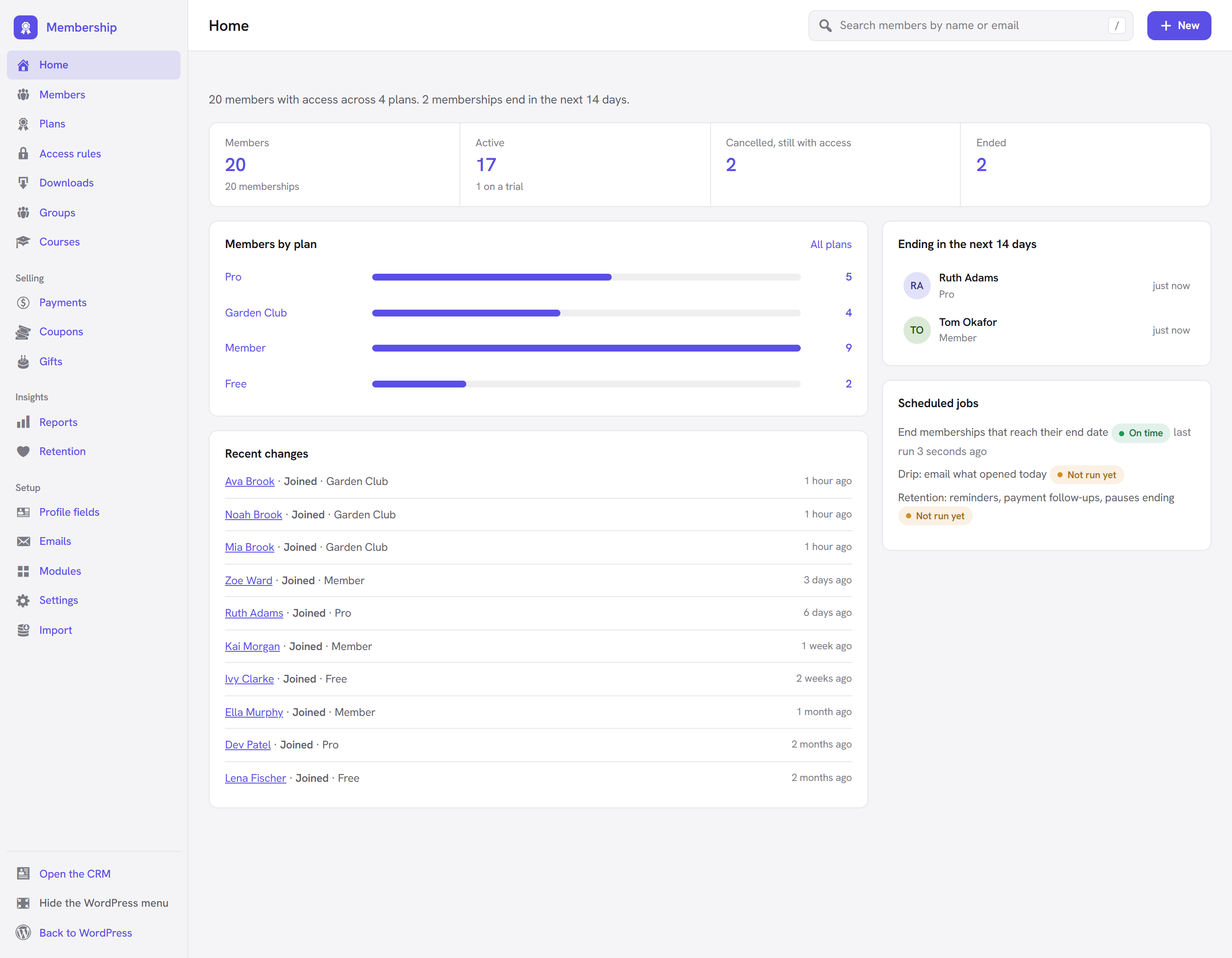
Each job shows a status and when it last ran (last run 12 minutes ago):
| Status | Means | What to do |
|---|---|---|
| On time | It is scheduled and ran when expected. | Nothing. |
| Not run yet | It is scheduled but has not run since it was set up. | Normal for a few minutes (the hourly job) or until the next day (daily jobs). |
| Late | It should have run a while ago (more than an hour for the hourly job, more than six hours for a daily one). | Add a real cron line (below). |
| Not scheduled | WordPress has no schedule for it. | Load any admin page: Membership schedules its jobs again by itself. If it stays, check that nothing on the site clears scheduled events. |
When a job is late or not scheduled, or WordPress's scheduler is switched off, the card shows the exact line to add to your server's scheduler, in a box you can click to select, and a WP-CLI alternative.
Site Health
The same check appears in Tools → Site Health as Membership scheduled jobs: "Membership's scheduled jobs run on time" (good), or "Membership's scheduled jobs are running late" (recommended), with the cron line to add.
Why WordPress cron can be late
WordPress has no clock of its own. Its scheduler runs when someone visits the site: on each page view it checks whether a job is due and runs it. That works well on a busy site. On a quiet one (a small club with a few visits a day, or a site in development) jobs run late, sometimes by hours, so a membership may stay open a little after its end date and a reminder may arrive a day late.
Some hosts also switch WordPress's scheduler off with DISABLE_WP_CRON in wp-config.php, expecting you to add
a real cron line. The card then says: "WordPress's own scheduler is switched off on this site (DISABLE_WP_CRON),
so add this line to the server's scheduler (cron), or ask your host to:"
How to add a real server cron line
A "real cron" is the server's own scheduler calling WordPress every few minutes, whether anyone visits or not.
-
Copy the line from the Scheduled jobs card. It looks like this, with your site's address:
*/5 * * * * wget -q -O - https://example.com/wp-cron.php?doing_wp_cron >/dev/null 2>&1*/5 * * * *means every 5 minutes; the rest asks your site to run whatever is due. -
Add it to your server's scheduler:
- cPanel: Advanced → Cron Jobs, choose Once per five minutes, paste the command part (everything after
*/5 * * * *) and click Add New Cron Job. - Plesk or another panel: look for Scheduled Tasks or Cron, and add a task that runs every 5 minutes.
- A server you manage: run
crontab -eand paste the whole line. - Managed WordPress hosting: many hosts run real cron already, or add it for you. Ask support to "run wp-cron.php every 5 minutes".
- cPanel: Advanced → Cron Jobs, choose Once per five minutes, paste the command part (everything after
-
Optional: once the real cron runs, you can stop WordPress also checking on page views by adding
define( 'DISABLE_WP_CRON', true );towp-config.php. -
Come back to Membership → Home after a while. The jobs should read On time.
If you have WP-CLI on the server, a cron line can also call wp cron event run --due-now from your site's folder.
WP-CLI commands
WP-CLI is WordPress's command-line tool. If your host gives you SSH access, it is usually
installed. Membership adds the command wp membership. Run wp help membership to see the list.
Wherever a command takes a user, you can give the user id, the email or the login name. Wherever it takes a
plan, give the plan's id or slug. A membership id is shown in wp membership list and on the member's page.
wp membership list
List memberships.
| Option | What it does |
|---|---|
--plan=<plan> | Only this plan (id or slug). |
--status=<status> | Only this status: active, trialing, past_due, paused, cancelled, expired, refunded, pending, or access for everyone who has access now. |
--user=<user> | Only this person (id, email or login). |
--format=<format> | table (default), csv, json or count. |
The columns are id, user, plan, status, source, started, ends and gateway (with the subscription id).
wp membership list --plan=pro --status=access
wp membership list [email protected]
wp membership list --status=past_due --format=count
wp membership export
Export memberships as CSV, in the columns the importer reads back (the same file as Members → Export CSV; see Import and export).
| Option | What it does |
|---|---|
[<file>] | Write to this file. Without it, the CSV is printed to the screen. |
--plan=<plan> | Only this plan. |
--status=<status> | Only this status, or access. |
wp membership export members.csv --status=access
wp membership plans
List the plans: id, slug, name, status and prices. Handy to find a slug for the other commands.
wp membership plans
wp membership grant
Give someone a plan.
| Argument / option | What it does |
|---|---|
<user> | The person (id, email or login). Required. |
<plan> | The plan (id or slug). Required. |
--ends=<date> | An end date (Y-m-d), never, or leave it out for the plan's own length. |
--note=<note> | A note for the membership's history. |
--notify | Send the welcome email. |
wp membership grant [email protected] member --ends=2027-01-31 --notify
wp membership grant sam pro --ends=never --note="Committee member"
wp membership extend
Push a membership's end date out.
| Argument / option | What it does |
|---|---|
<id> | The membership id. Required. |
--until=<when> | A date (Y-m-d), a period like "+1 month", never, or leave it out for one more plan length. |
wp membership extend 42 --until="+1 month"
wp membership expire
End a membership now. If it has a subscription, the subscription stops too.
| Argument / option | What it does |
|---|---|
<id> | The membership id. Required. |
--note=<note> | A note for the history. |
wp membership expire 42 --note="Refunded by phone"
wp membership reconcile
Bring memberships in step: end the ones past their end date (what the hourly job does), and ask Stripe and PayPal
for the real status of every subscription, in case a notification from the payment service was missed (for
example while the site was down). Differences are printed, one per line, such as
#42 sub_1Abc: here active, at stripe past_due., and fixed: ended, marked payment due, cancelled, or made active
again.
| Option | What it does |
|---|---|
--dry-run | Report what would change, without changing anything. |
wp membership reconcile --dry-run
wp membership reconcile
Good times to run it: after a migration or an import of live subscriptions, after the site was offline, or whenever a member says their status is wrong.
Good to know
Does a late job cost me money? No payment depends on it: Stripe and PayPal charge on their own schedule and notify the site. A late job only means a membership may stay open a little after its end date, or an email arrives late.
Can I run the hourly job by hand?
wp membership reconcile does the same ending of memberships (plus the subscription check). Or run all due
jobs with wp cron event run --due-now.
The commands say "No plan …" or "No user …".
Check the slug with wp membership plans, and the user with wp user list.
Next steps
- Import and export members: Import and export.
- The Scheduled jobs card on Home: The Home screen.
- What the daily Retention job sends: Retention.
- Back to the Membership overview.