RSS feeds
A link back on every feed item. Under SEO → General → RSS feed, a line added to the end of
every item in your feed. Sites that copy content automatically usually take it from the feed, so the
copies end up linking back to the original. Leave it empty to add nothing. %%post_link%% becomes a
link to the post and %%site_link%% a link to your site, and basic HTML is allowed:
The post %%post_link%% first appeared on %%site_link%%.
The feeds you don't use
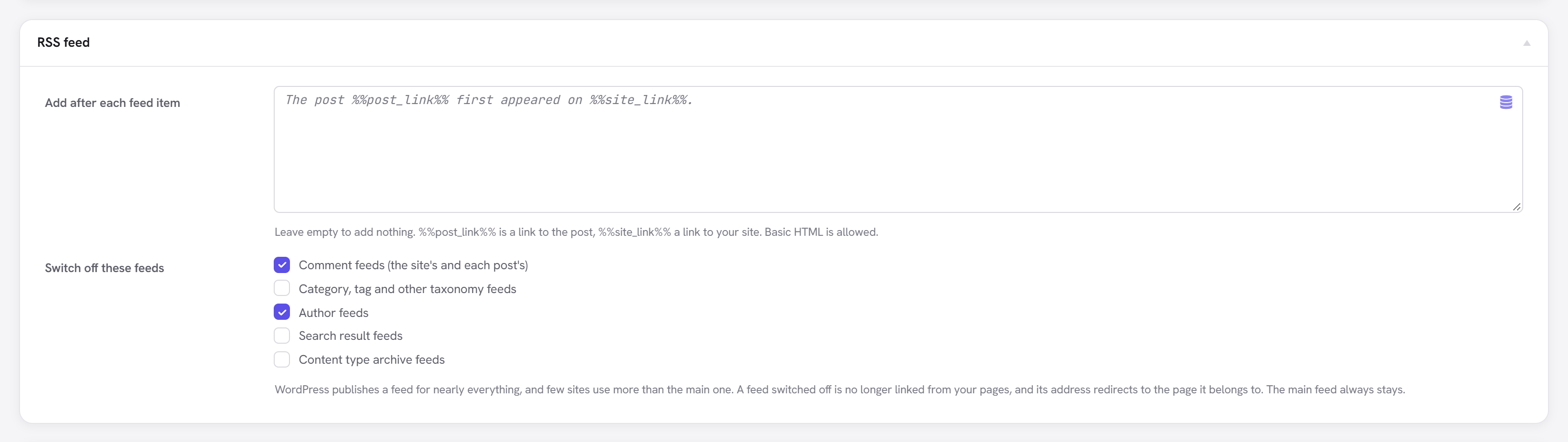
WordPress publishes a feed for nearly everything: every category, tag and author, every search, every post's comments. Few sites use more than the main one, and the rest are thin copies search engines crawl anyway. Under RSS feed → Switch off these feeds, tick the kinds you don't use:
| Kind | Example |
|---|---|
| Comment feeds | /comments/feed/, /my-post/feed/ |
| Category, tag and other taxonomy feeds | /category/news/feed/ |
| Author feeds | /author/sam/feed/ |
| Search result feeds | /?s=bread&feed=rss2 |
| Content type archive feeds | /recipes/feed/ |
A feed switched off is no longer linked from your pages' <head>, and its address redirects (301) to
the page it belongs to: /category/news/feed/ → /category/news/, the site comment feed → the home
page. The main feed (/feed/) is never switched off: it is the one people subscribe to.