404s
Every address that comes back "not found" is evidence: an old link on another site, a page that moved, a typo in a newsletter, a product that was taken down. SEO → 404s keeps a log of them, so a redirect can be made from what visitors actually asked for rather than guessed at. It matters most just after a move to a new site, which is also when nobody has time to go looking.
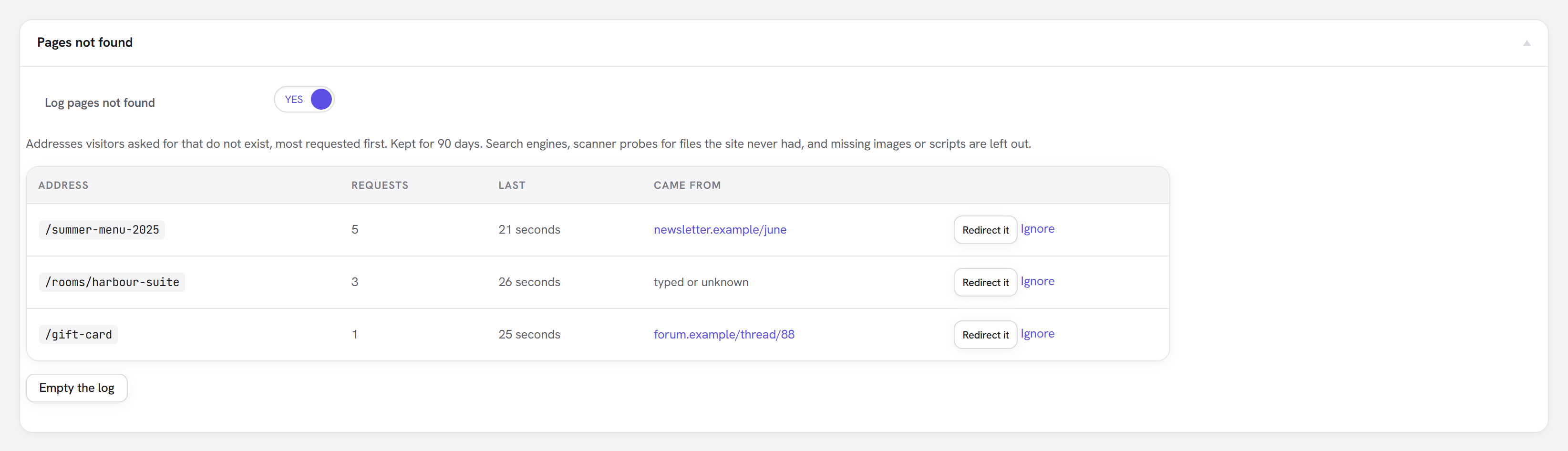
What it shows
| Column | |
|---|---|
| Address | What was asked for, relative to the site. |
| Requests | How many times. The most requested come first: fix those. |
| Last | When it was last asked for. |
| Came from | The page that linked to it, when the browser said. A link from another site is worth fixing at both ends: redirect it here, and ask them to update the link. |
Redirect it opens Your redirects with the address filled in; add where it should go and save. A redirected address leaves the log. Ignore removes one row, and Empty the log removes them all.
What is left out
So that the list is about real visitors and real pages:
- Search engines and other bots: a crawler re-checking an old address is not news.
- Scanner probes for files the site never had:
.php,.env, backups,/wp-admin/…. - Missing images, scripts, stylesheets and fonts: those are a theme or upload problem, not a page that moved.
- Addresses answered by a 410 Gone rule.
Limits
- Kept for 90 days, and at most 2,000 addresses; the least requested go first.
- Log pages not found switches it off, for a site that already logs 404s elsewhere.
- A page cached by a full-page cache is served without WordPress running, so its 404s may not be logged. Most caches don't cache 404s.