Broken links
The Links report knows every link in your pages. SEO → Broken links goes one step further and fetches each address the way a browser would, so it can say what the server actually answers.
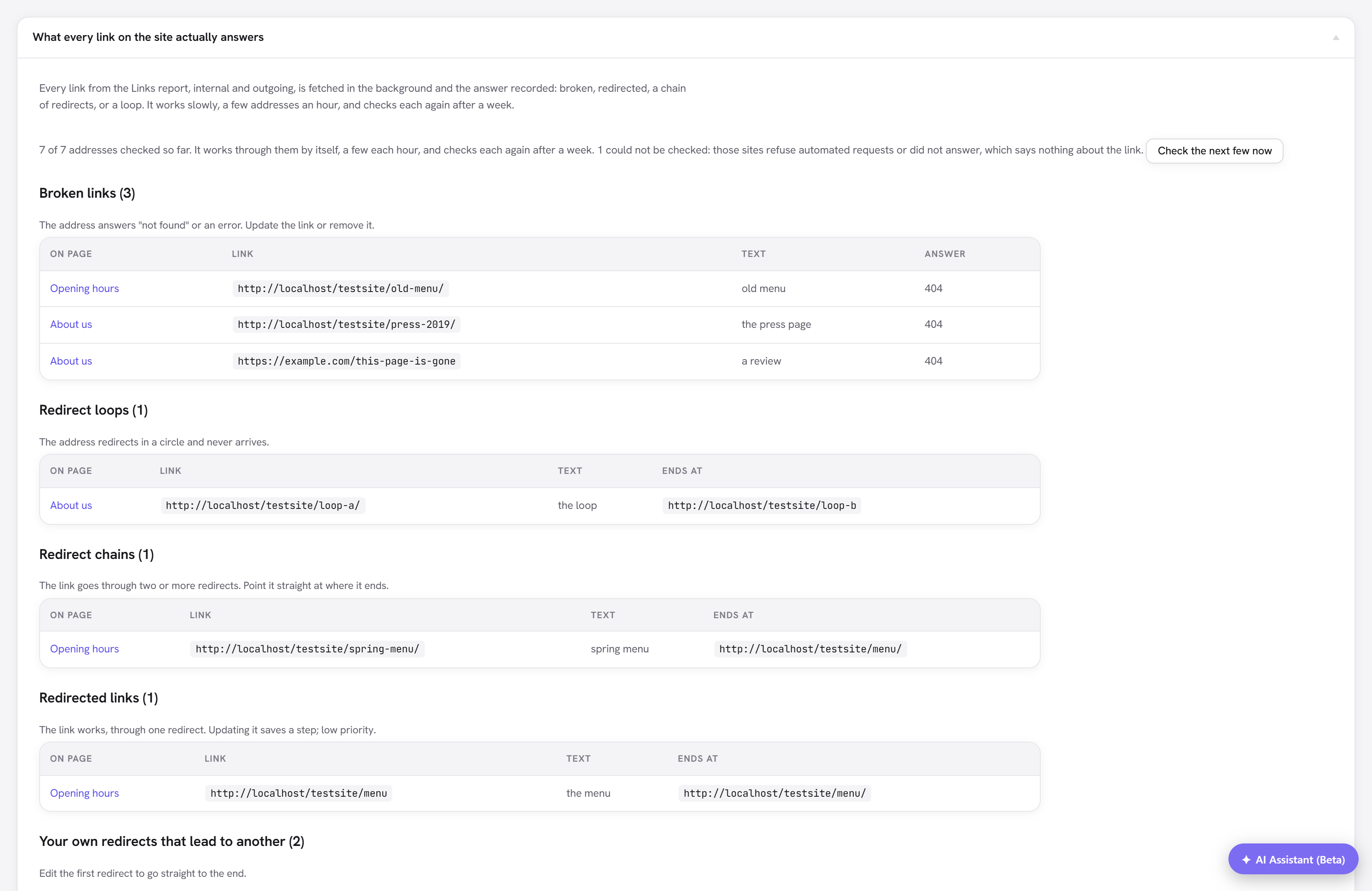
Nothing needs switching on. Once the Links report has finished reading the site, the checker starts by itself in the background. Check the next few now runs one batch straight away.
What it reports
| List | What it means | What to do |
|---|---|---|
| Broken links | The address answers "not found" (404), "gone" (410) or another client error, or a server error twice in a row. A redirect that ends at one of these counts too. | Update the link or remove it. |
| Redirect loops | The address redirects in a circle and never arrives. | Fix the redirect, then the link. |
| Redirect chains | The link goes through two or more redirects before arriving. | Point the link straight at the address under Ends at. |
| Redirected links | The link works, through one redirect. | Worth updating when you are editing the page anyway; low priority. |
| Your own redirects that lead to another | One of your redirects sends visitors to an address that another of your redirects then moves again, or back to the start. | Edit the first redirect to go straight to the end. |
Each row names the page the link is on, with a link to its editor, and the text of the link. A link used on several pages has a row for each page, because each one needs fixing.
"Could not be checked" is not "broken"
Plenty of healthy sites refuse automated requests. An address that answers 401, 403, 405, 406, 429 or 451, or does not answer at all, is counted as could not be checked and never listed as broken: a false alarm about somebody else's server would teach you to ignore the report. The count is shown at the top so you know how much of the site this applies to.
A server error (500 and above) is often a bad moment rather than a dead page, so it only counts as broken when the same address fails again a week later.
How it behaves
- Slowly. Up to 25 addresses an hour, at most three to any one outside site in a run, and each run stops after 40 seconds.
- Weekly. Each address is checked again after a week. Addresses no longer linked from any page drop off the list by themselves.
- Lightly. It asks for the headers only (a
HEADrequest), and falls back to reading the first few kilobytes for servers that refuse that. - Safely. An address in your content can never make the server probe its own private network: outside links go through WordPress's safe request, which refuses private addresses. Your own site is the exception, because it may legitimately be one.
A site with a thousand links takes about two days for the first full pass.
Limits
- Links in the header, footer and menus are not checked, because the link index leaves them out.
- Regex redirect rules are left out of the your own redirects list: where a pattern leads depends on the address it is given.
- A redirect chain is followed for five hops, then treated as unknown.
- The report lists the first 100 rows of each kind.
- It reports; it does not edit. Fixing a link is done in the page.
- Scheduled checks rely on WP-Cron, which needs visitors or a real cron job to fire.