robots.txt editor
robots.txt is the file crawlers read before anything else. It lists the addresses they should not
fetch. WordPress writes it for you on the fly, so there is no file on the server to edit, and the SEO
extension already adds your sitemap to it. SEO → robots.txt lets you add your
own rules without writing code.
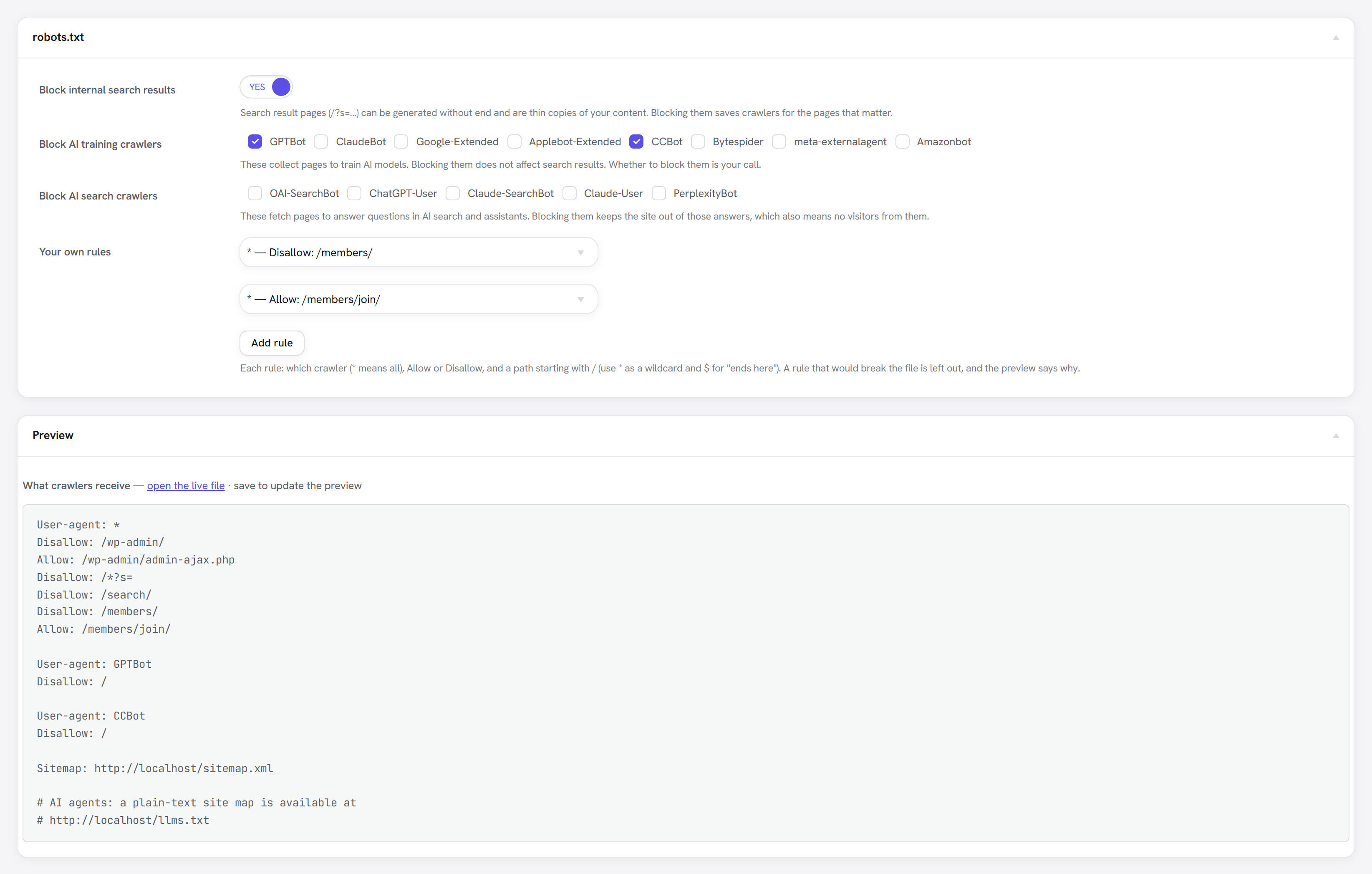
:::note robots.txt controls crawling, not indexing
A blocked address can still appear in search results if other pages link to it. Because the page was
never fetched, its noindex was never seen either. To keep a page out of results, use its noindex
switch and leave it crawlable.
:::
Block internal search results
Every search on your site produces a page (/?s=shoes, /search/shoes/), and there is no limit to
how many. They are thin copies of content that already exists, and crawlers can spend their visit on
them instead of on your real pages. The switch adds:
Disallow: /*?s=
Disallow: /search/
Block AI crawlers
Two groups, because they do different things:
| Group | Crawlers | Blocking them means |
|---|---|---|
| AI training | GPTBot (OpenAI), ClaudeBot (Anthropic), Google-Extended (Google's AI models), Applebot-Extended (Apple), CCBot (Common Crawl), Bytespider (ByteDance), meta-externalagent (Meta), Amazonbot (Amazon) | Your pages are not collected to train AI models. Search results are not affected: Google-Extended, for example, is separate from Googlebot. |
| AI search | OAI-SearchBot and ChatGPT-User (ChatGPT), Claude-SearchBot and Claude-User (Claude), PerplexityBot (Perplexity) | Those assistants cannot read your pages to answer questions, so they cannot cite or link to you either. |
Whether to block them is your decision; nothing is ticked by default. Each ticked crawler gets its own group:
User-agent: GPTBot
Disallow: /
robots.txt is a request, not a lock. The crawlers listed here say they honour it; a crawler that ignores it has to be blocked at the server or firewall.
Your own rules
Add rule adds a row with three fields:
- Crawler:
*for every crawler, or one crawler's name (Googlebot,Bingbot…). - Rule: Disallow (don't fetch) or Allow (an exception inside a disallowed path).
- Path: starts with
/.*matches anything and$means "ends here", so/*.pdf$matches every PDF.
Rules for * are added to WordPress's own User-agent: * group rather than a second one, and a rule
already there is not repeated.
A row that would break the file is left out, and the preview says which one and why: a path
without a leading /, or a crawler name with spaces. Line breaks are refused too, so one row can
never turn into two rules.
The preview
Below the settings is the exact file crawlers will receive, built the same way WordPress builds it (including what other plugins add), with a link to the live file. Save to update it. It also warns you when:
- A real
robots.txtfile is in the site's folder. The web server sends that file instead, so nothing set here is served until it is removed or renamed. - Settings → Reading asks search engines not to index the site. WordPress then blocks everything and these rules are not added.
- The site lives in a sub-folder. Crawlers read robots.txt only at the top of the domain.
- A crawler has its own narrower rules. A crawler follows only the group that names it most
specifically, so a
Googlebotrule makes Googlebot ignore every*rule, WordPress's/wp-admin/block included. Add rules to its group for anything it should still follow. (A crawler you block completely loses nothing, so the AI checkboxes don't trigger this.)
Moving it to another site
The rules travel with the rest of the SEO settings in Moving settings.