Settings
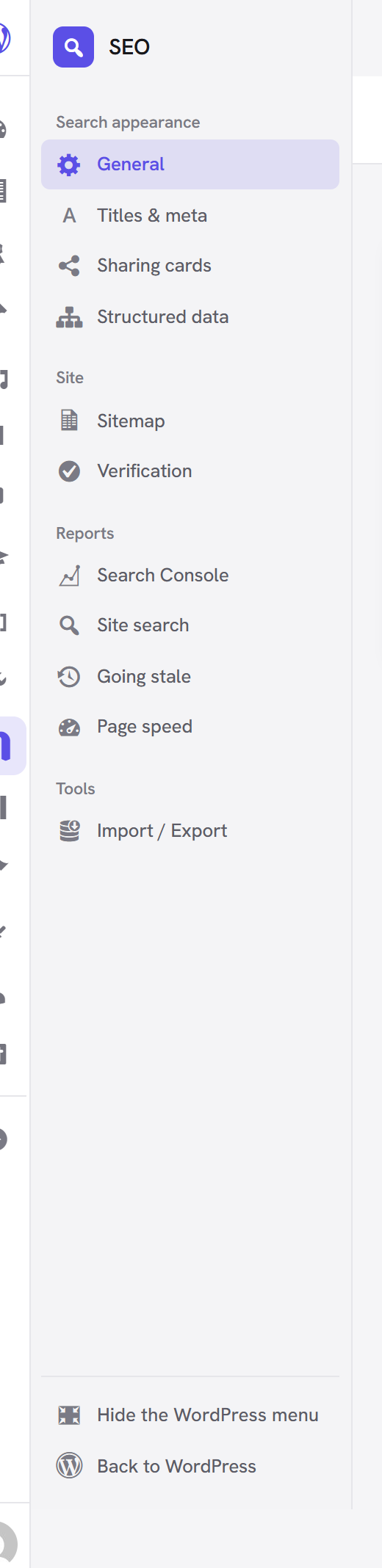 **Unyson+ → SEO** opens as its own screen: the WordPress menu folds to icons and SEO's own menu takes
the left edge, grouped into **Search appearance**, **Site**, **Reports** and **Tools**. Each entry is
its own address (`…&view=social_tab`), so a screen can be linked to and bookmarked, and only the view
you are on does any work — the four reports used to be queried on every load of the page.
**Unyson+ → SEO** opens as its own screen: the WordPress menu folds to icons and SEO's own menu takes
the left edge, grouped into **Search appearance**, **Site**, **Reports** and **Tools**. Each entry is
its own address (`…&view=social_tab`), so a screen can be linked to and bookmarked, and only the view
you are on does any work — the four reports used to be queried on every load of the page.
"Hide the WordPress menu", at the foot of the sidebar, puts the screen on its own; the setting is remembered for you and applies to every Unyson+ app screen. (The frame itself is the framework's — see Admin app shell if you are building one.)
The report views are covered under Reports, and Import / Export under Importing from another plugin.
General
Title separator, auto-generated descriptions, and canonical URLs. Canonical URLs are on by default and tell search engines which address is the original for each page; paginated pages correctly canonicalise to themselves rather than to page one.
Titles & Meta
A title and description template for every place a page can appear: the homepage, the blog index, each content type, each taxonomy, author and date archives, search results and 404s. Each also carries No index and No follow switches for the whole group.
Templates are written with template tags, so
%%title%% %%sep%% %%sitename%% becomes Hello world | My Site. Tags that resolve to
nothing take their separator with them, so a template never renders Title | | Site.
Sitemap
Your sitemap lives at /sitemap.xml and is linked from robots.txt, which is how search
engines find it. Submit that URL once in Search Console — there is nothing to resubmit
afterwards.
- One sitemap per content type and taxonomy, chunked at 1,000 URLs.
- Images are included by default, so your media can be found in image search.
- Anything set to no index is left out automatically — a single page in its own SEO panel, or a whole content type in the settings. A sitemap should never advertise a URL whose page tells crawlers to ignore it.
- Opening a sitemap in a browser shows a readable table rather than raw XML.
- WordPress publishes its own sitemap at
/wp-sitemap.xml; the extension switches that off by default so your site has one sitemap rather than two competing ones.
Social
Everything about how a page looks when it is shared.
Sharing cards are on by default and need no configuration: the share title follows your SEO title, the share description follows your meta description, and the image is found from the page itself. Set a default share image for pages that have none, and a card style — the large card is the better choice for almost every site.
Add your X / Twitter account so shared links are attributed to it.
Social profiles records the accounts that belong to this site. These are not decoration
and they are not links displayed anywhere: they exist to feed the sameAs property that
tells a search engine which accounts are genuinely yours. That structured data is still to
come, so for now these fields are stored and not yet emitted.
Reports
Three read-only views, plus the handful of settings that feed them: how long to keep recorded search phrases, when to call a page stale, and the API key for speed data. Covered under Reports.
Structured data
Whether the site represents an organisation or a person, its name, logo and contact details, and what each content type publishes as. Covered in full under Structured data.
Verification
Verification codes for Google Search Console, Bing, Yandex, Baidu and Pinterest. Paste only the code from the tag each service gives you, not the whole tag.